cancel
Showing results for 
Search instead for 
Did you mean: 

Data Days is here! Join us now for 60+ days of learning, challenges, and connection. Learn more

Reply
Anonymous
Not applicable

Data Source

Hello everyone,

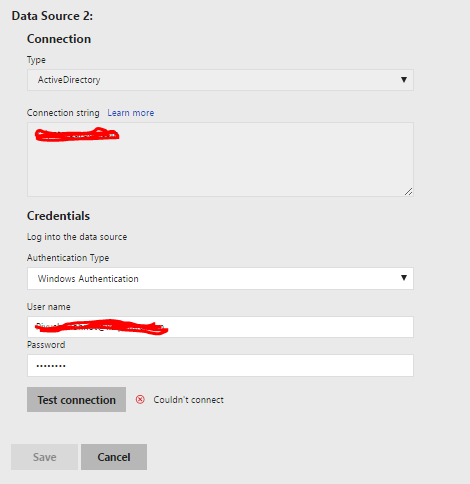
I have developed a dashboard in desktop client (October 2017) and published report on Report Server. The problem comes when I try to connect to Active Directory data source. It displays an error shown below in the picture. Without connecting data source, I can't schedule refresh. Any suggestions would be helpful.

error_AD.PNG


Thnanks and Regards

Piyush


1 ACCEPTED SOLUTION
Anonymous
Not applicable

Active Directory as a data source for refresh isn't supported yet.


Check here

View solution in original post

2 REPLIES 2
Anonymous
Not applicable

Hello everyone,

I have been trying to connect Active Directory data source in powerBI Report Server. But it doesn't connects. Is Active Directory data source (on-prem) supportable in Report Server or not?

error_AD.PNGAny help?


Thanks and Regards,

Piyush

Anonymous
Not applicable

Active Directory as a data source for refresh isn't supported yet.


Check here

Helpful resources

Announcements
Fabric Data Days is here Carousel

Fabric Data Days 2026

Don't miss out on Data Days, June 15 through August 7. Learn Fabric, Power BI, SQL, AI and more.

May Power BI Update Carousel

Power BI Monthly Update - May 2026

Check out the May 2026 Power BI update to learn about new features.

Power BI DataViz World Championships carousel

Power BI DataViz World Championships - June 2026

A new Power BI DataViz World Championship is coming this June! Don't miss out on submitting your entry.