This time we’re going bigger than ever. Fabric, Power BI, SQL, AI and more. We're covering it all. You won't want to miss it.
Learn moreDid you hear? There's a new SQL AI Developer certification (DP-800). Start preparing now and be one of the first to get certified. Register now
Hello,
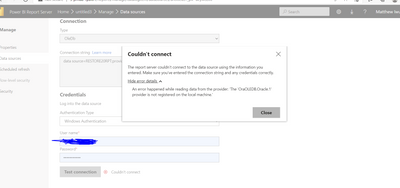
I have the error below when I try to set up data refresh for Power BI report in report Server.
I have used ODBC connection for the report and I have tried OLEDB connection for the same report too but I get the same error in each case.
What steps should I take to resolve this problem?
Solved! Go to Solution.
It sounds like you do not have the Oracle drivers installed on the Report Server machine. You will need to talk to the an admin of that server to get them to install those. Note that you probably cannot use a DSN to connect since the DSN definition is only on your machine and does not exist on the server, so when it goes to do a scheduled refresh it cannot find the server details.
Thank you for your response.
Below is the error detail. I get The same error when I try basic authentication or Windows authentication. The database is Oracle while SQL server clients is installed in another server
Check out the April 2026 Power BI update to learn about new features.
Sign up to receive a private message when registration opens and key events begin.
If you have recently started exploring Fabric, we'd love to hear how it's going. Your feedback can help with product improvements.
| User | Count |
|---|---|
| 4 | |
| 3 | |
| 2 | |
| 2 | |
| 1 |
| User | Count |
|---|---|
| 4 | |
| 3 | |
| 3 | |
| 2 | |
| 2 |