cancel
Showing results for 
Search instead for 
Did you mean: 

The Power BI Data Visualization World Championships is back! Get ahead of the game and start preparing now! Learn more

Reply
PriyankaA905
Frequent Visitor

Countrows in Report Server -Direct Query Mode

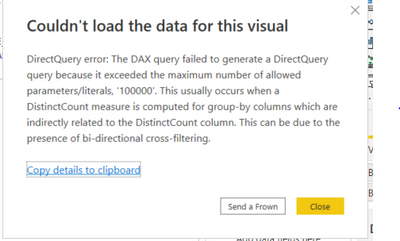
Hi, we encountered with the following error while using the balance bucket formula:

Bal_Bucket =
CALCULATE(DISTINCTCOUNT('MISREP.UTK_T_LIAB_AVG_BAL_NEW'[IACLINK_ACTUAL_ACNUM]),
FILTER( VALUES('MISREP.UTK_T_LIAB_AVG_BAL_NEW'[CURRENT_BALANCE_ASON]),
COUNTROWS(
FILTER(Bucket,
'MISREP.UTK_T_LIAB_AVG_BAL_NEW'[CURRENT_BALANCE_ASON]>= Bucket[MIN]
&& 'MISREP.UTK_T_LIAB_AVG_BAL_NEW'[CURRENT_BALANCE_ASON]<Bucket[MAX]))
> 0))


PriyankaA905_0-1651564822932.png

Also we discovered that there is no option as "Allow unrestricted measures in DirectQuery mode" in Report Server.

What is the solution for the above problem?

1 ACCEPTED SOLUTION
v-luwang-msft
Community Support
Community Support

Hi @PriyankaA905 ,

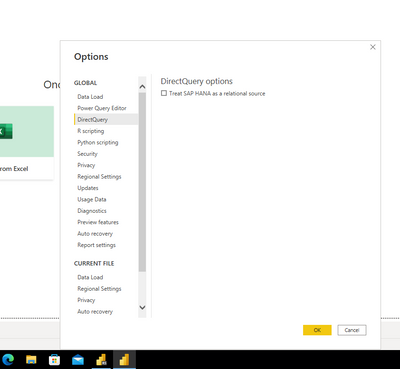
I also could not find it on Power BI Desktop not for version.According to the responses in other threads, that option was modified in 2018. Refer:https://community.powerbi.com/t5/Desktop/What-Happened-To-quot-Allow-unrestricted-measures-in-Direct...  

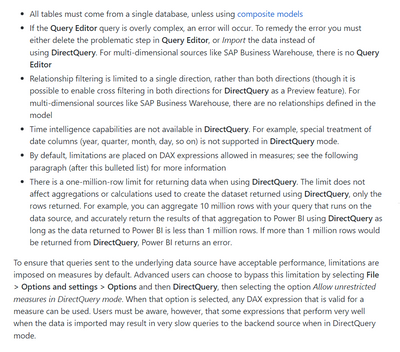
In addition, this feature is not used to break the 1-million-row limit in Direct Query, but rather the one-million-row limit for returning data when using DirectQuery still exists for the limitations are placed on DAX expressions allowed in measures, as you can see here:

https://www.eugenechiang.com/2019/07/11/power-bi-import-vs-directquery/ 

vluwangmsft_0-1652341619661.png


vluwangmsft_0-1651806286191.png

version:

vluwangmsft_1-1651806350057.png


Can you find this function in your Desktop?

In addition, the function is not described in the official article.refer:

https://docs.microsoft.com/en-us/power-bi/connect-data/desktop-use-directquery 


Best Regards

Lucien

View solution in original post

1 REPLY 1
v-luwang-msft
Community Support
Community Support

Hi @PriyankaA905 ,

I also could not find it on Power BI Desktop not for version.According to the responses in other threads, that option was modified in 2018. Refer:https://community.powerbi.com/t5/Desktop/What-Happened-To-quot-Allow-unrestricted-measures-in-Direct...  

In addition, this feature is not used to break the 1-million-row limit in Direct Query, but rather the one-million-row limit for returning data when using DirectQuery still exists for the limitations are placed on DAX expressions allowed in measures, as you can see here:

https://www.eugenechiang.com/2019/07/11/power-bi-import-vs-directquery/ 

vluwangmsft_0-1652341619661.png


vluwangmsft_0-1651806286191.png

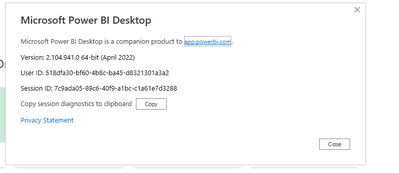
version:

vluwangmsft_1-1651806350057.png


Can you find this function in your Desktop?

In addition, the function is not described in the official article.refer:

https://docs.microsoft.com/en-us/power-bi/connect-data/desktop-use-directquery 


Best Regards

Lucien

Helpful resources

Announcements
Power BI DataViz World Championships

Power BI Dataviz World Championships

The Power BI Data Visualization World Championships is back! Get ahead of the game and start preparing now!

December 2025 Power BI Update Carousel

Power BI Monthly Update - December 2025

Check out the December 2025 Power BI Holiday Recap!

FabCon Atlanta 2026 carousel

FabCon Atlanta 2026

Join us at FabCon Atlanta, March 16-20, for the ultimate Fabric, Power BI, AI and SQL community-led event. Save $200 with code FABCOMM.