cancel
Showing results for 
Search instead for 
Did you mean: 

The Power BI Data Visualization World Championships is back! It's time to submit your entry. Live now!

Reply
PriyankaA905
Frequent Visitor

Countrows in Report Server -Direct Query Mode

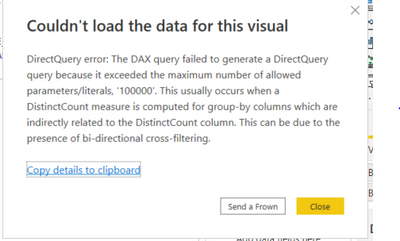
Hi, we encountered with the following error while using the balance bucket formula:

Bal_Bucket =
CALCULATE(DISTINCTCOUNT('MISREP.UTK_T_LIAB_AVG_BAL_NEW'[IACLINK_ACTUAL_ACNUM]),
FILTER( VALUES('MISREP.UTK_T_LIAB_AVG_BAL_NEW'[CURRENT_BALANCE_ASON]),
COUNTROWS(
FILTER(Bucket,
'MISREP.UTK_T_LIAB_AVG_BAL_NEW'[CURRENT_BALANCE_ASON]>= Bucket[MIN]
&& 'MISREP.UTK_T_LIAB_AVG_BAL_NEW'[CURRENT_BALANCE_ASON]<Bucket[MAX]))
> 0))


PriyankaA905_0-1651564822932.png

Also we discovered that there is no option as "Allow unrestricted measures in DirectQuery mode" in Report Server.

What is the solution for the above problem?

1 ACCEPTED SOLUTION
v-luwang-msft
Community Support
Community Support

Hi @PriyankaA905 ,

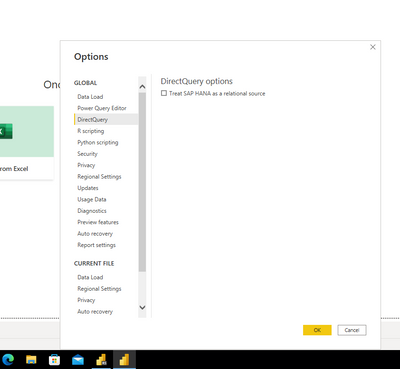
I also could not find it on Power BI Desktop not for version.According to the responses in other threads, that option was modified in 2018. Refer:https://community.powerbi.com/t5/Desktop/What-Happened-To-quot-Allow-unrestricted-measures-in-Direct...  

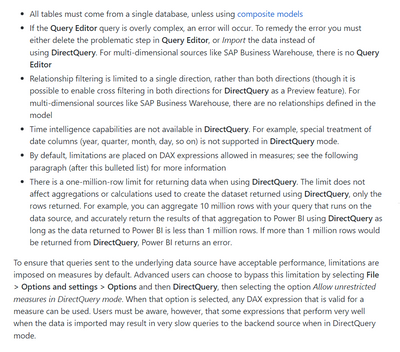
In addition, this feature is not used to break the 1-million-row limit in Direct Query, but rather the one-million-row limit for returning data when using DirectQuery still exists for the limitations are placed on DAX expressions allowed in measures, as you can see here:

https://www.eugenechiang.com/2019/07/11/power-bi-import-vs-directquery/ 

vluwangmsft_0-1652341619661.png


vluwangmsft_0-1651806286191.png

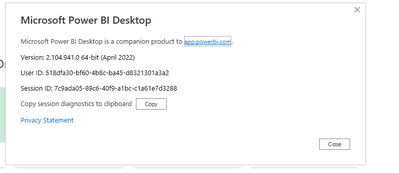
version:

vluwangmsft_1-1651806350057.png


Can you find this function in your Desktop?

In addition, the function is not described in the official article.refer:

https://docs.microsoft.com/en-us/power-bi/connect-data/desktop-use-directquery 


Best Regards

Lucien

View solution in original post

1 REPLY 1
v-luwang-msft
Community Support
Community Support

Hi @PriyankaA905 ,

I also could not find it on Power BI Desktop not for version.According to the responses in other threads, that option was modified in 2018. Refer:https://community.powerbi.com/t5/Desktop/What-Happened-To-quot-Allow-unrestricted-measures-in-Direct...  

In addition, this feature is not used to break the 1-million-row limit in Direct Query, but rather the one-million-row limit for returning data when using DirectQuery still exists for the limitations are placed on DAX expressions allowed in measures, as you can see here:

https://www.eugenechiang.com/2019/07/11/power-bi-import-vs-directquery/ 

vluwangmsft_0-1652341619661.png


vluwangmsft_0-1651806286191.png

version:

vluwangmsft_1-1651806350057.png


Can you find this function in your Desktop?

In addition, the function is not described in the official article.refer:

https://docs.microsoft.com/en-us/power-bi/connect-data/desktop-use-directquery 


Best Regards

Lucien

Helpful resources

Announcements
December 2025 Power BI Update Carousel

Power BI Monthly Update - December 2025

Check out the December 2025 Power BI Holiday Recap!

FabCon Atlanta 2026 carousel

FabCon Atlanta 2026

Join us at FabCon Atlanta, March 16-20, for the ultimate Fabric, Power BI, AI and SQL community-led event. Save $200 with code FABCOMM.