cancel
Showing results forย 
Search instead forย 
Did you mean:ย 

July 7 - July 17 | Round 2 of the Power BI Dataviz World Championships. Don't miss your chance! Learn more

Reply
PriyankaA905
Frequent Visitor

Countrows in Report Server -Direct Query Mode

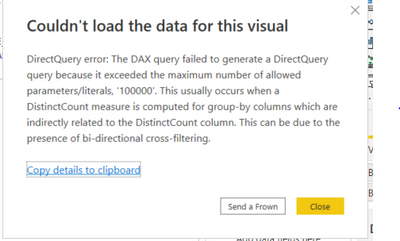
Hi, we encountered with the following error while using the balance bucket formula:

Bal_Bucket =
CALCULATE(DISTINCTCOUNT('MISREP.UTK_T_LIAB_AVG_BAL_NEW'[IACLINK_ACTUAL_ACNUM]),
FILTER( VALUES('MISREP.UTK_T_LIAB_AVG_BAL_NEW'[CURRENT_BALANCE_ASON]),
COUNTROWS(
FILTER(Bucket,
'MISREP.UTK_T_LIAB_AVG_BAL_NEW'[CURRENT_BALANCE_ASON]>= Bucket[MIN]
&& 'MISREP.UTK_T_LIAB_AVG_BAL_NEW'[CURRENT_BALANCE_ASON]<Bucket[MAX]))
> 0))


PriyankaA905_0-1651564822932.png

Also we discovered that there is no option as "Allow unrestricted measures in DirectQuery mode" in Report Server.

What is the solution for the above problem?

1 ACCEPTED SOLUTION
v-luwang-msft
Community Support
Community Support

Hi @PriyankaA905 ,

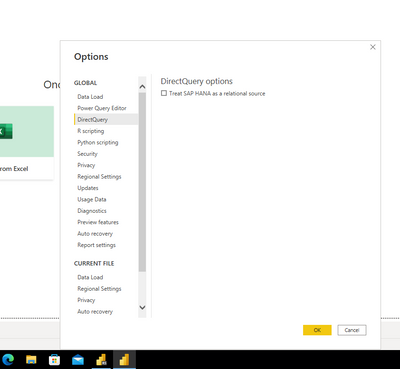
I also could not find it on Power BI Desktop not for version.According to the responses in other threads, that option was modified in 2018. Refer:https://community.powerbi.com/t5/Desktop/What-Happened-To-quot-Allow-unrestricted-measures-in-Direct...  

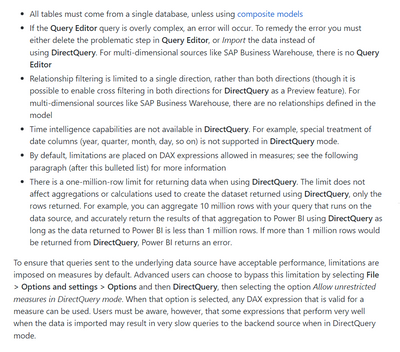
In addition, this feature is not used to break the 1-million-row limit in Direct Query, but rather the one-million-row limit for returning data when using DirectQuery still exists for the limitations are placed on DAX expressions allowed in measures, as you can see here๏ผš

https://www.eugenechiang.com/2019/07/11/power-bi-import-vs-directquery/ 

vluwangmsft_0-1652341619661.png


vluwangmsft_0-1651806286191.png

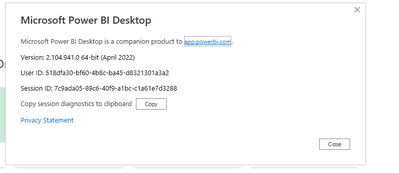
version:

vluwangmsft_1-1651806350057.png


Can you find this function in your Desktop?

In addition, the function is not described in the official article.refer๏ผš

https://docs.microsoft.com/en-us/power-bi/connect-data/desktop-use-directquery 


Best Regards

Lucien

View solution in original post

1 REPLY 1
v-luwang-msft
Community Support
Community Support

Hi @PriyankaA905 ,

I also could not find it on Power BI Desktop not for version.According to the responses in other threads, that option was modified in 2018. Refer:https://community.powerbi.com/t5/Desktop/What-Happened-To-quot-Allow-unrestricted-measures-in-Direct...  

In addition, this feature is not used to break the 1-million-row limit in Direct Query, but rather the one-million-row limit for returning data when using DirectQuery still exists for the limitations are placed on DAX expressions allowed in measures, as you can see here๏ผš

https://www.eugenechiang.com/2019/07/11/power-bi-import-vs-directquery/ 

vluwangmsft_0-1652341619661.png


vluwangmsft_0-1651806286191.png

version:

vluwangmsft_1-1651806350057.png


Can you find this function in your Desktop?

In addition, the function is not described in the official article.refer๏ผš

https://docs.microsoft.com/en-us/power-bi/connect-data/desktop-use-directquery 


Best Regards

Lucien

Helpful resources

Announcements
FabCon and SQLCon Barcelona 2026

FabCon & SQLCon โ€“ Barcelona 2026

Join us in Barcelona for FabCon and SQLCon, the Fabric, Power BI, SQL, and AI community event. Save โ‚ฌ200 with code FABCMTY200.

60 days of Data Days Carousel

Data Days 2026

Join Data Days 2026: 60 days of free live/on-demand sessions, challenges, study groups, and certification opportunities.

Power BI DataViz World Championships carousel

Power BI DataViz World Championships - June 2026

A new Power BI DataViz World Championship is coming this June! Don't miss out on submitting your entry.