cancel
Showing results for 
Search instead for 
Did you mean: 

Join the FabCon + SQLCon recap series. Up next: Power BI, Real-Time Intelligence, IQ and AI, and Data Factory take center stage. All sessions are available on-demand after the live show. Register now

Reply
HenriqueReis
Resolver I
Resolver I

Bubble chart error

Hi, community!


I didn't understand why does this graph doesn't show the corresponding value when I select a specific year.

Look:

HenriqueReis_0-1654176941269.png


Now, Im going to select 2015 and just one name will be shown: 

HenriqueReis_1-1654177039361.png


It happens exactly the same for whatever year I select. I didn't understood. Somebody can help me?

I appreciate any help.


Thanks!

6 REPLIES 6
v-luwang-msft
Community Support
Community Support

Hi @HenriqueReis ,

Designed to do just that. 

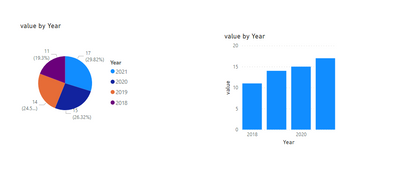
Not only Bubble chart.Refer the below:

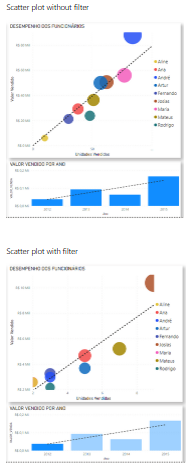
vluwangmsft_0-1654762644066.png

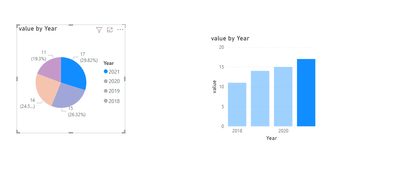
When click part of visual:(You can only do highlighting, but you cannot change the visual effect, if you want to change the visual effect you still need to use filter or slicer)

vluwangmsft_1-1654762674497.png

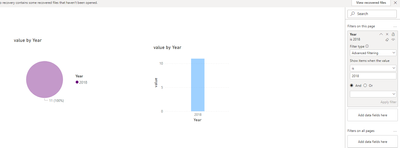
Filter:

vluwangmsft_2-1654763327846.png

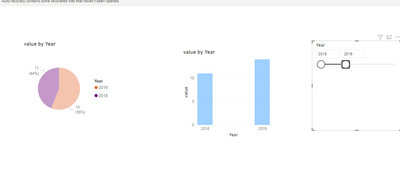
Slicer:

vluwangmsft_3-1654763422283.png


Refer:

https://docs.microsoft.com/en-us/power-bi/visuals/power-bi-visualization-slicers 

https://docs.microsoft.com/en-us/power-bi/create-reports/power-bi-report-add-filter?tabs=powerbi-des... 


Did I answer your question? Mark my post as a solution!


Best Regards

Lucien

Hi, thanks for answer.


But so why the scatter plot graph change?

HenriqueReis_0-1654764124641.png

Best regards!


FarhanAhmed
Community Champion
Community Champion

Can you please share the name of this custom visual. Also possible if you can share the sample file/data.


Did I answer your question? Mark my post as a solution! Appreciate your Kudos!!

Proud to be a Super User!


Hi, of sure:


The import visual is: Impact Bubble Chart

The data used:

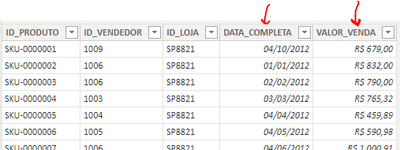
Some days from 2012 to 2015 + sold value on the data graph:

HenriqueReis_0-1654251794321.png


And in the bubble chart I used (same table) the name of who sold, units sold (x-axis) and amount (y-axis):

HenriqueReis_1-1654252029880.png


There's a correct relation between those tables:

HenriqueReis_2-1654252080139.png


Thank you!


Instead of using "Highlight" interaction between filter. You should use "Filter" in interaction.  I hope this will resolve the issue for you.


Did I answer your question? Mark my post as a solution! Appreciate your Kudos!!

Proud to be a Super User!


Hi, thans for your answer.


But thats exctly what do I wanna know:

Why the "highlights" didn't work?


Regards!

Helpful resources

Announcements
April Power BI Update Carousel

Power BI Monthly Update - April 2026

Check out the April 2026 Power BI update to learn about new features.

New to Fabric survey Carousel

New to Fabric Survey

If you have recently started exploring Fabric, we'd love to hear how it's going. Your feedback can help with product improvements.

Power BI DataViz World Championships carousel

Power BI DataViz World Championships - June 2026

A new Power BI DataViz World Championship is coming this June! Don't miss out on submitting your entry.

FabCon and SQLCon Highlights Carousel

FabCon &SQLCon Highlights

Experience the highlights from FabCon & SQLCon, available live and on-demand starting April 14th.