Join the #PBI10 DataViz contest
Power BI is turning 10, and we’re marking the occasion with a special community challenge. Use your creativity to tell a story, uncover trends, or highlight something unexpected.
Get started- Power BI forums
- Get Help with Power BI
- Desktop
- Service
- Report Server
- Power Query
- Mobile Apps
- Developer
- DAX Commands and Tips
- Custom Visuals Development Discussion
- Health and Life Sciences
- Power BI Spanish forums
- Translated Spanish Desktop
- Training and Consulting
- Instructor Led Training
- Dashboard in a Day for Women, by Women
- Galleries
- Webinars and Video Gallery
- Data Stories Gallery
- Themes Gallery
- Contests Gallery
- Quick Measures Gallery
- Notebook Gallery
- Translytical Task Flow Gallery
- R Script Showcase
- Ideas
- Custom Visuals Ideas (read-only)
- Issues
- Issues
- Events
- Upcoming Events
Join us for an expert-led overview of the tools and concepts you'll need to become a Certified Power BI Data Analyst and pass exam PL-300. Register now.
- Power BI forums
- Forums
- Get Help with Power BI
- Report Server
- Re: Being alerted to scheduled refresh failures
- Subscribe to RSS Feed
- Mark Topic as New
- Mark Topic as Read
- Float this Topic for Current User
- Bookmark
- Subscribe
- Printer Friendly Page


- Mark as New
- Bookmark
- Subscribe
- Mute
- Subscribe to RSS Feed
- Permalink
- Report Inappropriate Content
Being alerted to scheduled refresh failures
Running Jan 2021 PBI RS
What is a good way to get proactivitly alerted to a scheduled refresh stopping?
Sometimes a scheduled refresh just stops happening and users have to let me know. Once I click 'refresh now' the schedule refreshing begins again.
If PBI RS doesn't natively do this has anyone worked out a decent workaround?
Solved! Go to Solution.


- Mark as New
- Bookmark
- Subscribe
- Mute
- Subscribe to RSS Feed
- Permalink
- Report Inappropriate Content
Hi
Use this query (connected to your PBI report server) in an SSRS report and schedule the SSRS to email out the failures:
WITH cte_LastRefresh AS
(

SELECT
       MAX(SubscriptionHistoryID) AS SubscriptionHistoryID
       ,SubscriptionID
FROM dbo.SubscriptionHistory
WHERE [Status] = 2
GROUP BY SubscriptionID

)

SELECT
          c.Name                                      as [Report Name]
      --rs.scheduleid
      ,c.path                                  as [Report Path]
      ,sub.[Description]                 as [Schedule Name]
      --,sub.[LastStatus]                      as [Last Status]
         ,SUBSTRING(sh.Details,CHARINDEX('Message":"',sh.Details)+10,200)+ '...' AS [Error Detail]
      --CASE WHEN sub.[InactiveFlags] = 0 THEN 'Enabled'
             --     WHEN sub.[InactiveFlags] = 128 THEN 'Disabled'
             --     ELSE 'Other'
             --END  as [Enabled]
      --,sub.[EventType]                       as "Event Type"
      ,CONVERT(Varchar(17),sub.[LastRunTime],113) as [Last Run Time]
         ,SUBSTRING(u_own.UserName,CHARINDEX('\',u_own.UserName)+1,10) as [Created by]
         ,SUBSTRING(u_mod.[UserName],CHARINDEX('\',u_mod.[UserName])+1,10) as [Modified by]
         ,CASE WHEN jsch.next_run_date = 0 THEN '-'
               ELSE Convert(Varchar(17),msdb.dbo.agent_datetime(jsch.next_run_date, jsch.next_run_time),113)
             END as [Next Run Time]
        --,CASE c.[Type] WHEN 2 THEN 'SSRS'
             --                  WHEN 5 THEN 'Data Source'
             --                  WHEN 7 THEN 'Report Part'
             --                  WHEN 8 THEN 'Shared Dataset'
             --                  When 13 Then 'Power BI'
             --                  ELSE 'Other'
             -- END AS "ReportType"
             ,sub.LastStatus
  FROM [dbo].[Subscriptions] sub
       INNER JOIN dbo.[Catalog] c ON sub.report_oid = c.itemid
       INNER JOIN [dbo].Users u_own ON c.CreatedByID = u_own.UserID
       INNER JOIN [dbo].Users u_mod ON c.ModifiedByID = u_mod.UserID
       INNER JOIN dbo.ReportSchedule rs ON sub.SubscriptionID = rs.SubscriptionID
       INNER JOIN cte_LastRefresh lr ON rs.SubscriptionID = lr.SubscriptionID
       INNER JOIN dbo.SubscriptionHistory sh ON lr.SubscriptionHistoryID = sh.SubscriptionHistoryID
       LEFT OUTER JOIN msdb.dbo.sysjobs j ON CAST(rs.ScheduleID AS VARCHAR(100)) = j.name
       LEFT OUTER JOIN msdb.dbo.sysjobschedules jsch ON j.job_id = jsch.job_id
WHERE 1=1
       AND sub.LastStatus like '%failed%'
       AND jsch.next_run_date <> 0
       AND Convert(smalldatetime,msdb.dbo.agent_datetime(jsch.next_run_date, jsch.next_run_time)) > getdate()
order by 2
- Mark as New
- Bookmark
- Subscribe
- Mute
- Subscribe to RSS Feed
- Permalink
- Report Inappropriate Content
Hi
Use this query (connected to your PBI report server) in an SSRS report and schedule the SSRS to email out the failures:
WITH cte_LastRefresh AS
(

SELECT
       MAX(SubscriptionHistoryID) AS SubscriptionHistoryID
       ,SubscriptionID
FROM dbo.SubscriptionHistory
WHERE [Status] = 2
GROUP BY SubscriptionID

)

SELECT
          c.Name                                      as [Report Name]
      --rs.scheduleid
      ,c.path                                  as [Report Path]
      ,sub.[Description]                 as [Schedule Name]
      --,sub.[LastStatus]                      as [Last Status]
         ,SUBSTRING(sh.Details,CHARINDEX('Message":"',sh.Details)+10,200)+ '...' AS [Error Detail]
      --CASE WHEN sub.[InactiveFlags] = 0 THEN 'Enabled'
             --     WHEN sub.[InactiveFlags] = 128 THEN 'Disabled'
             --     ELSE 'Other'
             --END  as [Enabled]
      --,sub.[EventType]                       as "Event Type"
      ,CONVERT(Varchar(17),sub.[LastRunTime],113) as [Last Run Time]
         ,SUBSTRING(u_own.UserName,CHARINDEX('\',u_own.UserName)+1,10) as [Created by]
         ,SUBSTRING(u_mod.[UserName],CHARINDEX('\',u_mod.[UserName])+1,10) as [Modified by]
         ,CASE WHEN jsch.next_run_date = 0 THEN '-'
               ELSE Convert(Varchar(17),msdb.dbo.agent_datetime(jsch.next_run_date, jsch.next_run_time),113)
             END as [Next Run Time]
        --,CASE c.[Type] WHEN 2 THEN 'SSRS'
             --                  WHEN 5 THEN 'Data Source'
             --                  WHEN 7 THEN 'Report Part'
             --                  WHEN 8 THEN 'Shared Dataset'
             --                  When 13 Then 'Power BI'
             --                  ELSE 'Other'
             -- END AS "ReportType"
             ,sub.LastStatus
  FROM [dbo].[Subscriptions] sub
       INNER JOIN dbo.[Catalog] c ON sub.report_oid = c.itemid
       INNER JOIN [dbo].Users u_own ON c.CreatedByID = u_own.UserID
       INNER JOIN [dbo].Users u_mod ON c.ModifiedByID = u_mod.UserID
       INNER JOIN dbo.ReportSchedule rs ON sub.SubscriptionID = rs.SubscriptionID
       INNER JOIN cte_LastRefresh lr ON rs.SubscriptionID = lr.SubscriptionID
       INNER JOIN dbo.SubscriptionHistory sh ON lr.SubscriptionHistoryID = sh.SubscriptionHistoryID
       LEFT OUTER JOIN msdb.dbo.sysjobs j ON CAST(rs.ScheduleID AS VARCHAR(100)) = j.name
       LEFT OUTER JOIN msdb.dbo.sysjobschedules jsch ON j.job_id = jsch.job_id
WHERE 1=1
       AND sub.LastStatus like '%failed%'
       AND jsch.next_run_date <> 0
       AND Convert(smalldatetime,msdb.dbo.agent_datetime(jsch.next_run_date, jsch.next_run_time)) > getdate()
order by 2
- Mark as New
- Bookmark
- Subscribe
- Mute
- Subscribe to RSS Feed
- Permalink
- Report Inappropriate Content
Does this works other DBMS other than SRSS? Like PostgreSQL?
- Mark as New
- Bookmark
- Subscribe
- Mute
- Subscribe to RSS Feed
- Permalink
- Report Inappropriate Content
champion! that's works a treat


- Mark as New
- Bookmark
- Subscribe
- Mute
- Subscribe to RSS Feed
- Permalink
- Report Inappropriate Content
Hi! @robm135
Your schedule refresh stops after 4 failures and 2 months of inactivity.
https://docs.microsoft.com/en-us/power-bi/connect-data/refresh-scheduled-refresh#schedule-refresh
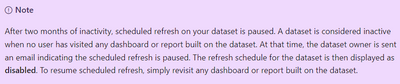

You can check the usage metrics report by clicking on the ellipsis (3 dots) beside your report that will give you idea if the report was ideal or not.
I hope this helps.
If my response has successfully addressed your question or concern, I kindly request that you mark this post as resolved. Additionally, if you found my assistance helpful, a thumbs-up would be greatly appreciated.
Thanks,
Ankit Kukreja
www.linkedin.com/in/ankit-kukreja1904
- Mark as New
- Bookmark
- Subscribe
- Mute
- Subscribe to RSS Feed
- Permalink
- Report Inappropriate Content
thanks, but I'm referring to the powerbi report server. I know in cloud you can set an email alert for scheduled failure but this isn't an option for report server (at least for Jan 2021 which I'm running)

Helpful resources

Join our Fabric User Panel
This is your chance to engage directly with the engineering team behind Fabric and Power BI. Share your experiences and shape the future.

Power BI Monthly Update - June 2025
Check out the June 2025 Power BI update to learn about new features.

Fabric Community Update - June 2025
Find out what's new and trending in the Fabric community.

| User | Count |
|---|---|
| 8 | |
| 2 | |
| 2 | |
| 2 | |
| 1 |


