cancel
Showing results for 
Search instead for 
Did you mean: 

The Power BI Data Visualization World Championships is back! Get ahead of the game and start preparing now! Learn more

Reply
Anupama
Regular Visitor

Azure SQL Database connection issue

Screenshot (1).png

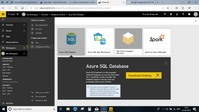
When I try to open the Azure SQL Database, It is asking me to download the PowerBI desktop.. which already i have... Please look at the pasted image for more reference. Please guide me solving this issue 

1 REPLY 1
BhaveshPatel
Community Champion
Community Champion

Hi @Anupama,


I would highly suggest you to use Power BI Desktop as your report authoring environment.


Using Power BI Desktop, You can connect to Azure SQL Database and once you finish authoring the report, You can publish to the PowerBI.com.


PowerBI.Com is report rendering environment where you can share reports/dashboards to the users via workspaces/apps.


Hope this makes sense!


Thanks,

Bhavesh

Thanks & Regards,
Bhavesh

Love the Self Service BI.
Please use the 'Mark as answer' link to mark a post that answers your question. If you find a reply helpful, please remember to give Kudos.

Helpful resources

Announcements
Power BI DataViz World Championships

Power BI Dataviz World Championships

The Power BI Data Visualization World Championships is back! Get ahead of the game and start preparing now!

November Power BI Update Carousel

Power BI Monthly Update - November 2025

Check out the November 2025 Power BI update to learn about new features.

FabCon Atlanta 2026 carousel

FabCon Atlanta 2026

Join us at FabCon Atlanta, March 16-20, for the ultimate Fabric, Power BI, AI and SQL community-led event. Save $200 with code FABCOMM.