This is best Fabric, Power BI, SQL and AI community event. How do we know? The last event sold out! Save €200 with code FABCMTY200.
Register nowA new Data Days event is coming soon! This time we’re going bigger than ever. Fabric, Power BI, SQL, AI and more. Don't miss out.
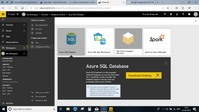
When I try to open the Azure SQL Database, It is asking me to download the PowerBI desktop.. which already i have... Please look at the pasted image for more reference. Please guide me solving this issue
Hi @Anupama,
I would highly suggest you to use Power BI Desktop as your report authoring environment.
Using Power BI Desktop, You can connect to Azure SQL Database and once you finish authoring the report, You can publish to the PowerBI.com.
PowerBI.Com is report rendering environment where you can share reports/dashboards to the users via workspaces/apps.
Hope this makes sense!
Thanks,
Bhavesh
Sign up to receive a private message when registration opens and key events begin.
If you have recently started exploring Fabric, we'd love to hear how it's going. Your feedback can help with product improvements.
| User | Count |
|---|---|
| 3 | |
| 2 | |
| 1 | |
| 1 | |
| 1 |
| User | Count |
|---|---|
| 2 | |
| 2 | |
| 2 | |
| 2 | |
| 2 |