cancel
Showing results for 
Search instead for 
Did you mean: 

July 7 - July 17 | Round 2 of the Power BI Dataviz World Championships. Don't miss your chance! Learn more

Reply
Anupama
Regular Visitor

Azure SQL Database connection issue

Screenshot (1).png

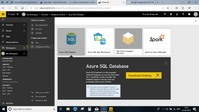
When I try to open the Azure SQL Database, It is asking me to download the PowerBI desktop.. which already i have... Please look at the pasted image for more reference. Please guide me solving this issue 

1 REPLY 1
BhaveshPatel
Super User
Super User

Hi @Anupama,


I would highly suggest you to use Power BI Desktop as your report authoring environment.


Using Power BI Desktop, You can connect to Azure SQL Database and once you finish authoring the report, You can publish to the PowerBI.com.


PowerBI.Com is report rendering environment where you can share reports/dashboards to the users via workspaces/apps.


Hope this makes sense!


Thanks,

Bhavesh

Thanks & Regards,
Bhavesh

Love the Self Service BI.
Please use the 'Mark as answer' link to mark a post that answers your question. If you find a reply helpful, please remember to give Kudos.

Helpful resources

Announcements
FabCon and SQLCon Barcelona 2026

FabCon & SQLCon – Barcelona 2026

Join us in Barcelona for FabCon and SQLCon, the Fabric, Power BI, SQL, and AI community event. Save €200 with code FABCMTY200.

Fabric Community Sticker Design Challenge Barcelona Carousel

Fabric Community Sticker Challenge - Barcelona 2026

If you love stickers, then you will definitely want to check out our community sticker challenge, Barcelona edition!

July Power BI Update Carousel

Power BI Monthly Update - July 2026

Check out the July 2026 Power BI update to learn about new features.

Power BI DataViz World Championships carousel

Power BI DataViz World Championships - June 2026

A new Power BI DataViz World Championship is coming this June! Don't miss out on submitting your entry.