We've captured the moments from FabCon & SQLCon that everyone is talking about, and we are bringing them to the community, live and on-demand. Starts on April 14th. Register now
"I love the potential of Microsoft Power BI and Xero for dynamic reporting to our accounting firm's clients - but there doesn't seem to be a way to limit the data to the most recently closed month. The default view for dashboards and reports is "as of today." Whereas, we wouldn't want to include information for the current month - because it is not complete, let alone closed. Data for an uncompleted month or non-financially-closed month could dangerously mislead our clients with non-reconciled and un-accrued results. Is there a way to prevent un-closed monthly data from flowing into Power-BI without painstakingly applying filters to each and every tile?"
@shartwell,
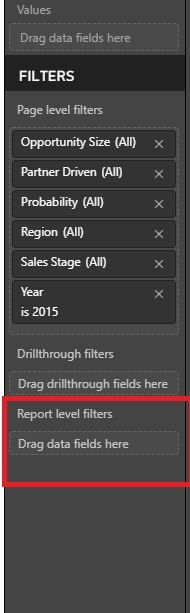
You can drag date field to Report level filters and limit the date to previous month. This way, after you re-pin visuals to dashboard, all the tiles will not include the information for the current month.
Regards,
Lydia
I applied the "MonthsAgo" field to the Report Level Filters and that successfully did the job of excluding current month balances in the P&L and Balance Sheet. (I used the "MonthsAgo" field with a value greater than or eaqual to 1 because the "Date" field did not work for me.) However, there are other values in the reports like for Bank Statement Closing Balance, AROutstanding, and APOutstanding, where this filter seems to have no effect - i.e., the balances are as of today NOT as of the close of the previous month. I want all balanced to be as of the last completed month but I can't figure out how to do it!
@shartwell,
The field you drag into report level filter may not have relationship with the fields that use to calculate Bank Statement Closing Balance, AROutstanding, and APOutstanding. Please try other fields.
Regards,
Lydia
"I love the potential of Microsoft Power BI and Xero for dynamic reporting to our accounting firm's clients - but there doesn't seem to be a way to limit the data to the most recently closed month. The default view for dashboards and reports is "as of today." Whereas, we wouldn't want to include information for the current month - because it is not complete, let alone closed. Data for an uncompleted month or non-financially-closed month could dangerously mislead our clients with non-reconciled and un-accrued results. Is there a way to prevent un-closed monthly data from flowing into Power-BI without painstakingly applying filters to each and every tile?"
If you have recently started exploring Fabric, we'd love to hear how it's going. Your feedback can help with product improvements.
A new Power BI DataViz World Championship is coming this June! Don't miss out on submitting your entry.
Share feedback directly with Fabric product managers, participate in targeted research studies and influence the Fabric roadmap.
| User | Count |
|---|---|
| 5 | |
| 3 | |
| 3 | |
| 2 | |
| 2 |
| User | Count |
|---|---|
| 11 | |
| 10 | |
| 7 | |
| 6 | |
| 5 |