cancel
Showing results for 
Search instead for 
Did you mean: 

The Power BI Data Visualization World Championships is back! Get ahead of the game and start preparing now! Learn more

Reply
Anonymous
Not applicable

why do i get timetamp on date columns in power BI

I have a  power BI dataset that shows  time stamps in every date column even though same date columns dont have a time stamp in the source data (oracle database) I have tried to remove the  time stamp   but  when i bring the dataset to report builder it still shows time stamp and  i cant get how to remove timestamp on adate column in report builder and use that column as a parameter. Anyone else faced this chanllenge?

2 REPLIES 2
v-yalanwu-msft
Community Support
Community Support

Hi, @Anonymous ;

Sometimes the date column will be in Date/Time format, there are two ways to change it:
1. When all are displayed as date 12:00:00,we could change the type to Date rather than Date/Time.
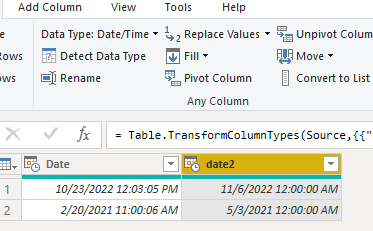
vyalanwumsft_0-1668063452411.png

2.if not 12:00:00 AM like Date column. we could add new column to change Date.

=Date.From([Date])
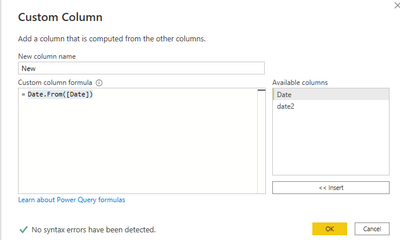
vyalanwumsft_1-1668063731335.png

The final show:

vyalanwumsft_2-1668063755111.png

let
    Source = Table.FromRows(Json.Document(Binary.Decompress(Binary.FromText("LcqxCQAxDAPAVYLrCCSZpPAqwfuvEch/e9w5YdoQ4RxyMYsr5q/Cjp7vCIY5pCKL+yvCQkb3BQ==", BinaryEncoding.Base64), Compression.Deflate)), let _t = ((type nullable text) meta [Serialized.Text = true]) in type table [Date = _t, date2 = _t]),
    #"Changed Type" = Table.TransformColumnTypes(Source,{{"Date", type datetime}, {"date2", type date}}),
    #"Added Custom" = Table.AddColumn(#"Changed Type", "New", each Date.From([Date]))
in
    #"Added Custom"


Best Regards,
Community Support Team _ Yalan Wu
If this post helps, then please consider Accept it as the solution to help the other members find it more quickly.

Anonymous
Not applicable

unfortunately since i am using direct query, non of this suggestions are working. i get this error message . any suggestions on the workaround?

jokimwele76_0-1668083603694.png


Helpful resources

Announcements
November Power BI Update Carousel

Power BI Monthly Update - November 2025

Check out the November 2025 Power BI update to learn about new features.

Fabric Data Days Carousel

Fabric Data Days

Advance your Data & AI career with 50 days of live learning, contests, hands-on challenges, study groups & certifications and more!

FabCon Atlanta 2026 carousel

FabCon Atlanta 2026

Join us at FabCon Atlanta, March 16-20, for the ultimate Fabric, Power BI, AI and SQL community-led event. Save $200 with code FABCOMM.

