Learn from the best! Meet the four finalists headed to the FINALS of the Power BI Dataviz World Championships! Register now
Dear Team,
I have three data tables as follow
1 Calander
| date | fy year | month | |
| 1/1/2019 | |||
| till | |||
| 7/11/2021 | 2021-22 |
2) data table 1
| date | incident ID | zone | Consumer affected |
| 7/11/2021 | 123445 | 1011 | 55000 |
| 6/11/2021 | 123444 | 1012 | 66000 |
3)data table 2
| month-year | zone | total consumers |
| 11-2021 | 1011 | 85000 |
| 11-2021 | 1012 | 70000 |
i have relationship between calander table and data table 1 using date column. and using zone column between data table 1 & 2.
I want to calculate ratio of affected consumer to total consumers for each zone on that month.
How to use means when i selected Month filter same month's total consumer should be in denominator.
Solved! Go to Solution.
Hi @visittokiran ,
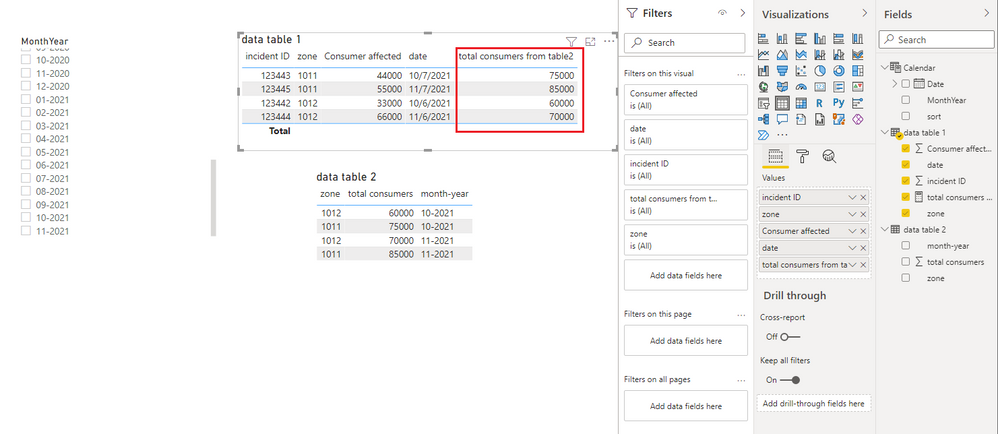
For your needs, it seems to be easier to use DAX.
You can create the following measure
total consumers from table2 =
CALCULATE (
SUM ( 'data table 2'[total consumers] ),
FILTER ( 'data table 2', [month-year] = MAX ( 'Calendar'[MonthYear] ) )
)
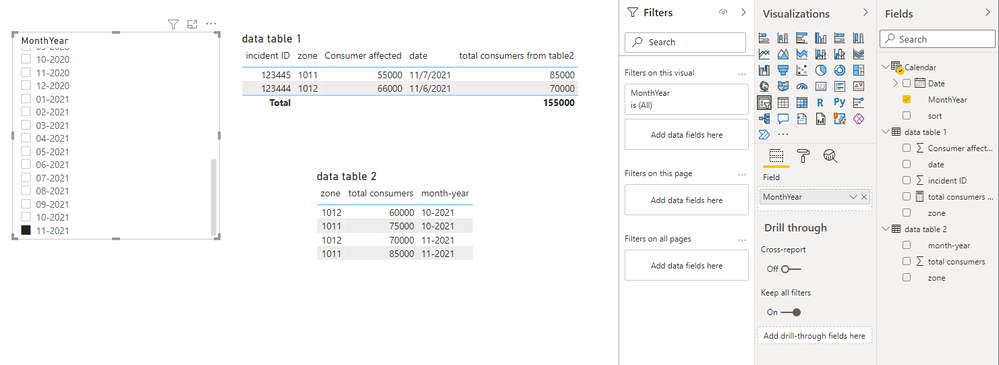
When you filter MonthYear, the results is as follows.
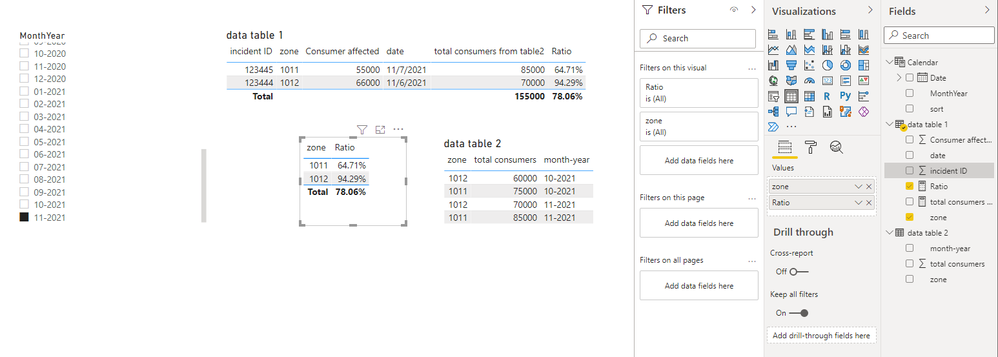
You want to calculate the ratio, just create the following
Ratio = DIVIDE(SUM('data table 1'[Consumer affected]),[total consumers from table2])
Best Regards,
Stephen Tao
If this post helps, then please consider Accept it as the solution to help the other members find it more quickly.
Hi @visittokiran ,
For your needs, it seems to be easier to use DAX.
You can create the following measure
total consumers from table2 =
CALCULATE (
SUM ( 'data table 2'[total consumers] ),
FILTER ( 'data table 2', [month-year] = MAX ( 'Calendar'[MonthYear] ) )
)
When you filter MonthYear, the results is as follows.
You want to calculate the ratio, just create the following
Ratio = DIVIDE(SUM('data table 1'[Consumer affected]),[total consumers from table2])
Best Regards,
Stephen Tao
If this post helps, then please consider Accept it as the solution to help the other members find it more quickly.
Hi @visittokiran ,
It sounds like you need set set your data model up into a star schema structure, rather than trying to relate your two fact (data) tables together.
1) First, create a proper date column within your dataTable2. Power Query is pretty smart and should automatically do this is you change the data type of your month-year column to Date type.
2) Remove the relationship between dataTable1 & 2 [zone].
3) Relate calendar[date] to dataTable2[month-year] (now a proper date).
4) Create a [zone] dimension table which just contains a unique list of all zones. You can do this in Power Query very quickly by creating a new query something like this:
= Table.Distinct(Table.SelectColumns(dataTable2, "zone"))
I've used dataTable2 as the source here as it appears to be an SCD table that will contain all possible values.
5) Relate dimensionZone[zone] to dataTable1[zone] and dataTable2[zone].
6) Create your generic measure, something like this:
_affectedRatio =
DIVIDE(
SUM(dataTable1[Consumer affected]),
SUM(dateTable2[total consumers]),
0
)
I've used SUM(dt1[Consumer affected]) as I don't know what behaviour you expect if there's more than one incident in a particular zone in the same month, so just amend this as necessary.
7) Create your visuals with calendar[month], dimensionZone[zone], and your generic measure and Power BI should apply the correct context filtering to give you your desired output.
Pete
Proud to be a Datanaut!
A new Power BI DataViz World Championship is coming this June! Don't miss out on submitting your entry.
Share feedback directly with Fabric product managers, participate in targeted research studies and influence the Fabric roadmap.
| User | Count |
|---|---|
| 5 | |
| 4 | |
| 4 | |
| 3 | |
| 3 |
| User | Count |
|---|---|
| 11 | |
| 10 | |
| 7 | |
| 7 | |
| 7 |