cancel
Showing results for 
Search instead for 
Did you mean: 

The Power BI Data Visualization World Championships is back! Get ahead of the game and start preparing now! Learn more

Reply
shashank_0107
New Member

time difference from different column in power query

time difference calculation issuetime difference calculation issue

hello everone, 

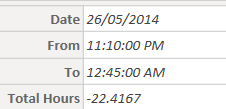
I am working on some project, here i need to calculate time difference between 2 time columns. but i am facing problem to calculate time when date changes in midnight after 00:00. As you can see in screenshot attached, the time 12.45am is of 27.05.2014. so when i am subtracting two TIME in power query it assumed that 12:45am is of 26.05.2014. that's y showing negative time difference. there is a huge data in which this error is coming. 


anyone guide me further. thanks in advance. 

1 ACCEPTED SOLUTION
dufoq3
Super User
Super User

Hi @shashank_0107, check this:


Result

dufoq3_0-1713079457763.png


version 1 (whole code)


let
    Source = Table.FromRows(Json.Document(Binary.Decompress(Binary.FromText("i45WMjLTNzDVNzIwNFHSUTI0tDI0sDIwUAjwBfGMrExMQTxHX6VYHfxKDa1MLYEIxIuNBQA=", BinaryEncoding.Base64), Compression.Deflate)), let _t = ((type nullable text) meta [Serialized.Text = true]) in type table [Date = _t, From = _t, To = _t]),
    ChangedType = Table.TransformColumnTypes(Source,{{"Date", type date}, {"From", type time}, {"To", type time}}, "sk-SK"),
    Ad_DifferenceTime = Table.AddColumn(ChangedType, "Difference Time", each if [To] < [From] then (Date.AddDays([Date], 1)&[To]) - ([Date]&[From]) else ([Date]&[To]) - ([Date]&[From]), type duration),
    Ad_TotalHours = Table.AddColumn(Ad_DifferenceTime, "Total Hours", each Duration.TotalHours([Difference Time]), type number)
in
    Ad_TotalHours


version 2 (add this as custom column)


[ a = Duration.TotalHours([To] - [From]),
  b = if a < 0 then a + 24 else a
][b]


Note: Check this link to learn how to use my query.
Check this link if you don't know how to provide sample data.

View solution in original post

2 REPLIES 2
dufoq3
Super User
Super User

Hi @shashank_0107, check this:


Result

dufoq3_0-1713079457763.png


version 1 (whole code)


let
    Source = Table.FromRows(Json.Document(Binary.Decompress(Binary.FromText("i45WMjLTNzDVNzIwNFHSUTI0tDI0sDIwUAjwBfGMrExMQTxHX6VYHfxKDa1MLYEIxIuNBQA=", BinaryEncoding.Base64), Compression.Deflate)), let _t = ((type nullable text) meta [Serialized.Text = true]) in type table [Date = _t, From = _t, To = _t]),
    ChangedType = Table.TransformColumnTypes(Source,{{"Date", type date}, {"From", type time}, {"To", type time}}, "sk-SK"),
    Ad_DifferenceTime = Table.AddColumn(ChangedType, "Difference Time", each if [To] < [From] then (Date.AddDays([Date], 1)&[To]) - ([Date]&[From]) else ([Date]&[To]) - ([Date]&[From]), type duration),
    Ad_TotalHours = Table.AddColumn(Ad_DifferenceTime, "Total Hours", each Duration.TotalHours([Difference Time]), type number)
in
    Ad_TotalHours


version 2 (add this as custom column)


[ a = Duration.TotalHours([To] - [From]),
  b = if a < 0 then a + 24 else a
][b]


Note: Check this link to learn how to use my query.
Check this link if you don't know how to provide sample data.

Anonymous
Not applicable

Do your math on these values as type datetime, and you will not have this issue.


--Nate

Helpful resources

Announcements
Power BI DataViz World Championships

Power BI Dataviz World Championships

The Power BI Data Visualization World Championships is back! Get ahead of the game and start preparing now!

December 2025 Power BI Update Carousel

Power BI Monthly Update - December 2025

Check out the December 2025 Power BI Holiday Recap!

FabCon Atlanta 2026 carousel

FabCon Atlanta 2026

Join us at FabCon Atlanta, March 16-20, for the ultimate Fabric, Power BI, AI and SQL community-led event. Save $200 with code FABCOMM.

Top Solution Authors