cancel
Showing results for 
Search instead for 
Did you mean: 

The Power BI Data Visualization World Championships is back! Get ahead of the game and start preparing now! Learn more

Reply
hongho2
Frequent Visitor

syntax

Hi,

For the syntax below, I want to set Staged column to Yes when status >15 else  No . However,I also want to set to No if  status is null or blank,  but don't know the syntax.  Can you assist ?


Staged = if(Number.FromText([#"Warehousing [Status]"]))>15 then "Yes" else "No"


1 ACCEPTED SOLUTION
hnguy71
Super User
Super User

Hi @hongho2 , this should work:


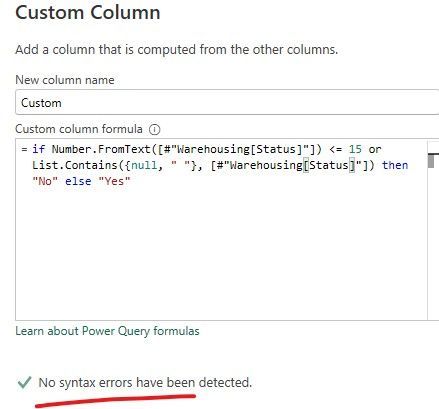
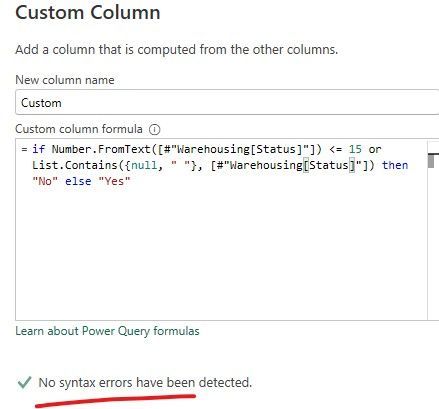
if Number.FromText([Status]) <= 15 or List.Contains({null, ""}, [Status]) then "No" else "Yes"


Did I answer your question?
Please help by clicking the thumbs up button and mark my post as a solution!

View solution in original post

6 REPLIES 6
hongho2
Frequent Visitor

expression.jpg

it merged with other table, but the filter is in the same table.

hnguy71
Super User
Super User

Hi @hongho2 , this should work:


if Number.FromText([Status]) <= 15 or List.Contains({null, ""}, [Status]) then "No" else "Yes"


Did I answer your question?
Please help by clicking the thumbs up button and mark my post as a solution!

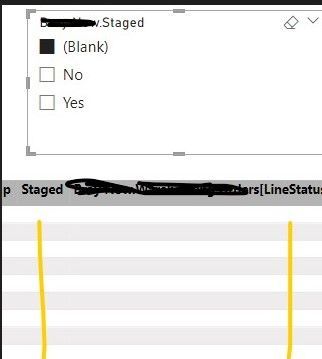
Thank you for your reply, but it did not work. I filtered for blanks,  It should show "No." from the status instead of nothing.


expression.jpg


Hi @hongho2 ,


Is this PowerQuery or DAX? If it didn't work in PowerQuery it should have given you an error message. Can you share me the error message?


Perhaps you can share a bit more information on how you're getting blanks? You're connecting to another table via merge, append, or a relationship?


Did I answer your question?
Please help by clicking the thumbs up button and mark my post as a solution!

it was merged with other table, but the filter is in the same table.

expression.jpg

Hi @hongho2 

Since it's merged with another table there could be a value or evaluation that doesn't match causing what could be a RI violation and then giving you a "blank" value. 


I don't know your model well enough to tell you where is your blank issue but if the data is not sensitive and you want me to investigate your issue for you, share your pbix for me to diagnose it.


Also seems you may need to clean your data a bit further.


Here's my full sample query:

let
    Source = Table.FromRows(Json.Document(Binary.Decompress(Binary.FromText("i45WMjRVitUBUgYQyghMIQhDMwhlDqYcdY10/UpzcpRiYwE=", BinaryEncoding.Base64), Compression.Deflate)), let _t = ((type nullable text) meta [Serialized.Text = true]) in type table [Status = _t]),
    #"Replaced Value" = Table.ReplaceValue(Source,"A-2-Null",null,Replacer.ReplaceValue,{"Status"}),
    #"Added Custom" = Table.AddColumn(#"Replaced Value", "Staged", each if Number.FromText([Status]) <= 15 or List.Contains({null, ""}, [Status]) then "No" else "Yes")
in
    #"Added Custom"


And the sample expected results:
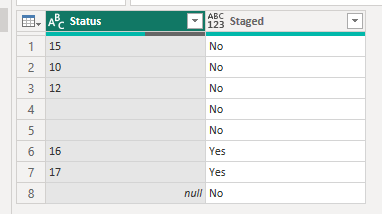
hnguy71_0-1697502386800.png


Did I answer your question?
Please help by clicking the thumbs up button and mark my post as a solution!

Helpful resources

Announcements
Power BI DataViz World Championships

Power BI Dataviz World Championships

The Power BI Data Visualization World Championships is back! Get ahead of the game and start preparing now!

December 2025 Power BI Update Carousel

Power BI Monthly Update - December 2025

Check out the December 2025 Power BI Holiday Recap!

FabCon Atlanta 2026 carousel

FabCon Atlanta 2026

Join us at FabCon Atlanta, March 16-20, for the ultimate Fabric, Power BI, AI and SQL community-led event. Save $200 with code FABCOMM.