Share feedback directly with Fabric product managers, participate in targeted research studies and influence the Fabric roadmap.
Sign up nowGet Fabric certified for FREE! Don't miss your chance! Learn more
Hi Everyone,
I wondered if in power query it's possible to remove duplicate values based on certain criteria. My data would look like this:
| ID | Client | Stage | Fee | Country | url | Source |
| 2 | ABC. | win | 500 | FR | abc.com | pipeline |
| 3 | XXX | FR | xxx.com | intake | ||
| 1 | MMM | |||||
| 2 | ABC | win | 500 | FR | intake | |
| 2 | abc | 100 | abc.com | intake | ||
| 3 | XXX | lost | 100 | NL | pipeline |
I want to remove the duplicate values based on ID but source = "pipeline". Is it possible to achieve this?
Any small help would be appreciated.
Thanks in advance.
Solved! Go to Solution.
Hi @Anonymous ,
We can add a step using Table.SelectRows function, please change #"Changed Type" to the name of your previous step.
RemoveDuplicate = Table.SelectRows(#"Changed Type",each let s=[Source] ,i = [ID] , totalSameIDNumber = Table.RowCount(Table.SelectRows(#"Changed Type",each [ID]=i)) in totalSameIDNumber=1 or s="pipeline")
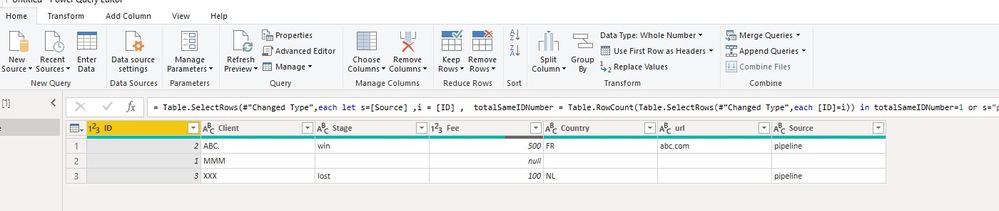
All the queries are here:
let
Source = Table.FromRows(Json.Document(Binary.Decompress(Binary.FromText("i45WMlLSUXJ0ctYDUuWZeUDS1MAASLoFAYnEpGS95PxcIKsgsyA1JzMvVSlWJ1rJGCgQEREBJBWgGKy6oqICqjozryQxG6LWEMj19fVFUovAIHmo9ci2ww1UQDXKCOIiqIQh2JkKKK5EUoxwY05+cQlcvZ8PVBPCQ7EA", BinaryEncoding.Base64), Compression.Deflate)), let _t = ((type text) meta [Serialized.Text = true]) in type table [ID = _t, Client = _t, Stage = _t, Fee = _t, Country = _t, url = _t, Source = _t]),
#"Changed Type" = Table.TransformColumnTypes(Source,{{"ID", Int64.Type}, {"Client", type text}, {"Stage", type text}, {"Fee", Int64.Type}, {"Country", type text}, {"url", type text}, {"Source", type text}}),
RemoveDuplicate = Table.SelectRows(#"Changed Type",each let s=[Source] ,i = [ID] , totalSameIDNumber = Table.RowCount(Table.SelectRows(#"Changed Type",each [ID]=i)) in totalSameIDNumber=1 or s="pipeline")
in
RemoveDuplicate
If it doesn't meet your requirement, Please show the exact expected result based on the Tables that you have shared.
Best regards,
Hi @Anonymous ,
We can add a step using Table.SelectRows function, please change #"Changed Type" to the name of your previous step.
RemoveDuplicate = Table.SelectRows(#"Changed Type",each let s=[Source] ,i = [ID] , totalSameIDNumber = Table.RowCount(Table.SelectRows(#"Changed Type",each [ID]=i)) in totalSameIDNumber=1 or s="pipeline")
All the queries are here:
let
Source = Table.FromRows(Json.Document(Binary.Decompress(Binary.FromText("i45WMlLSUXJ0ctYDUuWZeUDS1MAASLoFAYnEpGS95PxcIKsgsyA1JzMvVSlWJ1rJGCgQEREBJBWgGKy6oqICqjozryQxG6LWEMj19fVFUovAIHmo9ci2ww1UQDXKCOIiqIQh2JkKKK5EUoxwY05+cQlcvZ8PVBPCQ7EA", BinaryEncoding.Base64), Compression.Deflate)), let _t = ((type text) meta [Serialized.Text = true]) in type table [ID = _t, Client = _t, Stage = _t, Fee = _t, Country = _t, url = _t, Source = _t]),
#"Changed Type" = Table.TransformColumnTypes(Source,{{"ID", Int64.Type}, {"Client", type text}, {"Stage", type text}, {"Fee", Int64.Type}, {"Country", type text}, {"url", type text}, {"Source", type text}}),
RemoveDuplicate = Table.SelectRows(#"Changed Type",each let s=[Source] ,i = [ID] , totalSameIDNumber = Table.RowCount(Table.SelectRows(#"Changed Type",each [ID]=i)) in totalSameIDNumber=1 or s="pipeline")
in
RemoveDuplicate
If it doesn't meet your requirement, Please show the exact expected result based on the Tables that you have shared.
Best regards,
Wow... this works really well!!! thank you so much @v-lid-msft !!.
I kinda found out the solution my own way by grouping the table then merges it, but yours works way much cleaner!!!
Thanks a lot!!
If you love stickers, then you will definitely want to check out our Community Sticker Challenge!
Check out the January 2026 Power BI update to learn about new features.
| User | Count |
|---|---|
| 7 | |
| 5 | |
| 4 | |
| 3 | |
| 3 |
| User | Count |
|---|---|
| 13 | |
| 11 | |
| 11 | |
| 8 | |
| 6 |