cancel
Showing results for 
Search instead for 
Did you mean: 

July 7 - July 17 | Round 2 of the Power BI Dataviz World Championships. Don't miss your chance! Learn more

Reply
gabestille
New Member

refresh failed

I have been getting the error shown below for the last couple weeks. The report was working fine for a month and then stopped refreshing.  The report is pulling data from an excel file in SharePoint.


OneDrive refresh for Global Savings Tracker_Ideation.xlsx has been disabled. You can learn about common reasons refresh fails in our help topics or reach out to our Community for help. As always, you can also contact support.

If you contact support for this issue, please provide them with the following information:


Cluster Name: WABI-WEST-US-redirect.analysis.windows.net

Refresh Start Time: 01/06/2017 16:10:09Z

Refresh End Time: 01/06/2017 16:10:10Z

Thanks,

Microsoft Power BI

This email was sent by Microsoft Corporation

One Microsoft Way
Redmond, WA, 98052, USA

Privacy Policy | Terms and Conditions

4 REPLIES 4
gabestille
New Member

I have been getting the error shown below for the last couple weeks. The report was working fine for a month and then stopped refreshing.  The report is pulling data from an excel file in SharePoint.


OneDrive refresh for Global Savings Tracker_Ideation.xlsx has been disabled. You can learn about common reasons refresh fails in our help topics or reach out to our Community for help. As always, you can also contact support.

If you contact support for this issue, please provide them with the following information:


Cluster Name: WABI-WEST-US-redirect.analysis.windows.net

Refresh Start Time: 01/06/2017 16:10:09Z

Refresh End Time: 01/06/2017 16:10:10Z

Thanks,

Microsoft Power BI

This email was sent by Microsoft Corporation

One Microsoft Way
Redmond, WA, 98052, USA

Privacy Policy | Terms and Conditions

Anonymous
Not applicable

Hi @gabestille,

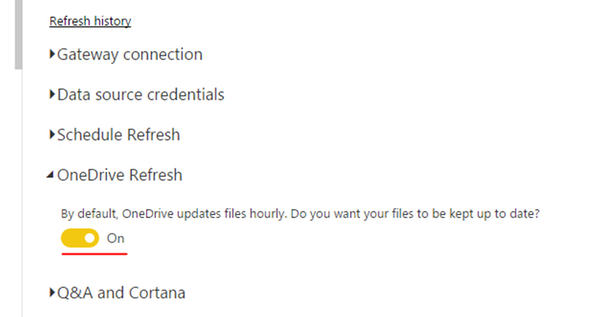
I suspect that you store Excel file in SharePoint Online and directly connect to the Excel file in Power BI Service using "Get Data-> Files" entry, right? If so, go to "Settings" , ensure that you connect to the Excel file in SharePoint using OAuth method for your Dataset, and make sure that OneDrive refresh is turned on.
1.PNG


Besides, do you get error message when you click "Refresh now" to refresh your dataset or set up "Schedule refresh" for your dataset? And these is also a refresh issue described in Power BI Support site, check if you hit this issue.

Thanks,
Lydia Zhang

How do I know if I am using OAuth method? Also, whenever I try to Refresh Now, or Schedule a Refresh, it errors out and shows I never changed it to a scheduled refresh.

Anonymous
Not applicable

Hi @gabestille,

Could you please post deatiled steps about  how you connect to the Excel file from Power BI Service? And please connect to the Excel file from Power BI Desktop via"Get Data->Web" entry, then publish Power BI Desktop to Service and check if you can refresh your dataset.

Thanks,
Lydia Zhang

Helpful resources

Announcements
FabCon and SQLCon Barcelona 2026

FabCon & SQLCon – Barcelona 2026

Join us in Barcelona for FabCon and SQLCon, the Fabric, Power BI, SQL, and AI community event. Save €200 with code FABCMTY200.

60 days of Data Days Carousel

Data Days 2026

Join Data Days 2026: 60 days of free live/on-demand sessions, challenges, study groups, and certification opportunities.

Power BI DataViz World Championships carousel

Power BI DataViz World Championships - June 2026

A new Power BI DataViz World Championship is coming this June! Don't miss out on submitting your entry.