Join us at FabCon Atlanta from March 16 - 20, 2026, for the ultimate Fabric, Power BI, AI and SQL community-led event. Save $200 with code FABCOMM.
Register now!View all the Fabric Data Days sessions on demand. View schedule
Hello,
I am tyring to figure out how to get the % of Total measure into a PowerPivot table.
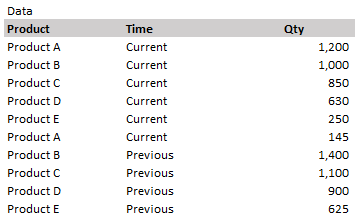
My data is structed this way, with columns for Product, Time and Qty.
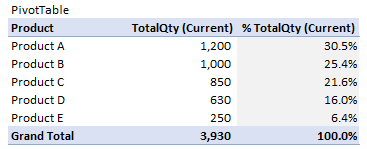
My pivot table looks like this, with the Product column in the row fields.
I am unsure of which measure to use to get the %TotalQty.
TotalQty = SUMX(FILTER ('Data', 'Data'[Time] = "Current"), 'Data'[Qty])
%TotalQty = ?
Solved! Go to Solution.
Hi @Anonymous
Have a try
%TotalQty = [TotalQty] / CALCULATE ([TotalQty],ALL('Data'[Product]))
Hi @Anonymous
Have a try
%TotalQty = [TotalQty] / CALCULATE ([TotalQty],ALL('Data'[Product]))
Check out the November 2025 Power BI update to learn about new features.
Advance your Data & AI career with 50 days of live learning, contests, hands-on challenges, study groups & certifications and more!
| User | Count |
|---|---|
| 10 | |
| 9 | |
| 6 | |
| 5 | |
| 3 |