Join us at FabCon Atlanta from March 16 - 20, 2026, for the ultimate Fabric, Power BI, AI and SQL community-led event. Save $200 with code FABCOMM.
Register now!The Power BI Data Visualization World Championships is back! Get ahead of the game and start preparing now! Learn more
Have a table with titles and first names combined in one field. I split the field to Name.1, Name.2, Name.3 etc.
In Name.1 there are some common titles, DR., Mrs, Deacon, Pastor etc. There are about 30 titles.
My question is how do I search the table for common titles (I can type a list) and if a match is found in Name.1 move Name.1 to Title, Name.2 to Name.1, Name.3 to Name.2
| Title | Name.1 | Name.2 | Name.3 |
| Rev | Paul | Leonard | |
| Cathy | Van | Nort | |
| Mai | Tran | ||
| Anson | Groves | ||
| Margi | Loesel | ||
| Rev | Dominic | Leo, | |
| Katherine | Kardok | ||
| Dre | |||
| Melody | Smith | ||
| Jane | Machleit | ||
| Fr. | Matthew | Hillyard, | |
| Traci | Baker | ||
| Rev | John | O'Cane |
converted table will look like:
| Title | Name.1 | Name.2 | Name.3 |
| Rev | Paul | Leonard | |
| Cathy | Van | Nort | |
| Mai | Tran | ||
| Anson | Groves | ||
| Margi | Loesel | ||
| Rev | Dominic | Leo, | |
| Katherine | Kardok | ||
| Dre | |||
| Melody | Smith | ||
| Jane | Machleit | ||
| Fr. | Matthew | Hillyard, | |
| Traci | Baker | ||
| Rev | John | O'Cane |
Thank you.
Solved! Go to Solution.
Hi, @VinceLuna
let
Source = Table.FromRows(Json.Document(Binary.Decompress(Binary.FromText("bY9BC8IwDIX/yth5iHjxrBOV6VRUvMwdwhZcsWsg6xT/vWkHk4KXJM1H+t4rijiKk/iML6kn6LW0PZIBruMyGWAKtvlIv4GReiC2I8pBSb2yJ9G4XpiO3GbD9MIuQDnww93sCTvUARpMrKhVRlWDj2SEOzGBrAz6mWt6BrcrRv8OpFBT7YxfWmWbAGXgP8qhajQqG7A1TzyyIviWaau0/ojiz4vkrVyGJTyR/0TIqHHpj/d+Op3NU6dVll8=", BinaryEncoding.Base64), Compression.Deflate)), let _t = ((type nullable text) meta [Serialized.Text = true]) in type table [Title = _t, Name.1 = _t, Name.2 = _t, Name.3 = _t]),
titles = List.Buffer({"DR.", "Mrs", "Rev", "Deacon", "Pastor", "Dre"}),
tbl_list = List.Buffer(Table.ToRows(Source)),
out = List.Transform(tbl_list, (x) => if List.Contains(titles, x{1}) then List.Skip(x) & {""} else x),
z = Table.FromRows(out, Table.ColumnNames(Source))
in
z
Hi, @VinceLuna
let
Source = Table.FromRows(Json.Document(Binary.Decompress(Binary.FromText("bY9BC8IwDIX/yth5iHjxrBOV6VRUvMwdwhZcsWsg6xT/vWkHk4KXJM1H+t4rijiKk/iML6kn6LW0PZIBruMyGWAKtvlIv4GReiC2I8pBSb2yJ9G4XpiO3GbD9MIuQDnww93sCTvUARpMrKhVRlWDj2SEOzGBrAz6mWt6BrcrRv8OpFBT7YxfWmWbAGXgP8qhajQqG7A1TzyyIviWaau0/ojiz4vkrVyGJTyR/0TIqHHpj/d+Op3NU6dVll8=", BinaryEncoding.Base64), Compression.Deflate)), let _t = ((type nullable text) meta [Serialized.Text = true]) in type table [Title = _t, Name.1 = _t, Name.2 = _t, Name.3 = _t]),
titles = List.Buffer({"DR.", "Mrs", "Rev", "Deacon", "Pastor", "Dre"}),
tbl_list = List.Buffer(Table.ToRows(Source)),
out = List.Transform(tbl_list, (x) => if List.Contains(titles, x{1}) then List.Skip(x) & {""} else x),
z = Table.FromRows(out, Table.ColumnNames(Source))
in
z
Thanks I'll give it a shot. Have to figure our where to insert code.
Hi @VinceLuna ,
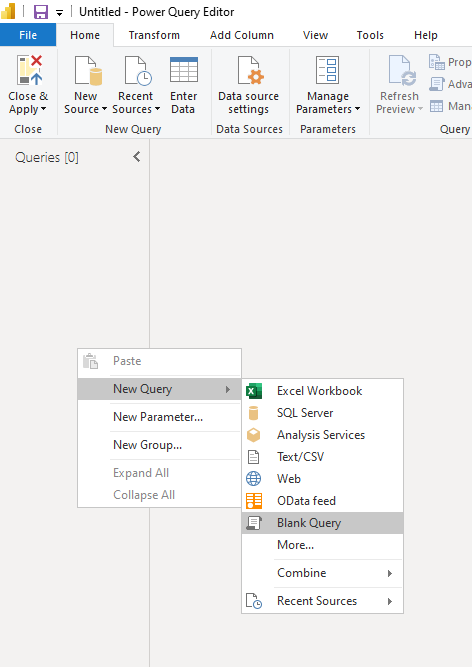
Create a blank query in Power Query editor.
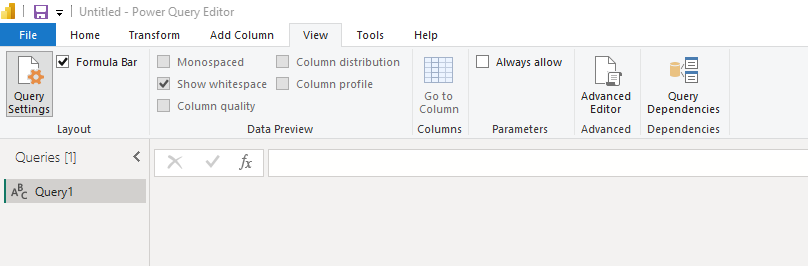
And then copy and paste his code into the advanced editor under "View".
Query overview in Power BI Desktop - Power BI | Microsoft Learn
Best Regards,
Stephen Tao
If this post helps, then please consider Accept it as the solution to help the other members find it more quickly.
The Power BI Data Visualization World Championships is back! Get ahead of the game and start preparing now!
| User | Count |
|---|---|
| 18 | |
| 9 | |
| 9 | |
| 6 | |
| 6 |