Get certified for free when you join Fabric Data Days 2026 and dive into Fabric, Power BI, SQL, AI, and other essential data skills.
Join nowTry your skills in the Power BI Dataviz World Championship! Round one ends June 26. Join now
Hi,
In my dataset, I am having a field "DateTime" (format: 9/8/2020 12:00:00 AM). I want to load the data from the source only for the time in between 10:00:00 AM to 04:00:00 PM only.
Please suggest how to achieve this.
Thanks
Solved! Go to Solution.
Hi @jitpbi ,
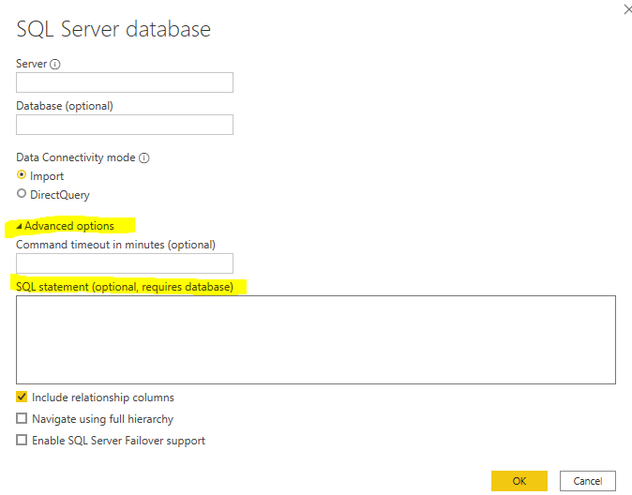
If your data source is from database, you could write T-SQL to restrict data while connecting. For other data sources, it is not supported to restrict when we load data. You could import it firstly and then filter in Query Editor. For this situation, @Jimmy801 's answer is a good solution.
Hi @jitpbi ,
If your data source is from database, you could write T-SQL to restrict data while connecting. For other data sources, it is not supported to restrict when we load data. You could import it firstly and then filter in Query Editor. For this situation, @Jimmy801 's answer is a good solution.
Hello @jitpbi
use Table.SelectRows where you apply a Time.From to your DateTime-Column and compare it twice to the wanted timeframe
Check out this code
let
Source = Table.FromRows(Json.Document(Binary.Decompress(Binary.FromText("i45WstS30DcyMDJQMDSyMjAAIgVHX6VYHSQJcxziZlDxAJi4oQHUJEMkHbEA", BinaryEncoding.Base64), Compression.Deflate)), let _t = ((type nullable text) meta [Serialized.Text = true]) in type table [DateTime = _t]),
#"Changed Type" = Table.TransformColumnTypes(Source,{{"DateTime", type datetime, "en-us"}}),
SelectRowsWithinTimeFrame = Table.SelectRows
(
#"Changed Type",
each Time.From(_[DateTime]) <= #time(16,0,0) and Time.From(_[DateTime]) >= #time(10,0,0)
)
in
SelectRowsWithinTimeFrame
Copy paste this code to the advanced editor in a new blank query to see how the solution works.
If this post helps or solves your problem, please mark it as solution (to help other users find useful content and to acknowledge the work of users that helped you)
Kudoes are nice too
Have fun
Jimmy
Don't miss out on Data Days, June 15 through August 7. Learn Fabric, Power BI, SQL, AI and more.
Check out the May 2026 Power BI update to learn about new features.
| User | Count |
|---|---|
| 4 | |
| 3 | |
| 3 | |
| 3 | |
| 2 |
| User | Count |
|---|---|
| 11 | |
| 9 | |
| 5 | |
| 5 | |
| 4 |