Join us at FabCon Atlanta from March 16 - 20, 2026, for the ultimate Fabric, Power BI, AI and SQL community-led event. Save $200 with code FABCOMM.
Register now!Learn from the best! Meet the four finalists headed to the FINALS of the Power BI Dataviz World Championships! Register now
Hi,
I have date in excel where my dates aare my column headers- ed, Apr-20, MAy-20, etc. Now when I import my data in Power BI the headers are changed to text. But I need them to stay in date format as I need to show the change of month over month .
Pls help!
Solved! Go to Solution.
Hello @Anonymous
in your case your headers in Excel are stored as date (01/01/2020) but visualized in another format like Apr-20. As Power BI is reading the real data in the cells, not the visualisation. So, or you transform your data in Excel like real text or you apply something like that
let
Source = Table.FromRows(Json.Document(Binary.Decompress(Binary.FromText("i45WMjDRNzDUNzIwMlDSUTIwReaYwTmxOtFKhkAhIyA2VoqNBQA=", BinaryEncoding.Base64), Compression.Deflate)), let _t = ((type nullable text) meta [Serialized.Text = true]) in type table [Column1 = _t, Column2 = _t, Column3 = _t]),
#"Added Index" = Table.AddIndexColumn(Source, "Index", 0, 1),
TransformFirstRow = Table.FromRecords( Table.TransformRows
(
#"Added Index",
(rec)=> if rec[Index]=0 then Record.FromTable(Table.TransformColumns(Record.ToTable(rec), {{"Value", each Date.ToText(Date.From(_,"en-US"),"MMM-YY","en-US")}})) else rec
)),
#"Removed Columns" = Table.RemoveColumns(TransformFirstRow,{"Index"}),
PromoteHeader = Table.PromoteHeaders(#"Removed Columns")
in
PromoteHeader
Excel-import
after transformation

I've simulate the source-step as if you would access to your Excel-sheet
Copy paste this code to the advanced editor in a new blank query to see how the solution works.
If this post helps or solves your problem, please mark it as solution (to help other users find useful content and to acknowledge the work of users that helped you)
Kudoes are nice too
Have fun
Jimmy
Hello @Anonymous
in your case your headers in Excel are stored as date (01/01/2020) but visualized in another format like Apr-20. As Power BI is reading the real data in the cells, not the visualisation. So, or you transform your data in Excel like real text or you apply something like that
let
Source = Table.FromRows(Json.Document(Binary.Decompress(Binary.FromText("i45WMjDRNzDUNzIwMlDSUTIwReaYwTmxOtFKhkAhIyA2VoqNBQA=", BinaryEncoding.Base64), Compression.Deflate)), let _t = ((type nullable text) meta [Serialized.Text = true]) in type table [Column1 = _t, Column2 = _t, Column3 = _t]),
#"Added Index" = Table.AddIndexColumn(Source, "Index", 0, 1),
TransformFirstRow = Table.FromRecords( Table.TransformRows
(
#"Added Index",
(rec)=> if rec[Index]=0 then Record.FromTable(Table.TransformColumns(Record.ToTable(rec), {{"Value", each Date.ToText(Date.From(_,"en-US"),"MMM-YY","en-US")}})) else rec
)),
#"Removed Columns" = Table.RemoveColumns(TransformFirstRow,{"Index"}),
PromoteHeader = Table.PromoteHeaders(#"Removed Columns")
in
PromoteHeader
Excel-import
after transformation
I've simulate the source-step as if you would access to your Excel-sheet
Copy paste this code to the advanced editor in a new blank query to see how the solution works.
If this post helps or solves your problem, please mark it as solution (to help other users find useful content and to acknowledge the work of users that helped you)
Kudoes are nice too
Have fun
Jimmy
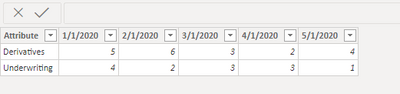
@Anonymous Can you just rename them? Otherwise, before your promoted headers step try transforming the data to text. Or possibly edit the Change Type step? Would have to see your Advaned Editor code.
Share feedback directly with Fabric product managers, participate in targeted research studies and influence the Fabric roadmap.
Check out the February 2026 Power BI update to learn about new features.
| User | Count |
|---|---|
| 12 | |
| 12 | |
| 10 | |
| 6 | |
| 5 |