FabCon is coming to Atlanta
Join us at FabCon Atlanta from March 16 - 20, 2026, for the ultimate Fabric, Power BI, AI and SQL community-led event. Save $200 with code FABCOMM.
Register now!- Power BI forums
- Get Help with Power BI
- Desktop
- Service
- Report Server
- Power Query
- Mobile Apps
- Developer
- DAX Commands and Tips
- Custom Visuals Development Discussion
- Health and Life Sciences
- Power BI Spanish forums
- Translated Spanish Desktop
- Training and Consulting
- Instructor Led Training
- Dashboard in a Day for Women, by Women
- Galleries
- Data Stories Gallery
- Themes Gallery
- Contests Gallery
- QuickViz Gallery
- Quick Measures Gallery
- Visual Calculations Gallery
- Notebook Gallery
- Translytical Task Flow Gallery
- TMDL Gallery
- R Script Showcase
- Webinars and Video Gallery
- Ideas
- Custom Visuals Ideas (read-only)
- Issues
- Issues
- Events
- Upcoming Events
The Power BI Data Visualization World Championships is back! It's time to submit your entry. Live now!
- Power BI forums
- Forums
- Get Help with Power BI
- Power Query
- Re: invalid identifier for list.sum syntax
- Subscribe to RSS Feed
- Mark Topic as New
- Mark Topic as Read
- Float this Topic for Current User
- Bookmark
- Subscribe
- Printer Friendly Page


- Mark as New
- Bookmark
- Subscribe
- Mute
- Subscribe to RSS Feed
- Permalink
- Report Inappropriate Content
invalid identifier for list.sum syntax
Hi, I use group by window to sum Rev Act and GM Act by InvoiceDate and OrderNo_Revised_Item. it all works well until I try to amend the sum of Rev Act by applying a condition in when evaluating the source, which is [I/C]="C". (highlight in bold), I got an error message like invalid identifier.
= Table.Group(Source, {"InvoiceDate", "OrderNo_Revised_Item"}, {{"Ext Rev Act", each List.Sum(Table.SelectRows(Source, each [I/C]="C") [Rev Act]), type nullable number}, {"GM Act", each List.Sum([GM Act]), type nullable number}})
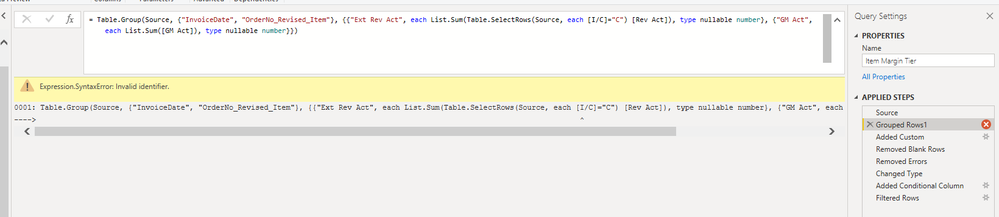
I couldn't figure out what is wrong with that. Can anyone help?
Solved! Go to Solution.


- Mark as New
- Bookmark
- Subscribe
- Mute
- Subscribe to RSS Feed
- Permalink
- Report Inappropriate Content
Hi @gavin007 ,
yes, I didn't pay attention to the other code. Problem is, that you have used the "each"-keyword twice and now the syntax sugar doesn't know what to refer to.
Therefore I'd recommend to transform at least one of the functions to the explicit syntax:
Table.Group(Source, {"InvoiceDate", "OrderNo_Revised_Item"}, {{"Ext Rev Act", each List.Sum(Table.SelectRows(Source, (row) => row[#"I/C"]="C") [Rev Act]), type nullable number}, {"GM Act", each List.Sum([GM Act]), type nullable number}})
Imke Feldmann (The BIccountant)
If you liked my solution, please give it a thumbs up. And if I did answer your question, please mark this post as a solution. Thanks!
How to integrate M-code into your solution -- How to get your questions answered quickly -- How to provide sample data -- Check out more PBI- learning resources here -- Performance Tipps for M-queries

- Mark as New
- Bookmark
- Subscribe
- Mute
- Subscribe to RSS Feed
- Permalink
- Report Inappropriate Content
Follow on LinkedIn
@ me in replies or I'll lose your thread!!!
Instead of a Kudo, please vote for this idea
Become an expert!: Enterprise DNA
External Tools: MSHGQM
YouTube Channel!: Microsoft Hates Greg
Latest book!: DAX For Humans
DAX is easy, CALCULATE makes DAX hard...
- Mark as New
- Bookmark
- Subscribe
- Mute
- Subscribe to RSS Feed
- Permalink
- Report Inappropriate Content
Hi @gavin007
that's probably due to the special characters in the field name. Try to escape it like so: [#"C/O"].
Imke Feldmann (The BIccountant)
If you liked my solution, please give it a thumbs up. And if I did answer your question, please mark this post as a solution. Thanks!
How to integrate M-code into your solution -- How to get your questions answered quickly -- How to provide sample data -- Check out more PBI- learning resources here -- Performance Tipps for M-queries
- Mark as New
- Bookmark
- Subscribe
- Mute
- Subscribe to RSS Feed
- Permalink
- Report Inappropriate Content
@ImkeF It partialy work but it then it has error message like "We cannot convert the value 380000 to type Function."
Is there something wrong with the type?
- Mark as New
- Bookmark
- Subscribe
- Mute
- Subscribe to RSS Feed
- Permalink
- Report Inappropriate Content
Hi @gavin007 ,
yes, I didn't pay attention to the other code. Problem is, that you have used the "each"-keyword twice and now the syntax sugar doesn't know what to refer to.
Therefore I'd recommend to transform at least one of the functions to the explicit syntax:
Table.Group(Source, {"InvoiceDate", "OrderNo_Revised_Item"}, {{"Ext Rev Act", each List.Sum(Table.SelectRows(Source, (row) => row[#"I/C"]="C") [Rev Act]), type nullable number}, {"GM Act", each List.Sum([GM Act]), type nullable number}})
Imke Feldmann (The BIccountant)
If you liked my solution, please give it a thumbs up. And if I did answer your question, please mark this post as a solution. Thanks!
How to integrate M-code into your solution -- How to get your questions answered quickly -- How to provide sample data -- Check out more PBI- learning resources here -- Performance Tipps for M-queries
- Mark as New
- Bookmark
- Subscribe
- Mute
- Subscribe to RSS Feed
- Permalink
- Report Inappropriate Content
@ImkeF That is awsome. It is working perfecly. Can i humbly ask how and where can i learn this syntax? I am good with click and drop but when it comes to scripting, expecially with the M language structue, i find it difficult to write a script like that.
- Mark as New
- Bookmark
- Subscribe
- Mute
- Subscribe to RSS Feed
- Permalink
- Report Inappropriate Content
Hi @gavin007 ,
glad to hear that it worked for you.
I've collected some learning resources here: https://www.thebiccountant.com/learning-resources/
Imke Feldmann (The BIccountant)
If you liked my solution, please give it a thumbs up. And if I did answer your question, please mark this post as a solution. Thanks!
How to integrate M-code into your solution -- How to get your questions answered quickly -- How to provide sample data -- Check out more PBI- learning resources here -- Performance Tipps for M-queries
- Mark as New
- Bookmark
- Subscribe
- Mute
- Subscribe to RSS Feed
- Permalink
- Report Inappropriate Content
hi @gavin007
I wonder if you wanted to add [Rev Act] for the entire Source table or just for each sub-group.
In the latter case, you should replace Source with _.
then from
Table.SelectRows(Source, each [I/C]="C") [Rev Act])
to
Table.SelectRows(_, each [I/C]="C") [Rev Act])
In general, for faster and more useful help you should provide the expected and the input data and if any error appears in your code, the complete copy of the code used.
- Mark as New
- Bookmark
- Subscribe
- Mute
- Subscribe to RSS Feed
- Permalink
- Report Inappropriate Content
@Anonymous that actual help. Many Thanks!

Helpful resources

Power BI Dataviz World Championships
The Power BI Data Visualization World Championships is back! It's time to submit your entry.

Power BI Monthly Update - January 2026
Check out the January 2026 Power BI update to learn about new features.

FabCon Atlanta 2026
Join us at FabCon Atlanta, March 16-20, for the ultimate Fabric, Power BI, AI and SQL community-led event. Save $200 with code FABCOMM.


| User | Count |
|---|---|
| 16 | |
| 12 | |
| 9 | |
| 8 | |
| 7 |


