cancel
Showing results for 
Search instead for 
Did you mean: 

Get Fabric Certified for FREE during AI Skills Fest. This week only. Secure your voucher now.

Reply
Anonymous
Not applicable

inconsistent reading of date format UK<>US

I am reading in data from an online spreadsheet in SharePoint and Power Query is inconsistently reading the date formats. I've double checked the source file and can see no reason for it as the values look consistently correct. 


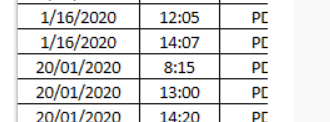
On the left is the Power Query view, data type is date and UK formats hold until 31st of January at which point is seems to switch to US format and shows the second of March instead of 3rd Feb. You can see the source data in the other image which i've checked as clean. The real problem for me is the inconsistency. If it was one way or the other i could handle it.


Any ideas, hint, tips or support are gratefully received!

Thanks

1 ACCEPTED SOLUTION

Hello @Anonymous 


There seems to be something utterly wrong in your database because I'm not able to undestand what dataformat you have in Excel

image.png

the first lines are indicating 16th Jannuary - meaning MM/DD/YYYY. But this logic can not be applied to the other lines. I suppose this dates are mainainted as text in your Excel. 

SO just change the date format in Excel and you should be fine


If this post helps or solves your problem, please mark it as solution (to help other users find useful content and to acknowledge the work of users that helped you)
Kudoes are nice too

Have fun

Jimmy

View solution in original post

2 REPLIES 2
Anonymous
Not applicable

Seems it didn't post the images first time round

Power Query Desktop.PNGExcel Source.PNG

Hello @Anonymous 


There seems to be something utterly wrong in your database because I'm not able to undestand what dataformat you have in Excel

image.png

the first lines are indicating 16th Jannuary - meaning MM/DD/YYYY. But this logic can not be applied to the other lines. I suppose this dates are mainainted as text in your Excel. 

SO just change the date format in Excel and you should be fine


If this post helps or solves your problem, please mark it as solution (to help other users find useful content and to acknowledge the work of users that helped you)
Kudoes are nice too

Have fun

Jimmy

Helpful resources

Announcements
May Power BI Update Carousel

Power BI Monthly Update - May 2026

Check out the May 2026 Power BI update to learn about new features.

Fabric SQL PBI Data Days

Data Days 2026 coming soon!

Sign up to receive a private message when registration opens and key events begin.

New to Fabric survey Carousel

New to Fabric Survey

If you have recently started exploring Fabric, we'd love to hear how it's going. Your feedback can help with product improvements.

Power BI DataViz World Championships carousel

Power BI DataViz World Championships - June 2026

A new Power BI DataViz World Championship is coming this June! Don't miss out on submitting your entry.