cancel
Showing results for 
Search instead for 
Did you mean: 

Level up your Power BI skills this month - build one visual each week and tell better stories with data! Get started

Reply
Anonymous
Not applicable

how to write formula when doing query

Hi Profs


could you help me on this?

I hope the last 3 months lastest date and current month all dates to be filtered into the query, that is for the current month the data all will be included, then include May and April latest date also. in the future, it will be the same current month all data, then the latest date of the previous months, eg June 22 and May 25.


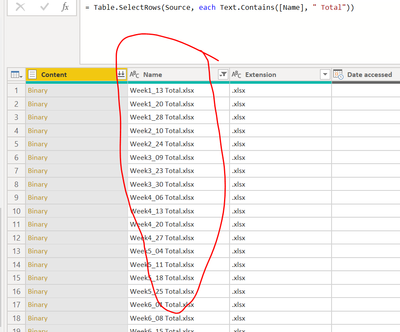
how to filter in the query process, I do not want to load in all the data, then use dax to get the result...

the data is too big


Capture.PNG


@Smauro


thanks in advance profs

Hi Profs I am not sure how to change your previous posted code to fit in here

@Smauro @AIB


1 ACCEPTED SOLUTION
v-alq-msft
Community Support
Community Support

Hi, @Anonymous 


Based on your description, I created data to reproduce your scenario. The pbix file is attached in the end.

Table:

a1.PNG


Here is the codes in 'Advanced Editor'.

let
    Source = Table.FromRows(Json.Document(Binary.Decompress(Binary.FromText("ZdK7CsMwDAXQXymeQ9EjfuQ/Ch1CMB0yNdChHfL5TVxZptagyQdf+eJ5dugGR8fwMfd1fVIGvtxen8d23bf37pZhLufnIChC6BFXFBuKPRoF0aiIxh55WYfEcAbqTRAzNTP1JorBoAhDj1INY0VkCpgEMShiU0Bp53xXjRszmDhEQciq0OQhiSJQRTaQq4pNmcrxFF7kiXwGUzl6QWW/n0I0KlSVmkpGRVHkVZE3KklTNTBksIGToNSQySsdlZu8KjR5hKKIVNH/t1q+", BinaryEncoding.Base64), Compression.Deflate)), let _t = ((type nullable text) meta [Serialized.Text = true]) in type table [Content = _t, Month = _t, Day = _t, Name = _t]),
    #"Changed Type" = Table.TransformColumnTypes(Source,{{"Content", Int64.Type}, {"Month", Int64.Type}, {"Day", Int64.Type}, {"Name", type text}}),
    Custom1 = Table.SelectRows(#"Changed Type",each let d=[Day],m=Date.Month(DateTime.LocalNow()),n=[Month] in n=m or 
(
(m-n)=1 and
d=Record.Field( Table.Max(Table.SelectRows(#"Changed Type",each [Month]=n), "Day"),"Day")
)
 or
(
 (m-n)=2 and
 d=Record.Field( Table.Max(Table.SelectRows(#"Changed Type",each [Month]=n), "Day"),"Day")
 ) 
)
in
    Custom1


Result:
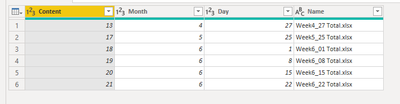
a2.PNG


Best Regards

Allan


If this post helps, then please consider Accept it as the solution to help the other members find it more quickly.

View solution in original post

4 REPLIES 4
v-alq-msft
Community Support
Community Support

Hi, @Anonymous 


Based on your description, I created data to reproduce your scenario. The pbix file is attached in the end.

Table:

a1.PNG


Here is the codes in 'Advanced Editor'.

let
    Source = Table.FromRows(Json.Document(Binary.Decompress(Binary.FromText("ZdK7CsMwDAXQXymeQ9EjfuQ/Ch1CMB0yNdChHfL5TVxZptagyQdf+eJ5dugGR8fwMfd1fVIGvtxen8d23bf37pZhLufnIChC6BFXFBuKPRoF0aiIxh55WYfEcAbqTRAzNTP1JorBoAhDj1INY0VkCpgEMShiU0Bp53xXjRszmDhEQciq0OQhiSJQRTaQq4pNmcrxFF7kiXwGUzl6QWW/n0I0KlSVmkpGRVHkVZE3KklTNTBksIGToNSQySsdlZu8KjR5hKKIVNH/t1q+", BinaryEncoding.Base64), Compression.Deflate)), let _t = ((type nullable text) meta [Serialized.Text = true]) in type table [Content = _t, Month = _t, Day = _t, Name = _t]),
    #"Changed Type" = Table.TransformColumnTypes(Source,{{"Content", Int64.Type}, {"Month", Int64.Type}, {"Day", Int64.Type}, {"Name", type text}}),
    Custom1 = Table.SelectRows(#"Changed Type",each let d=[Day],m=Date.Month(DateTime.LocalNow()),n=[Month] in n=m or 
(
(m-n)=1 and
d=Record.Field( Table.Max(Table.SelectRows(#"Changed Type",each [Month]=n), "Day"),"Day")
)
 or
(
 (m-n)=2 and
 d=Record.Field( Table.Max(Table.SelectRows(#"Changed Type",each [Month]=n), "Day"),"Day")
 ) 
)
in
    Custom1


Result:

a2.PNG


Best Regards

Allan


If this post helps, then please consider Accept it as the solution to help the other members find it more quickly.

Mariusz
Community Champion
Community Champion

Hi @Anonymous 


Can you paste a sample, btw do you have a year column? it might be useful in Jan, Feb where you actually need to look at months 1, 12 and 11 or 2, 1 and 12


Many Thanks

Mariusz 


Anonymous
Not applicable

Hi Prof,


why is it useful as you mentioned that... @Mariusz 

Anonymous
Not applicable

Hi Prof


Troyxx_0-1592912862222.png

actually there is no year column, but I think maybe later they will name the year inside, currently no need


https://1drv.ms/x/s!Am9VKMj_rOZJoHcFQJNqyLY5j2CJ?e=xmLIHi

here is the excel, thanks in advance Prof @Mariusz 

Helpful resources

Announcements
April Power BI Update Carousel

Power BI Monthly Update - April 2026

Check out the April 2026 Power BI update to learn about new features.

Fabric SQL PBI Data Days

Data Days 2026 coming soon!

Sign up to receive a private message when registration opens and key events begin.

New to Fabric survey Carousel

New to Fabric Survey

If you have recently started exploring Fabric, we'd love to hear how it's going. Your feedback can help with product improvements.

Power BI DataViz World Championships carousel

Power BI DataViz World Championships - June 2026

A new Power BI DataViz World Championship is coming this June! Don't miss out on submitting your entry.