cancel
Showing results for 
Search instead for 
Did you mean: 

July 7 - July 17 | Round 2 of the Power BI Dataviz World Championships. Don't miss your chance! Learn more

Reply
saipawar
Helper IV
Helper IV

how to create case statement with else

How to create a case statement with "else" of SQL?

I would like to create a new measure or column with two groups - 

a) Launch Content 

b) Not launch content

Here's how my data looks - 

Launch Content
JAN - hybrid installs
FEB - KPIS
FEB - SD WAN
Not launch related
Not launch related
APR - Mimics
JUL - Hiking 
OCT - qwerty

Not launch related


Output - 

Rows with "Not a launch content" to be grouped as "Not considered" and rest as "Considered Content"


Here's my current code for new column - 

Is Launch Content =
IF(CONTAINSSTRING([Launch Content],"Not launch related"),"Not considered",
ELSE,"Considered Content

)


Thanks

1 ACCEPTED SOLUTION
Icey
Community Support
Community Support

Hi @saipawar ,


If you want to create a custom column in Power Query, try this:

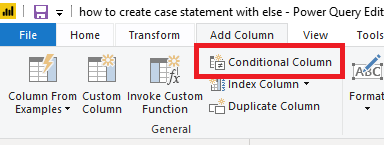
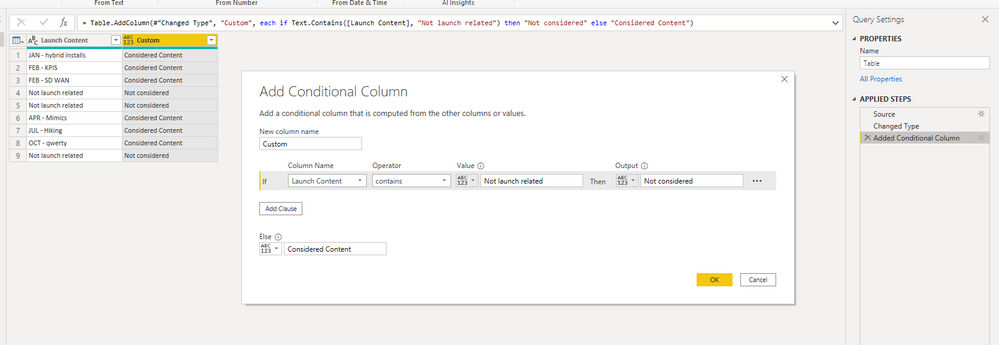
  • Create a conditional column.

condi.PNG

custom.PNG


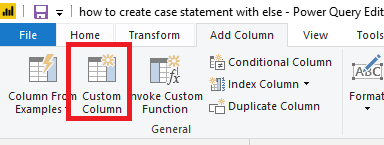
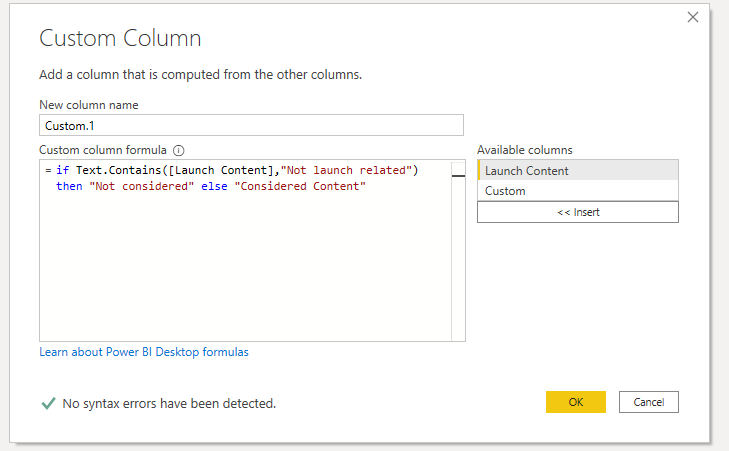
  • Or, create a custom column.
= if Text.Contains([Launch Content],"Not launch related") then "Not considered" else "Considered Content")

cus.PNGcustom2.PNG


If you want to create a calculated column in data view, try this:

Is Launch Content = 
IF (
    CONTAINSSTRING ( [Launch Content], "Not launch related" ),
    "Not considered",
    "Considered Content"
)
Is Launch Content 2 = 
IF (
    FIND ( "Not launch related", [Launch Content],, 0 ) <> 0,
    "Not considered",
    "Considered Content"
)
Is Launch Content 3 = 
IF (
    SEARCH( "Not launch related", [Launch Content],, 0 ) <> 0,
    "Not considered",
    "Considered Content"
)

calculated column.PNG


Best Regards,

Icey


If this post helps, then please consider Accept it as the solution to help the other members find it more quickly.

View solution in original post

6 REPLIES 6
Icey
Community Support
Community Support

Hi @saipawar ,


If you want to create a custom column in Power Query, try this:

  • Create a conditional column.

condi.PNG

custom.PNG


  • Or, create a custom column.
= if Text.Contains([Launch Content],"Not launch related") then "Not considered" else "Considered Content")

cus.PNGcustom2.PNG


If you want to create a calculated column in data view, try this:

Is Launch Content = 
IF (
    CONTAINSSTRING ( [Launch Content], "Not launch related" ),
    "Not considered",
    "Considered Content"
)
Is Launch Content 2 = 
IF (
    FIND ( "Not launch related", [Launch Content],, 0 ) <> 0,
    "Not considered",
    "Considered Content"
)
Is Launch Content 3 = 
IF (
    SEARCH( "Not launch related", [Launch Content],, 0 ) <> 0,
    "Not considered",
    "Considered Content"
)

calculated column.PNG


Best Regards,

Icey


If this post helps, then please consider Accept it as the solution to help the other members find it more quickly.

@Icey  Thanks a lot for laying out all the options. Your is one of the best solutions I've come across in the community to date.
I went with the conditional column approach and it worked. Thanks.

Ultimately, after grouping 'Considered" and "Not considered" values, I would like to put them in a table against the months. 

Here's my desired output - 


MonthConsidered Not considered
January124
February 27
March231

How can I achieve this? 

Currently, when I pull the new column in values, I can use it only once to filter the data either for "Considered" or "Not considered". 

Do I need to create 2 different conditional columns then? or please recommend the best approach.


Thanks again

Icey
Community Support
Community Support

Hi @saipawar ,


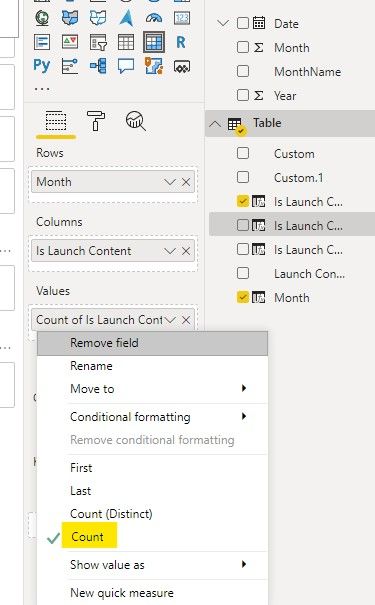
Please consider to create a Matrix visual. Then, put "Month" column into "Rows" field, "Is Launch Content" column into "Columns" field and Count of "Is Launch Content" column into "Values" field.

count.jpg


Best Regards,

Icey


If this post helps, then please consider Accept it as the solution to help the other members find it more quickly.

samdthompson
Memorable Member
Memorable Member

hi, try this:


Is Launch Content =
IF [Launch Content]="Not launch related"

THEN "Not considered"

ELSE "Considered Content


// if this is a solution please mark as such. Kudos always appreciated.

// if this is a solution please mark as such. Kudos always appreciated.

@samdthompson 

This gives an error saying "Unexpected expression THEN" and "Syntax for THEN is incorrect"

Is there any other  alternative to this?


Sorry. case sensitive


Is Launch Content =
IF [Launch Content]="Not launch related"

then "Not considered"

else "Considered Content


// if this is a solution please mark as such. Kudos always appreciated

// if this is a solution please mark as such. Kudos always appreciated.

Helpful resources

Announcements
FabCon and SQLCon Barcelona 2026

FabCon & SQLCon – Barcelona 2026

Join us in Barcelona for FabCon and SQLCon, the Fabric, Power BI, SQL, and AI community event. Save €200 with code FABCMTY200.

60 days of Data Days Carousel

Data Days 2026

Join Fabric Data Days 2026: 60 days of free live/on-demand sessions, challenges, study groups, and certification opportunities.

Power BI DataViz World Championships carousel

Power BI DataViz World Championships - June 2026

A new Power BI DataViz World Championship is coming this June! Don't miss out on submitting your entry.