Don't miss your chance to take the Fabric Data Engineer (DP-700) exam on us!
Learn moreWe've captured the moments from FabCon & SQLCon that everyone is talking about, and we are bringing them to the community, live and on-demand. Starts on April 14th. Register now
Hello,
This question relates to the Power query in Excel.
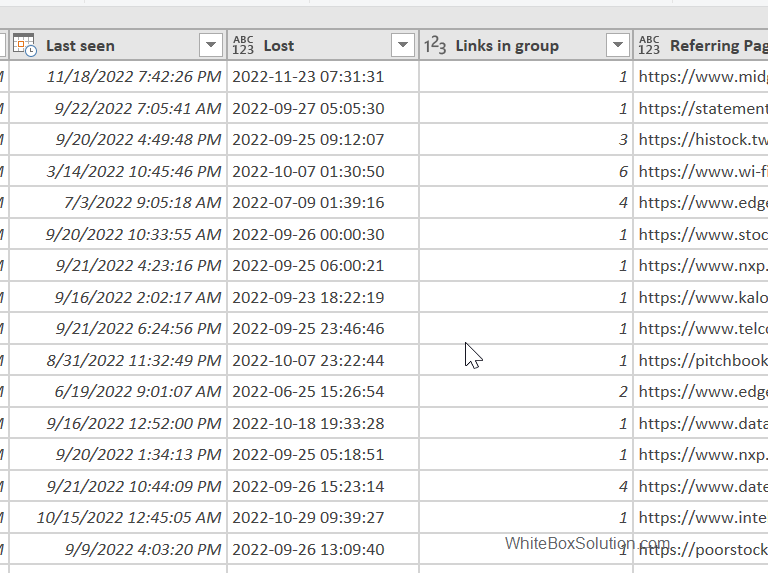
Column "Lost" as shown in screenshot has either dates or blanks. I want to add a new column based on the column "lost" with the following conditions.
1. If there is any date in the column "Lost", the corresponding row in the new column should say "Lost."
2, If there is any cell with no data, the corresponding row in the new column shall say "New."
How can I achieve this?
Solved! Go to Solution.
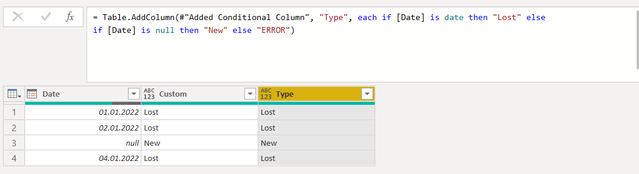
You can eventually use bit more sofisticated formula, which evaluate data type:
Hi @mfaisalk ,
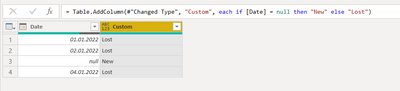
I used simple conditional column. Truth is, it does not consider data types, so it not might be the perfect solution. In case you have only dates or nulls, then following formula will solve your problem:
You can eventually use bit more sofisticated formula, which evaluate data type:
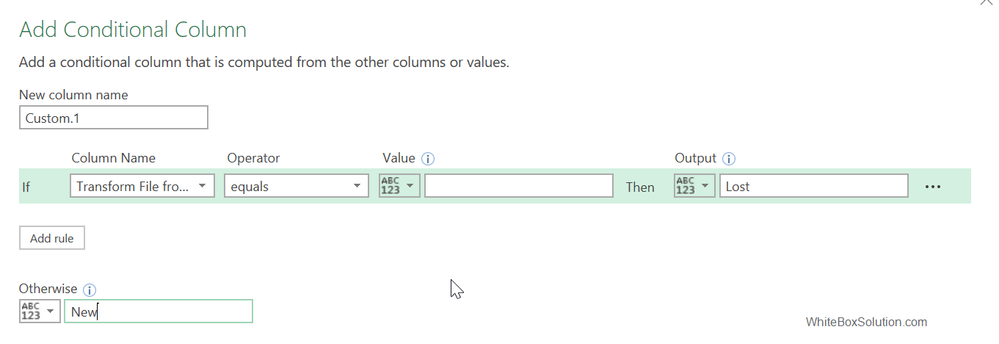
Thanks a lot, the first simple will work perfectly....as the data type is only date. As I have blank cells so, instead of null, I used blank as a condition. see screenshot
If you have recently started exploring Fabric, we'd love to hear how it's going. Your feedback can help with product improvements.
A new Power BI DataViz World Championship is coming this June! Don't miss out on submitting your entry.
Share feedback directly with Fabric product managers, participate in targeted research studies and influence the Fabric roadmap.
| User | Count |
|---|---|
| 5 | |
| 4 | |
| 3 | |
| 3 | |
| 2 |
| User | Count |
|---|---|
| 8 | |
| 8 | |
| 6 | |
| 6 | |
| 5 |