This time we’re going bigger than ever. Fabric, Power BI, SQL, AI and more. We're covering it all. You won't want to miss it.
Learn moreDid you hear? There's a new SQL AI Developer certification (DP-800). Start preparing now and be one of the first to get certified. Register now
Hi,
I have data source from sharepoint (Teams).
It was working then when I refresh the data, I am getting error in Power BI Desktop.
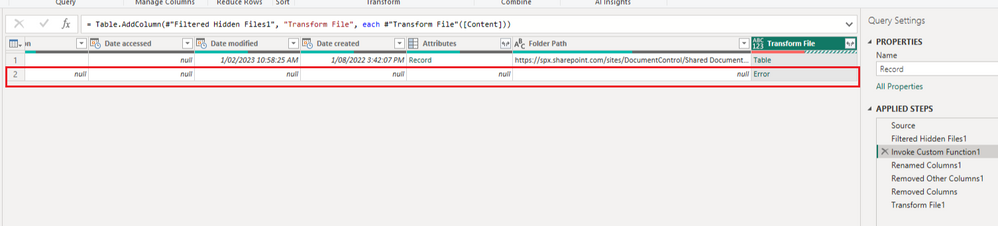
Then, when I look at power queries, I have got below error.
Not sure where that comes from.
Anyone can advise?
Solved! Go to Solution.
Hi @Anonymous
There is an error on the second row in your table. It seems this row doesn't have a file so it produces an error when invoking the custom function. So before this step, insert a step to filter out rows that have null values. This can avoid this error.
Hope this helps.
Best Regards,
Community Support Team _ Jing
If this post helps, please Accept it as Solution to help other members find it.
Hi @Anonymous
There is an error on the second row in your table. It seems this row doesn't have a file so it produces an error when invoking the custom function. So before this step, insert a step to filter out rows that have null values. This can avoid this error.
Hope this helps.
Best Regards,
Community Support Team _ Jing
If this post helps, please Accept it as Solution to help other members find it.
Thanks. It works now.
But just wondering how i get that error row... Nothing had changed.
Check out the April 2026 Power BI update to learn about new features.
Sign up to receive a private message when registration opens and key events begin.
If you have recently started exploring Fabric, we'd love to hear how it's going. Your feedback can help with product improvements.
| User | Count |
|---|---|
| 3 | |
| 3 | |
| 3 | |
| 2 | |
| 2 |