Don't miss your chance to take the Fabric Data Engineer (DP-600) exam for FREE! Find out how by attending the DP-600 session on April 23rd (pacific time), live or on-demand.
Learn moreNext up in the FabCon + SQLCon recap series: The roadmap for Microsoft SQL and Maximizing Developer experiences in Fabric. All sessions are available on-demand after the live show. Register now
Hi,
I have data source from sharepoint (Teams).
It was working then when I refresh the data, I am getting error in Power BI Desktop.
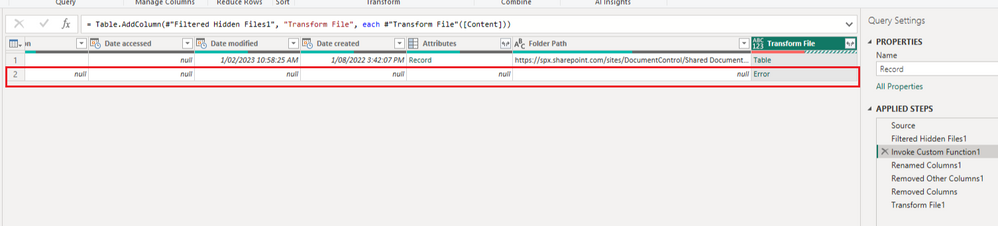
Then, when I look at power queries, I have got below error.
Not sure where that comes from.
Anyone can advise?
Solved! Go to Solution.
Hi @Anonymous
There is an error on the second row in your table. It seems this row doesn't have a file so it produces an error when invoking the custom function. So before this step, insert a step to filter out rows that have null values. This can avoid this error.
Hope this helps.
Best Regards,
Community Support Team _ Jing
If this post helps, please Accept it as Solution to help other members find it.
Hi @Anonymous
There is an error on the second row in your table. It seems this row doesn't have a file so it produces an error when invoking the custom function. So before this step, insert a step to filter out rows that have null values. This can avoid this error.
Hope this helps.
Best Regards,
Community Support Team _ Jing
If this post helps, please Accept it as Solution to help other members find it.
Thanks. It works now.
But just wondering how i get that error row... Nothing had changed.
If you have recently started exploring Fabric, we'd love to hear how it's going. Your feedback can help with product improvements.
A new Power BI DataViz World Championship is coming this June! Don't miss out on submitting your entry.
| User | Count |
|---|---|
| 5 | |
| 3 | |
| 3 | |
| 3 | |
| 2 |
| User | Count |
|---|---|
| 7 | |
| 5 | |
| 5 | |
| 5 | |
| 4 |