
cancel
Showing results for 
Search instead for 
Did you mean: 

Learn from the best! Meet the four finalists headed to the FINALS of the Power BI Dataviz World Championships! Register now

Reply
panshu77
Regular Visitor

failed to connect power bi desktop to onedrive sharepoint folder

I was trying to connect power bi desktop to get data from one of my own onedrive sharepoint folders.


I went to "get data", selected "sharepoint folder" and then input the url

"https://abc001-my.sharepoint.com/personal/xxx_abc_com/"


signned in with my business microsoft account, and then tried to connect.


The connection failed with the following error message:

Details: "Web.Contents failed to get contents from 'https://abc001-my.sharepoint.com/personal/xxx_abc_com/_api/web/lists/getbyid('fedaa18d-8384-436c-aaa...' (500): Internal Server Error"


Please help. thanks.


4 REPLIES 4
Anonymous
Not applicable

@panshu77,

Do you connect to OneDrive for business folder? If so, what is your Power BI Desktop version?

I can connect to OneDrive for business folder in latest version of Power BI Desktop(2.65.5313.1381). Could you please paste the following code in Advanced Editor of a blank query and check if there are issues?

let
    Source = SharePoint.Files("https://abc001-my.sharepoint.com/personal/xxx_abc001_com")
in
    Source


Regards,
Lydia

Thanks for the help. My version is 2.65.5313.621 64-bit (December 2018).


I opened a blank query and tried the code you suggested.


= let
    Source = "SharePoint.Files("https://abc001-my.sharepoint.com/personal/xxx_abc001_com")
in
    Source


Below is the error msg:DataSource.NotFound: SharePoint: Request failed (404): The remote server returned an error: (404) Not Found. (404 FILE NOT FOUND)
Details:
    DataSourceKind=SharePoint
    DataSourcePath=https://abc001-my.sharepoint.com/personal/xxx_abc001_com
    SPRequestGuid=c641bb9e-401c-7000-d643-4ddb1235011a
    Url=https://slb001-my.sharepoint.com/personal/xxx_abc001_com/_vti_bin/ListData.svc


Anonymous
Not applicable

I am struggling with the same issue right now. Did you finally solve this?


When I am connecting to the sharepoint folder with the query like the one suggested here:


= let
    Source = "SharePoint.Files("https://abc001-my.sharepoint.com/personal/xxx_abc001_com")
in
    Source

(so I have to get rid of API=15 to get the list the files in the folder)

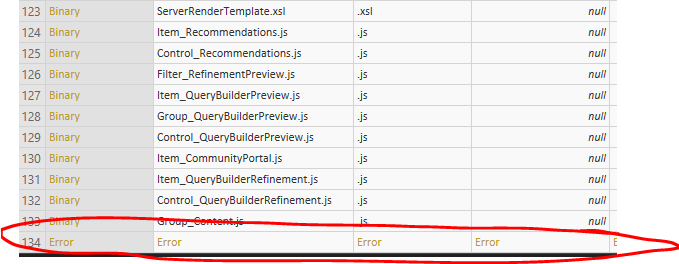
I found there is an error in the list:


Capture.PNG

Whenever I click any "Binary" file from the list to get to the dataset I got the the same error as you have:


Capture1.PNG


I am using the latest PBI Desktop version: 2.66.5376.2521 64-bit (February 2019)

The trick is that I cannot remove this error anyway. Even "remove errors" option doesn't work.


MVPs please help!

I have the same problem. Did anyone manage to find a solution?

Helpful resources

Announcements
Join our Fabric User Panel

Join our Fabric User Panel

Share feedback directly with Fabric product managers, participate in targeted research studies and influence the Fabric roadmap.

February Power BI Update Carousel

Power BI Monthly Update - February 2026

Check out the February 2026 Power BI update to learn about new features.

FabCon Atlanta 2026 carousel

FabCon Atlanta 2026

Join us at FabCon Atlanta, March 16-20, for the ultimate Fabric, Power BI, AI and SQL community-led event. Save $200 with code FABCOMM.

Top Solution Authors