Share feedback directly with Fabric product managers, participate in targeted research studies and influence the Fabric roadmap.
Sign up nowGet Fabric certified for FREE! Don't miss your chance! Learn more
I can do this API in Postman
POST API
URL: https://URL/portal/api/checkKanbanPart/
Body / Raw
Solved! Go to Solution.
Try building your JSON using records instead.
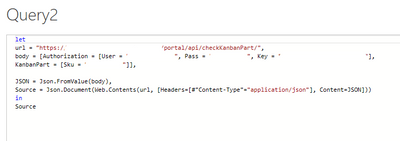
let
url = "https://URL/portal/api/checkKanbanPart/",
body = [Authorization = [User = "firstname.lastname", Pass = "password", Key = "keyvalue"],
Part = [Sku = "12345"]],
JSON = Json.FromValue(body),
Source = Json.Document(Web.Contents(url,[Headers = [#"Content-Type"="application/json"], Content = JSON ] ))
in
Source
Pat
thank you for your answer Pat,
It seems to build the json correctly but I get an error in the last step
"DataFormat.Error: We found extra characters at the end of JSON input.
Details:
Value={
Position=106"
here is my query in Power BI and my API call in Postman.
I would remove the Json.Document from the last step and see what you are getting from Web.Contents alone. Are you getting a successful response or not? If so, is it JSON format?
Pat
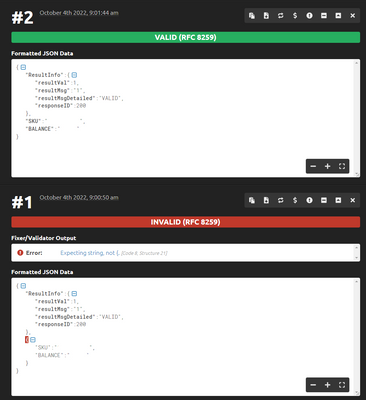
Well, it turns out, the problem is the format of the API response. I copied the response into a file.json and tried to import it in PowerBI. It gave me the same error.
Then I found this JSON format validator and found out there are some extra quotation marks. See screenshot.
I made the changes in the file.json and it pickes it up.
A workaround I found was to get the web.contents as you suggested and transform it into text. Then I break the text by delimiters and I get me values from there.
It's ugly but it works.
Another way is to follow up with the supplier of the API and get them to correct their format.
In the end, your solution worked, so thank you very much! I'll mark it as accepted.
Try building your JSON using records instead.
let
url = "https://URL/portal/api/checkKanbanPart/",
body = [Authorization = [User = "firstname.lastname", Pass = "password", Key = "keyvalue"],
Part = [Sku = "12345"]],
JSON = Json.FromValue(body),
Source = Json.Document(Web.Contents(url,[Headers = [#"Content-Type"="application/json"], Content = JSON ] ))
in
Source
Pat
If you love stickers, then you will definitely want to check out our Community Sticker Challenge!
Check out the January 2026 Power BI update to learn about new features.
| User | Count |
|---|---|
| 13 | |
| 11 | |
| 10 | |
| 9 | |
| 6 |