cancel
Showing results for 
Search instead for 
Did you mean: 

The Power BI Data Visualization World Championships is back! It's time to submit your entry. Live now!

Reply
Anonymous
Not applicable

data does not load

Hey all, 

I am importing data from sql to Power BI, but the power query editor is not loading, therefore when I refresh my data, it is still not the latest version of my data. 

Can I somehow fix this bad performance/make power query completing loading?

The alternative that I have in mind is changing from import to direct query, but then I would have to rebuild the whole report again, right?


Thanks,

Susanne

5 REPLIES 5
az38
Community Champion
Community Champion

Hi @Anonymous 

First of all check:

a) there is a difference between refresh data and refresh preview in Power Query Editor mode. If your data isn't up to date in Power Query - press Refresh Preview in Home Ribbon

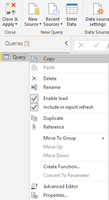
b) check if "Include in report refresh" and "Enable load" are active. Right click on data source name in Queries pane of Power Query Editor

28876.png


do not hesitate to give a kudo to useful posts and mark solutions as solution
LinkedIn
Anonymous
Not applicable

Hey @az38 ,


thanks for your reply. I have pressed Refresh Preview in Power Query, this is exactly where the data does not load.

I have also checked your points in b), these settings are active. 

Do you have any further ideas how to make the query editor load my data? 


Thanks,

Susanne

az38
Community Champion
Community Champion

So, @Anonymous 

if you dont get any Error messages during load process, it looks like you are connect to the wrong data source or your data source wasnt updated

maybe you could place your pbix-file on cloud file storage - i will take a look


do not hesitate to kudo useful posts and mark solutions as solution


do not hesitate to give a kudo to useful posts and mark solutions as solution
LinkedIn
Anonymous
Not applicable

Dear @az38 ,

unfortunately I cannot provide my file since its confidential material from my company.

So there is an exclamation mark next to my importet data on the left pane in the query editor 

and it doesn't show any data, just a plain screen


thanks,

susanne

az38
Community Champion
Community Champion

well @Anonymous 

usually, if you see exclamation mark you can see en error if you will go through all your APPLIED STEPS. try one by one and try to find an error. like here


after that go to the Advanced Editor and copy-paste source code here. usually, there is no any confidential info


do not hesitate to give a kudo to useful posts and mark solutions as solution
LinkedIn

Helpful resources

Announcements
Power BI DataViz World Championships

Power BI Dataviz World Championships

The Power BI Data Visualization World Championships is back! It's time to submit your entry.

December 2025 Power BI Update Carousel

Power BI Monthly Update - December 2025

Check out the December 2025 Power BI Holiday Recap!

FabCon Atlanta 2026 carousel

FabCon Atlanta 2026

Join us at FabCon Atlanta, March 16-20, for the ultimate Fabric, Power BI, AI and SQL community-led event. Save $200 with code FABCOMM.

Top Solution Authors