cancel
Showing results for 
Search instead for 
Did you mean: 

View all the Fabric Data Days sessions on demand. View schedule

Reply
IvanSinelnyk
New Member

custom data labels

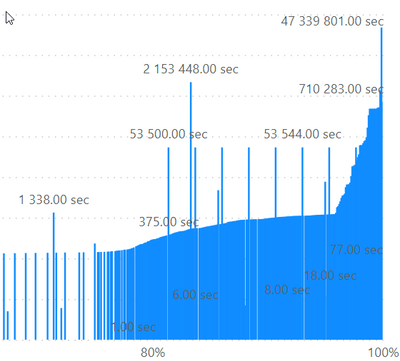
Hi everyone.  Need help. I have column with number of seconds (number type) and I need that big numbers (~32 000 000) transform to days, hours ... I allredy made it with DAX. But can't use this result to see averege time.

Screenshot 

IvanSinelnyk_0-1631815432238.png

Thanks

1 ACCEPTED SOLUTION
v-yingjl
Community Support
Community Support

Hi @IvanSinelnyk ,

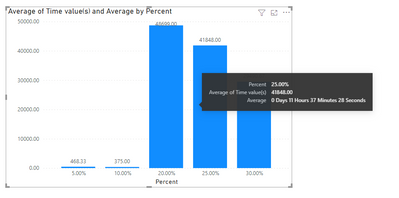
Text value could not be used in the Value field if want to show like x days x hours x minutes x seconds. You can create a meaure like this to use it as a tooltip:

Average = 
VAR _avg =
    AVERAGE ( 'Table'[Time value(s)] )
VAR _day =
    ROUNDDOWN ( _avg / 3600 / 24, 0 )
VAR _hour =
    ROUNDDOWN ( ( _avg - _day * 3600 * 24 ) / 3600, 0 )
VAR _minute =
    ROUNDDOWN ( ( _avg - _hour * 3600 ) / 60, 0 )
VAR _second =
    ROUND ( _avg - _hour * 3600 - _minute * 60, 2 )
RETURN
    _day & " Days " & _hour & " Hours " & _minute & " Minutes " & _second & " Seconds"

vyingjl_0-1632118679757.png


Best Regards,
Community Support Team _ Yingjie Li
If this post helps, then please consider Accept it as the solution to help the other members find it more quickly.

View solution in original post

6 REPLIES 6
v-yingjl
Community Support
Community Support

Hi @IvanSinelnyk ,

Text value could not be used in the Value field if want to show like x days x hours x minutes x seconds. You can create a meaure like this to use it as a tooltip:

Average = 
VAR _avg =
    AVERAGE ( 'Table'[Time value(s)] )
VAR _day =
    ROUNDDOWN ( _avg / 3600 / 24, 0 )
VAR _hour =
    ROUNDDOWN ( ( _avg - _day * 3600 * 24 ) / 3600, 0 )
VAR _minute =
    ROUNDDOWN ( ( _avg - _hour * 3600 ) / 60, 0 )
VAR _second =
    ROUND ( _avg - _hour * 3600 - _minute * 60, 2 )
RETURN
    _day & " Days " & _hour & " Hours " & _minute & " Minutes " & _second & " Seconds"

vyingjl_0-1632118679757.png


Best Regards,
Community Support Team _ Yingjie Li
If this post helps, then please consider Accept it as the solution to help the other members find it more quickly.

IvanSinelnyk
New Member

 Here I explane my probleme (2 minutes)  https://www.youtube.com/watch?v=J8kPc0CkZ14 

@IvanSinelnyk : The issue you might run into while converting into Day,Hour and Minutes are as follows


- your converted value would be text and you can not use them as value in the visuals

- There is no standard format such as "DDD:HH:MM"


Check out the following link, this will be useful to you. 


https://www.reddit.com/r/PowerBI/comments/9urrmm/show_time_data_as_total_hours_and_chart_it/


If this post helps, then please consider Accepting it as the solution, Give Kudos to motivate the contributors.


Syndicate_Admin
Administrator
Administrator

Anonymous
Not applicable

= Table.AddColumn(NameOfPriorStep, "Duration", each #duration(0,0,0,[NameOfSecondsColumn]))


--Nate

ponnusamy
Solution Supplier
Solution Supplier

@IvanSinelnyk 


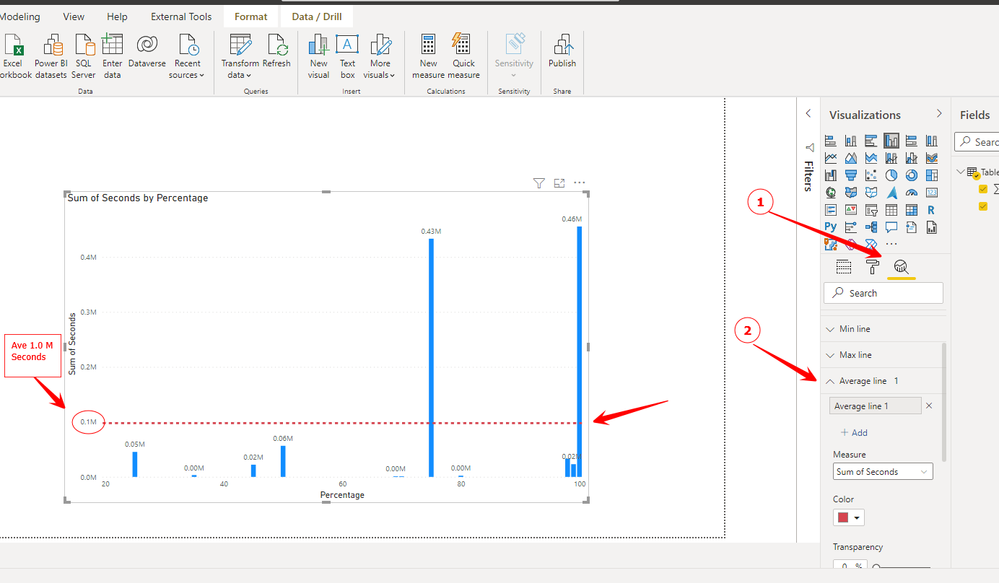
I am assuming that you want to see average time on the visual (bar chart). You can go to "Analytics" after selecting this barchart visual, go to average line and add it.


ponnusamy_1-1631821154712.png


Helpful resources

Announcements
November Power BI Update Carousel

Power BI Monthly Update - November 2025

Check out the November 2025 Power BI update to learn about new features.

Fabric Data Days Carousel

Fabric Data Days

Advance your Data & AI career with 50 days of live learning, contests, hands-on challenges, study groups & certifications and more!

FabCon Atlanta 2026 carousel

FabCon Atlanta 2026

Join us at FabCon Atlanta, March 16-20, for the ultimate Fabric, Power BI, AI and SQL community-led event. Save $200 with code FABCOMM.