cancel
Showing results for 
Search instead for 
Did you mean: 

July 7 - July 17 | Round 2 of the Power BI Dataviz World Championships. Don't miss your chance! Learn more

Reply
Anonymous
Not applicable

Newbie needs help - 400 Error code

Good day all,


Forgive me if this is the wrong area to post in (completely new to this forum).

I am currently using the Sage API to GET data into MS Power BI.

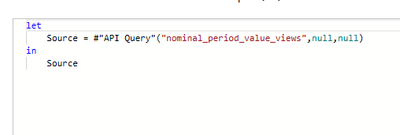
This is the simple query I am running in Advanced Query.

Saffa1976_0-1631891255830.png

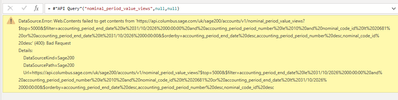
Once I select done I get the following message

Saffa1976_1-1631891323556.png

I have gone back to Sage and they have tested this in Postman and it works. 


Any ideas?


Any help would be greatly appreciated.


1 ACCEPTED SOLUTION
Anonymous
Not applicable

@Anonymous 
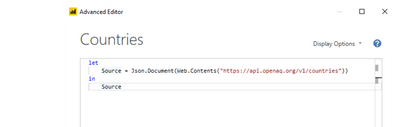
That is not how to use API in Power Query, you can take a look at the tutorial.


Read API Data with Power BI using Power Query (mssqltips.com)

Vpazhenmsft_2-1632118423076.png


Paul Zheng _ Community Support Team
If this post helps, please Accept it as the solution to help the other members find it more quickly.

View solution in original post

2 REPLIES 2
Anonymous
Not applicable

@Anonymous 
That is not how to use API in Power Query, you can take a look at the tutorial.


Read API Data with Power BI using Power Query (mssqltips.com)

Vpazhenmsft_2-1632118423076.png


Paul Zheng _ Community Support Team
If this post helps, please Accept it as the solution to help the other members find it more quickly.

jennratten
Super User
Super User

Here is a page that lists the requirements for the API call.  You would need to check your API Query function to make sure they are all handled properly - something is not being done correctly in the function.


https://developer.columbus.sage.com/docs#/uk/sage200/accounts/v1/nominal_period_value_views 


Helpful resources

Announcements
FabCon and SQLCon Barcelona 2026

FabCon & SQLCon – Barcelona 2026

Join us in Barcelona for FabCon and SQLCon, the Fabric, Power BI, SQL, and AI community event. Save €200 with code FABCMTY200.

60 days of Data Days Carousel

Data Days 2026

Join Fabric Data Days 2026: 60 days of free live/on-demand sessions, challenges, study groups, and certification opportunities.

Power BI DataViz World Championships carousel

Power BI DataViz World Championships - June 2026

A new Power BI DataViz World Championship is coming this June! Don't miss out on submitting your entry.