Don't miss your chance to take the Fabric Data Engineer (DP-700) exam on us!
Learn moreWe've captured the moments from FabCon & SQLCon that everyone is talking about, and we are bringing them to the community, live and on-demand. Starts on April 14th. Register now
Good day all,
Forgive me if this is the wrong area to post in (completely new to this forum).
I am currently using the Sage API to GET data into MS Power BI.
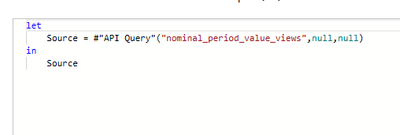
This is the simple query I am running in Advanced Query.
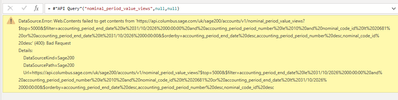
Once I select done I get the following message
I have gone back to Sage and they have tested this in Postman and it works.
Any ideas?
Any help would be greatly appreciated.
Solved! Go to Solution.
@Anonymous
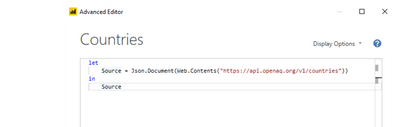
That is not how to use API in Power Query, you can take a look at the tutorial.
Read API Data with Power BI using Power Query (mssqltips.com)
Paul Zheng _ Community Support Team
If this post helps, please Accept it as the solution to help the other members find it more quickly.
@Anonymous
That is not how to use API in Power Query, you can take a look at the tutorial.
Read API Data with Power BI using Power Query (mssqltips.com)
Paul Zheng _ Community Support Team
If this post helps, please Accept it as the solution to help the other members find it more quickly.
Here is a page that lists the requirements for the API call. You would need to check your API Query function to make sure they are all handled properly - something is not being done correctly in the function.
https://developer.columbus.sage.com/docs#/uk/sage200/accounts/v1/nominal_period_value_views
If you have recently started exploring Fabric, we'd love to hear how it's going. Your feedback can help with product improvements.
A new Power BI DataViz World Championship is coming this June! Don't miss out on submitting your entry.
Share feedback directly with Fabric product managers, participate in targeted research studies and influence the Fabric roadmap.
| User | Count |
|---|---|
| 5 | |
| 4 | |
| 3 | |
| 3 | |
| 2 |
| User | Count |
|---|---|
| 8 | |
| 7 | |
| 6 | |
| 6 | |
| 5 |