We've captured the moments from FabCon & SQLCon that everyone is talking about, and we are bringing them to the community, live and on-demand. Starts on April 14th. Register now
Hello Guys,
I want to compare two rows and get the data I have one table which have data column , Resourece Name column i want the Name of resouce name which are created or deleted on the selected date compared with the previous date
for example:
if I select 1 Oct then I want the resource name compared with the previous Date 27sept resource Name and find out the data which are newly created on 1 Oct in this example newly created resouce are: abc12, pra, qwert and deleted resources are:
| kjlh |
| asdfgh |
| rakad |
Sample Table :
| Date | ResouceName |
| 1/10/2020 | pra |
| 1/10/2020 | qwert |
| 1/10/2020 | abc |
| 1/10/2020 | abc12 |
| 1/10/2020 | zyx |
| 1/10/2020 | abc |
| Date | ResouceName |
| 27/09/2020 | kjlh |
| 27/09/2020 | asdfgh |
| 27/09/2020 | rakad |
| 27/09/2020 | abc |
| 27/09/2020 | zyx |
| 27/09/2020 | abc |
| Date | ResouceName |
| 3/10/2020 | pra |
| 3/10/2020 | qwert |
| 3/10/2020 | abc |
| 3/10/2020 | abc |
| 3/10/2020 | zyx12 |
| 3/10/2020 | prab2346 |
| 3/10/2020 | prab2346 |
| 3/10/2020 | zyx12 |
| 3/10/2020 | lkjn |
| 3/10/2020 | poewer |
Solved! Go to Solution.
Hi, @PrabodhPurwar
Based on your description, I created data to reproduce your scenario. The pbix file is attached in the end.
Table:
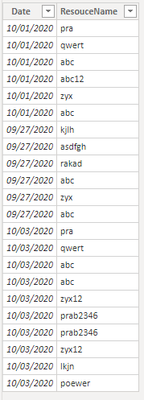
Dates(a calculated table):
Dates = DISTINCT('Table'[Date])
You may create two measures as below.
deleted resources =
var _selecteddate = SELECTEDVALUE(Dates[Date])
var _predate =
CALCULATE(
MAX(Dates[Date]),
FILTER(
ALL(Dates),
[Date]<_selecteddate
)
)
var tab1 =
CALCULATETABLE(
DISTINCT('Table'[ResouceName]),
FILTER(
ALL('Table'),
[Date]=_predate
)
)
var tab2 =
CALCULATETABLE(
DISTINCT('Table'[ResouceName]),
FILTER(
ALL('Table'),
[Date]=_selecteddate
)
)
var _inter =
CALCULATETABLE(
DISTINCT('Table'[ResouceName]),
INTERSECT(
tab1,
tab2
)
)
return
CONCATENATEX(
FILTER(
tab1,
NOT([ResouceName] in _inter)
),
[ResouceName],
","
)
newly created resources =
var _selecteddate = SELECTEDVALUE(Dates[Date])
var _predate =
CALCULATE(
MAX(Dates[Date]),
FILTER(
ALL(Dates),
[Date]<_selecteddate
)
)
var tab1 =
CALCULATETABLE(
DISTINCT('Table'[ResouceName]),
FILTER(
ALL('Table'),
[Date]=_predate
)
)
var tab2 =
CALCULATETABLE(
DISTINCT('Table'[ResouceName]),
FILTER(
ALL('Table'),
[Date]=_selecteddate
)
)
var _inter =
CALCULATETABLE(
DISTINCT('Table'[ResouceName]),
INTERSECT(
tab1,
tab2
)
)
return
CONCATENATEX(
FILTER(
tab2,
NOT([ResouceName] in _inter)
),
[ResouceName],
","
)
Result:
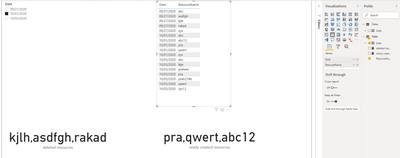
Best Regards
Allan
If this post helps, then please consider Accept it as the solution to help the other members find it more quickly.
Hi, @PrabodhPurwar
Based on your description, I created data to reproduce your scenario. The pbix file is attached in the end.
Table:
Dates(a calculated table):
Dates = DISTINCT('Table'[Date])
You may create two measures as below.
deleted resources =
var _selecteddate = SELECTEDVALUE(Dates[Date])
var _predate =
CALCULATE(
MAX(Dates[Date]),
FILTER(
ALL(Dates),
[Date]<_selecteddate
)
)
var tab1 =
CALCULATETABLE(
DISTINCT('Table'[ResouceName]),
FILTER(
ALL('Table'),
[Date]=_predate
)
)
var tab2 =
CALCULATETABLE(
DISTINCT('Table'[ResouceName]),
FILTER(
ALL('Table'),
[Date]=_selecteddate
)
)
var _inter =
CALCULATETABLE(
DISTINCT('Table'[ResouceName]),
INTERSECT(
tab1,
tab2
)
)
return
CONCATENATEX(
FILTER(
tab1,
NOT([ResouceName] in _inter)
),
[ResouceName],
","
)
newly created resources =
var _selecteddate = SELECTEDVALUE(Dates[Date])
var _predate =
CALCULATE(
MAX(Dates[Date]),
FILTER(
ALL(Dates),
[Date]<_selecteddate
)
)
var tab1 =
CALCULATETABLE(
DISTINCT('Table'[ResouceName]),
FILTER(
ALL('Table'),
[Date]=_predate
)
)
var tab2 =
CALCULATETABLE(
DISTINCT('Table'[ResouceName]),
FILTER(
ALL('Table'),
[Date]=_selecteddate
)
)
var _inter =
CALCULATETABLE(
DISTINCT('Table'[ResouceName]),
INTERSECT(
tab1,
tab2
)
)
return
CONCATENATEX(
FILTER(
tab2,
NOT([ResouceName] in _inter)
),
[ResouceName],
","
)
Result:
Best Regards
Allan
If this post helps, then please consider Accept it as the solution to help the other members find it more quickly.
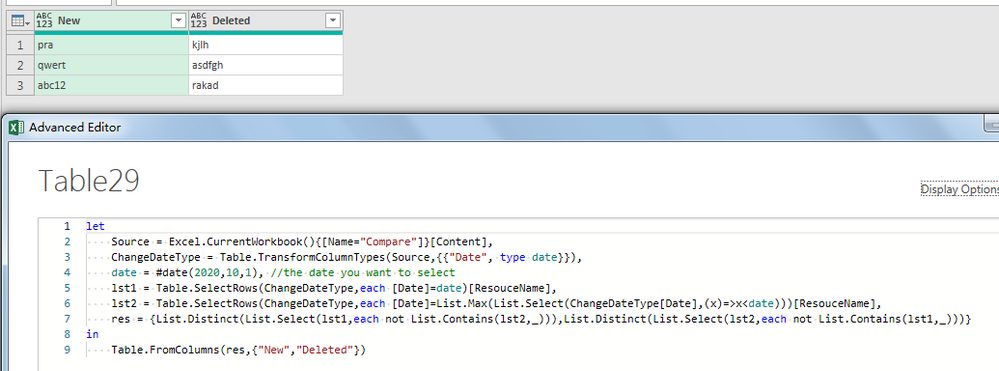
Hi, please try this one.
let
Source = Excel.CurrentWorkbook(){[Name="Compare"]}[Content],
ChangeDateType = Table.TransformColumnTypes(Source,{{"Date", type date}}),
date = #date(2020,10,1), //the date you want to select
lst1 = Table.SelectRows(ChangeDateType,each [Date]=date)[ResouceName],
lst2 = Table.SelectRows(ChangeDateType,each [Date]=List.Max(List.Select(ChangeDateType[Date],(x)=>x<date)))[ResouceName],
res = {List.Distinct(List.Select(lst1,each not List.Contains(lst2,_))),List.Distinct(List.Select(lst2,each not List.Contains(lst1,_)))}
in
Table.FromColumns(res,{"New","Deleted"})
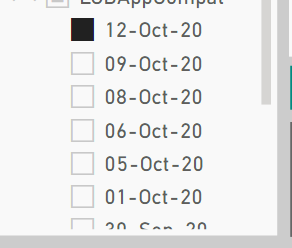
i m selecting the date from Filter like i select the date 12-oct and i want to compare with 09 -oct and find out the resource name Which are created or deleted.
If you have recently started exploring Fabric, we'd love to hear how it's going. Your feedback can help with product improvements.
A new Power BI DataViz World Championship is coming this June! Don't miss out on submitting your entry.
| User | Count |
|---|---|
| 5 | |
| 3 | |
| 3 | |
| 2 | |
| 2 |
| User | Count |
|---|---|
| 10 | |
| 8 | |
| 7 | |
| 7 | |
| 5 |