Hi @Anonymous,
The most secure way is to test for each row if all cells are empty (= null)
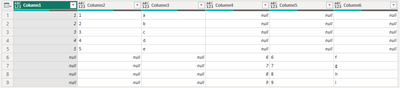
Give this a go, you can copy the full script into a new blank query.
let
    Source = Table.FromColumns(
        {
            {1..5} & List.Repeat( { null }, 4),
            {"1".."5"} & List.Repeat( { null }, 4),
            {"a".."e"} & List.Repeat( { null }, 4),
            List.Repeat( { null }, 5) & {6..9},
            List.Repeat( { null }, 5) & {"6".."9"},
            List.Repeat( { null }, 5) & {"f".."i"}
        }
    ),
    TableA = Table.SelectRows(
        Table.SelectColumns(Source, List.FirstN( Table.ColumnNames(Source), Number.RoundAwayFromZero( Table.ColumnCount(Source)/2, 0)) ),
        each not List.IsEmpty(List.RemoveMatchingItems(Record.FieldValues(_), {"", null}))
    ),
    TableB = Table.SelectRows(
        Table.SelectColumns(Source, List.LastN( Table.ColumnNames(Source), Number.RoundAwayFromZero( Table.ColumnCount(Source)/2, 0)) ),
        each not List.IsEmpty(List.RemoveMatchingItems(Record.FieldValues(_), {"", null}))
    ),
    Combined = TableA & Table.RenameColumns( TableB, List.Zip( {Table.ColumnNames(TableB), Table.ColumnNames(TableA) }) )
in
    Combined
This separates your table into 2 parts TableA and TableB. Then removes rows which are blank.
Combines the two table and for that a renaming operation is required. With this result.

Ps. If this helps solve your query please mark this post as Solution, thanks!


