cancel
Showing results for 
Search instead for 
Did you mean: 

Join the FabCon + SQLCon recap series. Up next: Power BI, Real-Time Intelligence, IQ and AI, and Data Factory take center stage. All sessions are available on-demand after the live show. Register now

Reply
kellyyaker
Frequent Visitor

Yext REST API Not Returning Data Table

I am attempting to make a connection to Yext's REST API and the results in Power Query are nothing like what should be populating in the table. Below is my process for setting up the connection in PBI (for reference: here are the developer instructions on Yext https://developer.yext.com/docs/api-reference/).


I used the API  call link formatted how they suggested: 

https://api.yext.com/v2/accounts/me/locations?api_key=xxxxxxxxxxxxxxxxxxxxa&v=20201110


I tested it in Postman without errors and saw this returned as some of the data in the API:
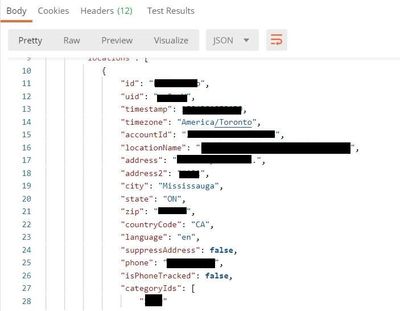
api1.jpg

 Once confirming the link worked, I went to "Get Data" and selected Web and used the advanced option, filling it in like so:
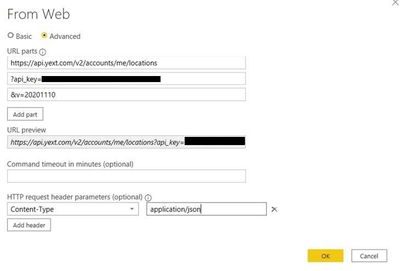
api2.jpg

 I think the above may be the step where I'm missing something because the results in Power Query look like this:

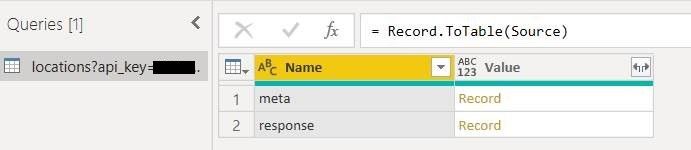
api3.jpg


api4.jpg


I'm not a developer, just a somewhat tech adept marketing analytics manager, so I'm pretty confident I've missed a step somewhere, but I can't find any documentation on the Yext API in Power BI.


Can someone please offer some suggestions on how I can get this connection working properly? Thanks!

1 REPLY 1
artemus
Microsoft Employee
Microsoft Employee

Just click the Record link in the second row, and the data should appear. You may need to further do actions like convert to table or click on more links.


Also note: The recommended way to do this is to change your source to:

= Json.Document(Web.Contents("https://api.yext.com/v2/accounts/me/locations&v=20201110", [ApiKeyName = "api_key"]))

 And then choose the API Key authentication option when you connect.

Helpful resources

Announcements
April Power BI Update Carousel

Power BI Monthly Update - April 2026

Check out the April 2026 Power BI update to learn about new features.

New to Fabric survey Carousel

New to Fabric Survey

If you have recently started exploring Fabric, we'd love to hear how it's going. Your feedback can help with product improvements.

Power BI DataViz World Championships carousel

Power BI DataViz World Championships - June 2026

A new Power BI DataViz World Championship is coming this June! Don't miss out on submitting your entry.

FabCon and SQLCon Highlights Carousel

FabCon &SQLCon Highlights

Experience the highlights from FabCon & SQLCon, available live and on-demand starting April 14th.