Join us at FabCon Atlanta from March 16 - 20, 2026, for the ultimate Fabric, Power BI, AI and SQL community-led event. Save $200 with code FABCOMM.
Register now!Get Fabric Certified for FREE during Fabric Data Days. Don't miss your chance! Request now
Hi !
Simple question I guess but cannot solve it. I have a column with Year & Week in text format e.g. 202408 (Year 2024 and Weekno 08). How do I convert this into a datecolumn?
Solved! Go to Solution.
Hi @catzw6699 ,
The date data type in Power BI does not support year + week for now.
And in addition to using Power Query, you can also use DAX:
Use these DAXs to create calculated columns:
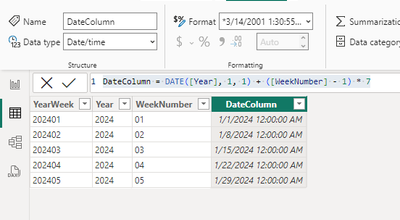
Year = LEFT([YearWeek], 4)WeekNumber = RIGHT([YearWeek], 2)DateColumn = DATE([Year], 1, 1) + ([WeekNumber] - 1) * 7
The final output is as below:
Best Regards,
Dino Tao
If this post helps, then please consider Accept it as the solution to help the other members find it more quickly.
Hi @catzw6699 ,
The date data type in Power BI does not support year + week for now.
And in addition to using Power Query, you can also use DAX:
Use these DAXs to create calculated columns:
Year = LEFT([YearWeek], 4)WeekNumber = RIGHT([YearWeek], 2)DateColumn = DATE([Year], 1, 1) + ([WeekNumber] - 1) * 7
The final output is as below:
Best Regards,
Dino Tao
If this post helps, then please consider Accept it as the solution to help the other members find it more quickly.
Hi @catzw6699 - I have split the year and week column. I have changed the Year column to Date and Week Column to Text in Power Query.. Below is the code
let
Source = Table.FromRows(Json.Document(Binary.Decompress(Binary.FromText("i45WMjIwMjGwUIqNBQA=", BinaryEncoding.Base64), Compression.Deflate)), let _t = ((type nullable text) meta [Serialized.Text = true]) in type table [Column1 = _t]),
#"Changed Type" = Table.TransformColumnTypes(Source,{{"Column1", type text}}),
#"Added Custom" = Table.AddColumn(#"Changed Type", "Year", each Text.Start([Column1],4)),
#"Changed Type1" = Table.TransformColumnTypes(#"Added Custom",{{"Year", type date}}),
#"Added Custom1" = Table.AddColumn(#"Changed Type1", "Week", each Text.End([Column1],Text.Length([Column1])-4)),
#"Changed Type2" = Table.TransformColumnTypes(#"Added Custom1",{{"Week", type text}})
in
#"Changed Type2"
Check out the November 2025 Power BI update to learn about new features.
Advance your Data & AI career with 50 days of live learning, contests, hands-on challenges, study groups & certifications and more!
| User | Count |
|---|---|
| 10 | |
| 9 | |
| 6 | |
| 5 | |
| 3 |