cancel
Showing results for 
Search instead for 
Did you mean: 

Learn from the best! Meet the four finalists headed to the FINALS of the Power BI Dataviz World Championships! Register now

Reply
catzw6699
Regular Visitor

Year&Week

 Hi !
Simple question I guess but cannot solve it. I have a column with Year & Week in text format e.g. 202408 (Year 2024 and Weekno 08). How do I convert this into a datecolumn?

1 ACCEPTED SOLUTION
Anonymous
Not applicable

Hi @catzw6699 ,

The date data type in Power BI does not support year + week for now.
And in addition to using Power Query, you can also use DAX:
Use these DAXs to create calculated columns:

Year = LEFT([YearWeek], 4)
WeekNumber = RIGHT([YearWeek], 2)
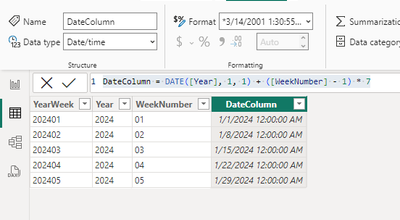
DateColumn = DATE([Year], 1, 1) + ([WeekNumber] - 1) * 7

The final output is as below:

vjunyantmsft_0-1709264355858.png


Best Regards,
Dino Tao
If this post helps, then please consider Accept it as the solution to help the other members find it more quickly.

View solution in original post

2 REPLIES 2
Anonymous
Not applicable

Hi @catzw6699 ,

The date data type in Power BI does not support year + week for now.
And in addition to using Power Query, you can also use DAX:
Use these DAXs to create calculated columns:

Year = LEFT([YearWeek], 4)
WeekNumber = RIGHT([YearWeek], 2)
DateColumn = DATE([Year], 1, 1) + ([WeekNumber] - 1) * 7

The final output is as below:

vjunyantmsft_0-1709264355858.png


Best Regards,
Dino Tao
If this post helps, then please consider Accept it as the solution to help the other members find it more quickly.

Chakravarthy
Resolver II
Resolver II

Hi @catzw6699 - I have split the year and week column. I have changed the Year column to Date and Week Column to Text in Power Query.. Below is the code

let
Source = Table.FromRows(Json.Document(Binary.Decompress(Binary.FromText("i45WMjIwMjGwUIqNBQA=", BinaryEncoding.Base64), Compression.Deflate)), let _t = ((type nullable text) meta [Serialized.Text = true]) in type table [Column1 = _t]),
#"Changed Type" = Table.TransformColumnTypes(Source,{{"Column1", type text}}),
#"Added Custom" = Table.AddColumn(#"Changed Type", "Year", each Text.Start([Column1],4)),
#"Changed Type1" = Table.TransformColumnTypes(#"Added Custom",{{"Year", type date}}),
#"Added Custom1" = Table.AddColumn(#"Changed Type1", "Week", each Text.End([Column1],Text.Length([Column1])-4)),
#"Changed Type2" = Table.TransformColumnTypes(#"Added Custom1",{{"Week", type text}})
in
#"Changed Type2"

Helpful resources

Announcements
Join our Fabric User Panel

Join our Fabric User Panel

Share feedback directly with Fabric product managers, participate in targeted research studies and influence the Fabric roadmap.

March Power BI Update Carousel

Power BI Community Update - March 2026

Check out the March 2026 Power BI update to learn about new features.