cancel
Showing results for 
Search instead for 
Did you mean: 

The Power BI Data Visualization World Championships is back! Get ahead of the game and start preparing now! Learn more

Reply
Anonymous
Not applicable

Writing a query which standardize the days

Hello,

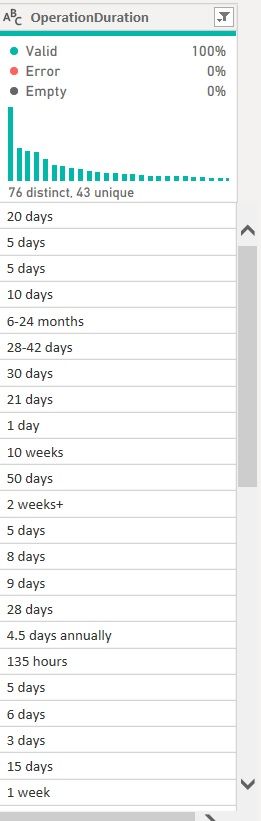
The following query column has a mixture of days / months / hours.

And I want to summarise it into 1 column where it involve only days.

I understand that I need to use an IF ELSE statement, but i am pretty lost from there. 

DaysFormula.jpg

Truly appreciate any sort of advice

1 ACCEPTED SOLUTION
artemus
Microsoft Employee
Microsoft Employee

First, a problem, how many days is a month, could be 28, 29, 30, or 31 depending which month and if it is a leap year. For this example I will assume one month is 30.436875 days.


Start by using "Enter Data" to create a mapping table of unit to number of days

day1
week7
month30.436875
hour0.15014739235743134753098878822799
year365.2425


Then:

1. Split your table with OperationDuration by space (first time only)

2. Split the first column by '-' (only once)

3. Change the two column types to number

4. Select the first two columns and under "Add Column" choose the Stastics button and choose Average

5. Do a merage on the table you entered and your source table using the right split column (from step1) and the first column of the table you enterd in. Use a fuzzy join.

6. Expand the merged column choosing the second column

7. Select the expanded column and the Average column and under "Add Column" choose multiply.

8. Remove all other columns. Any nulls in this column will be the result of an error.

View solution in original post

2 REPLIES 2
artemus
Microsoft Employee
Microsoft Employee

First, a problem, how many days is a month, could be 28, 29, 30, or 31 depending which month and if it is a leap year. For this example I will assume one month is 30.436875 days.


Start by using "Enter Data" to create a mapping table of unit to number of days

day1
week7
month30.436875
hour0.15014739235743134753098878822799
year365.2425


Then:

1. Split your table with OperationDuration by space (first time only)

2. Split the first column by '-' (only once)

3. Change the two column types to number

4. Select the first two columns and under "Add Column" choose the Stastics button and choose Average

5. Do a merage on the table you entered and your source table using the right split column (from step1) and the first column of the table you enterd in. Use a fuzzy join.

6. Expand the merged column choosing the second column

7. Select the expanded column and the Average column and under "Add Column" choose multiply.

8. Remove all other columns. Any nulls in this column will be the result of an error.
lbendlin
Super User
Super User

What about the crazy entries - 


6-24 months

2 weeks+

4.5 days annually


How are you planning to map these?

Helpful resources

Announcements
Power BI DataViz World Championships

Power BI Dataviz World Championships

The Power BI Data Visualization World Championships is back! Get ahead of the game and start preparing now!

December 2025 Power BI Update Carousel

Power BI Monthly Update - December 2025

Check out the December 2025 Power BI Holiday Recap!

FabCon Atlanta 2026 carousel

FabCon Atlanta 2026

Join us at FabCon Atlanta, March 16-20, for the ultimate Fabric, Power BI, AI and SQL community-led event. Save $200 with code FABCOMM.

Top Solution Authors