Join us in Barcelona for FabCon and SQLCon, September 28 - October 1, 2026.
This is best Fabric, Power BI, SQL and AI community event. How do we know? The last event sold out! Save €200 with code FABCMTY200.
Register now- Power BI forums
- Get Help with Power BI
- Desktop
- Service
- Report Server
- Power Query
- Mobile Apps
- Developer
- DAX Commands and Tips
- Custom Visuals Development Discussion
- Health and Life Sciences
- Power BI Spanish forums
- Translated Spanish Desktop
- Training and Consulting
- Instructor Led Training
- Dashboard in a Day for Women, by Women
- Galleries
- Data Stories Gallery
- Themes Gallery
- Contests Gallery
- QuickViz Gallery
- Quick Measures Gallery
- Visual Calculations Gallery
- Fabric Apps Gallery
- Notebook Gallery
- Translytical Task Flow Gallery
- TMDL Gallery
- R Script Showcase
- Webinars and Video Gallery
- Ideas
- Custom Visuals Ideas (read-only)
- Issues
- Issues
- Events
- Upcoming Events
The Fabric community is upgrading! Read all of the details including the timeline and what you can expect. Learn more
- Power BI forums
- Forums
- Get Help with Power BI
- Power Query
- Re: Write value on every 5 rows
- Subscribe to RSS Feed
- Mark Topic as New
- Mark Topic as Read
- Float this Topic for Current User
- Bookmark
- Subscribe
- Printer Friendly Page

- Mark as New
- Bookmark
- Subscribe
- Mute
- Subscribe to RSS Feed
- Permalink
- Report Inappropriate Content
Write value on every 5 rows
Dear Power Bi community,
Do you know how I can write in PowerQuery:
To index the rows based on their date ( earliest to latest) and to index them only if they have a special text value ( for example "text")
After the indexing is done, to write in another new column the value "text2" every 5 rows?
Solved! Go to Solution.


- Mark as New
- Bookmark
- Subscribe
- Mute
- Subscribe to RSS Feed
- Permalink
- Report Inappropriate Content
Yes, it's achievable. Sort the data on 2 columns (text, date).
Then do a 'Group By' on Text, using the All Rows aggregation.
Then add an index within each group with code similar to this:
Add a custom column
Table.AddIndexColumn([all], "sub", 1, 1, Int64.Type)[all] is the name of the All Rows column from the previous step.
Remove the columns that you don't want and expand the column headers to return the required data.
Good luck
- Mark as New
- Bookmark
- Subscribe
- Mute
- Subscribe to RSS Feed
- Permalink
- Report Inappropriate Content
Yes, it's achievable. Sort the data on 2 columns (text, date).
Then do a 'Group By' on Text, using the All Rows aggregation.
Then add an index within each group with code similar to this:
Add a custom column
Table.AddIndexColumn([all], "sub", 1, 1, Int64.Type)[all] is the name of the All Rows column from the previous step.
Remove the columns that you don't want and expand the column headers to return the required data.
Good luck
- Mark as New
- Bookmark
- Subscribe
- Mute
- Subscribe to RSS Feed
- Permalink
- Report Inappropriate Content
Make 2 copies of the table (using Duplicate from the interface)
1st table : Filter out rows with text in Column2 (from the column header).
2nd table : Filter out rows with no text in Column2. Sort the Date column ascending. Add an Index (from Add Column menu).
Add a column (with your column name inserted) :
if Number.Mod([IndexCol], 5) = 0 then "SKIP LOT" else ""
---
Append the 2 tables (from the interface)
--
That should do it. Let me know how it goes
- Mark as New
- Bookmark
- Subscribe
- Mute
- Subscribe to RSS Feed
- Permalink
- Report Inappropriate Content
Hello, Thanks a lot it worked. Do you know if there is this complication: we have different texts, and I want to index based on the value "texts".
For the first Step I will sort the rows based on ascending date. But how can I index based on the text value? Example is below
For instance:
| Text Value | Date | Index |
| Text A | 02/12/2021 | 2 |
| Text A | 01/12/2021 | 1 |
| Text B | 01/12/2021 | 1 |
| Text C | 01/12/2021 | 1 |
| Text B | 02/12/2021 | 2 |
| Text C | 02/12/2021 | 2 |
| Text A | 03/12/2021 | 3 |
| Text A | 04/12/2021 | 4 |


- Mark as New
- Bookmark
- Subscribe
- Mute
- Subscribe to RSS Feed
- Permalink
- Report Inappropriate Content
Yes, with sort function, custom conditional index column and math.
Please provide some data.
| Have I solved your problem? Please click Accept as Solution so I don't keep coming back to this post, oh yeah, others may find it useful also ;). |
| If you found this post helpful, please give Kudos. It gives me a sense of instant gratification and, if you give me Kudos enough times, magical unicorns will appear on your screen. If you find my signature vaguely amusing, please give Kudos. |
- Mark as New
- Bookmark
- Subscribe
- Mute
- Subscribe to RSS Feed
- Permalink
- Report Inappropriate Content
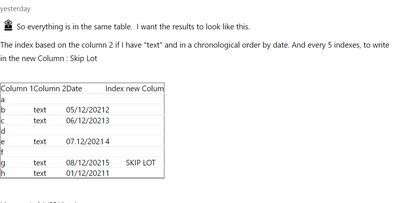
So everything is in the same table. I want the results to look like this.
The index based on the column 2 if I have "text" and in a chronological order by date. And every 5 indexes, to write in the new Column : Skip Lot
| Column 1 | Column 2 | Date | Index | new Colum |
| a | ||||
| b | text | 05/12/2021 | 2 | |
| c | text | 06/12/2021 | 3 | |
| d | ||||
| e | text | 07.12/2021 | 4 | |
| f | ||||
| g | text | 08/12/2021 | 5 | SKIP LOT |
| h | text | 01/12/2021 | 1 |

- Mark as New
- Bookmark
- Subscribe
- Mute
- Subscribe to RSS Feed
- Permalink
- Report Inappropriate Content
@Anonymous providing sample data and desired output would be a good start
========================
Did I answer your question? Mark my post as a solution!
Proud to be a Super User
My Custom Visualization Projects
• Plotting Live Sound: Live Sound
• Beautiful News: Women in Parliament, Energy Mix, Shrinking Armies
• Visual Capitalist: Working Hrs
• Others: Easing Graph, Animated Calendar
MayViz Submissions
• Week 1: View
• Week 2: View
• Week 3: View
• Week 4: View
========================
- Mark as New
- Bookmark
- Subscribe
- Mute
- Subscribe to RSS Feed
- Permalink
- Report Inappropriate Content
Helpful resources

FabCon & SQLCon – Barcelona 2026
Join us in Barcelona for FabCon and SQLCon, the Fabric, Power BI, SQL, and AI community event. Save €200 with code FABCMTY200.

Power BI DataViz World Championships - June 2026
A new Power BI DataViz World Championship is coming this June! Don't miss out on submitting your entry.


