cancel
Showing results for 
Search instead for 
Did you mean: 

The Power BI Data Visualization World Championships is back! Get ahead of the game and start preparing now! Learn more

Reply
Patryk_PL_92
Helper I
Helper I

Working with .htm document

Hi Experts !

I am searching for some tips regarding extracting data from .htm document.

I get reports in .htm files from SAP system and need to extract some amounts for further analysis.


Unfortunately it seems to be very hard to format the data as all columns from .htm document loads to PQ as a single table and each column has a lot of additional spaces in random places, so I can not split to columns even if I try some tricks.


Below I attach a snip what I get after expanding html tables to the deepes level.


In row 1 I got names of columns I want to promote to headers.


Any idea what approach to take to be able to split that into columns like:
CoCd; G/L Acct; Short Text; Crcy; BusA; Balance carryforward etc. ??


I already tried to use "Replace values" and replace all single spaces to "-" (to keep the structure of text where single space should stay) and then replace all double spaces to single space, but it didn't work 😞


Would be grateful for any advice 🙂


Patryk_PL_92_0-1674115497914.png

Patryk_PL_92_1-1674115671448.png


1 ACCEPTED SOLUTION
BA_Pete
Super User
Super User

Hi @Patryk_PL_92 ,


Here's a query that converts this:
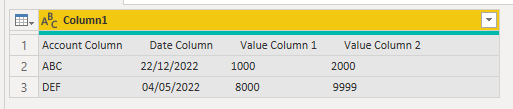
BA_Pete_0-1674138913124.png


...into this:

BA_Pete_1-1674138945958.png


let
    Source = Table.FromRows(Json.Document(Binary.Decompress(Binary.FromText("i45WckxOzi/NK1Fwzs8pzc1TgAOXxJJUDMGwxJxSuKghDnEjpVgdoLlOzgr4gJGRvqGRvpGBkRGyqKGBgQFeXUB5sPEurm54jVcwMNE3MMUwX8ECvwWWQKAUGwsA", BinaryEncoding.Base64), Compression.Deflate)), let _t = ((type nullable text) meta [Serialized.Text = true]) in type table [Column1 = _t]),

    columnHeaders = List.RemoveNulls(List.ReplaceValue(Text.Split(Source[Column1]{0}, "  "),"",null,Replacer.ReplaceValue)),
    remTopRow = Table.Skip(Source,1),
    replaceSpace = Table.ReplaceValue(remTopRow," ","<>",Replacer.ReplaceText,{"Column1"}),
    replaceGtLt = Table.ReplaceValue(replaceSpace,"><","",Replacer.ReplaceText,{"Column1"}),
    splitByLtGt = Table.SplitColumn(replaceGtLt, "Column1", Splitter.SplitTextByDelimiter("<>", QuoteStyle.Csv), List.Transform({1..List.NonNullCount(columnHeaders)}, each Text.From(_))),
    renCols = Table.RenameColumns(splitByLtGt, List.Zip({Table.ColumnNames(splitByLtGt), columnHeaders}))
in
    renCols


Summary:

columnHeaders = Split out the column names that you want to keep from the source into a list - we'll use this later

remTopRow = Now we have our headers, we can just get rid of the first table row to keep things tidy later

replaceSpace & replaceGtLt = Use the old "<>" => "><" replace trick to get down to a singular instance of a delimiter

splitByLtGt = Split columns by our singular "<>" delimiter into as many columns as we need based on the count of columnHeaders

renCols = Overwrite your new column headers with the values in columnHeaders


This does assume that none of your fields have spaces in them. If they do, then you can adjust the replaceSpace step to look for a double-space "  ",  and replace with "<><>", but you'll have to trim all your column values before assigning data types to remove any straggling spaces.


Pete


Now accepting Kudos! If my post helped you, why not give it a thumbs-up?

Proud to be a Datanaut!


View solution in original post

2 REPLIES 2
BA_Pete
Super User
Super User

Hi @Patryk_PL_92 ,


Here's a query that converts this:

BA_Pete_0-1674138913124.png


...into this:

BA_Pete_1-1674138945958.png


let
    Source = Table.FromRows(Json.Document(Binary.Decompress(Binary.FromText("i45WckxOzi/NK1Fwzs8pzc1TgAOXxJJUDMGwxJxSuKghDnEjpVgdoLlOzgr4gJGRvqGRvpGBkRGyqKGBgQFeXUB5sPEurm54jVcwMNE3MMUwX8ECvwWWQKAUGwsA", BinaryEncoding.Base64), Compression.Deflate)), let _t = ((type nullable text) meta [Serialized.Text = true]) in type table [Column1 = _t]),

    columnHeaders = List.RemoveNulls(List.ReplaceValue(Text.Split(Source[Column1]{0}, "  "),"",null,Replacer.ReplaceValue)),
    remTopRow = Table.Skip(Source,1),
    replaceSpace = Table.ReplaceValue(remTopRow," ","<>",Replacer.ReplaceText,{"Column1"}),
    replaceGtLt = Table.ReplaceValue(replaceSpace,"><","",Replacer.ReplaceText,{"Column1"}),
    splitByLtGt = Table.SplitColumn(replaceGtLt, "Column1", Splitter.SplitTextByDelimiter("<>", QuoteStyle.Csv), List.Transform({1..List.NonNullCount(columnHeaders)}, each Text.From(_))),
    renCols = Table.RenameColumns(splitByLtGt, List.Zip({Table.ColumnNames(splitByLtGt), columnHeaders}))
in
    renCols


Summary:

columnHeaders = Split out the column names that you want to keep from the source into a list - we'll use this later

remTopRow = Now we have our headers, we can just get rid of the first table row to keep things tidy later

replaceSpace & replaceGtLt = Use the old "<>" => "><" replace trick to get down to a singular instance of a delimiter

splitByLtGt = Split columns by our singular "<>" delimiter into as many columns as we need based on the count of columnHeaders

renCols = Overwrite your new column headers with the values in columnHeaders


This does assume that none of your fields have spaces in them. If they do, then you can adjust the replaceSpace step to look for a double-space "  ",  and replace with "<><>", but you'll have to trim all your column values before assigning data types to remove any straggling spaces.


Pete


Now accepting Kudos! If my post helped you, why not give it a thumbs-up?

Proud to be a Datanaut!


Hi!

thanks for your effort and detailed explanation 🙂

seems that working when you work with .htm documents you need to be very creative and use some tricks to gather any useful information, that set of steps is really nice. It does not solve my problem entirely, but it took me to another stage where I need to do something with data in rows to split into columns correctly


For some reason "replace values" (space to anything) is not working now, so I am stuck, also I found another blockers after that, so I give up on that point and will ask to send me files in other format - like .csv/ .xls /.xml etc.


I do not recommend anybody to work with .htm documents, it is a nightmare 😮


I accept that as a solution, because it solves a part of the problem and it took me futher 🙂

Helpful resources

Announcements
Power BI DataViz World Championships

Power BI Dataviz World Championships

The Power BI Data Visualization World Championships is back! Get ahead of the game and start preparing now!

December 2025 Power BI Update Carousel

Power BI Monthly Update - December 2025

Check out the December 2025 Power BI Holiday Recap!

FabCon Atlanta 2026 carousel

FabCon Atlanta 2026

Join us at FabCon Atlanta, March 16-20, for the ultimate Fabric, Power BI, AI and SQL community-led event. Save $200 with code FABCOMM.

Top Solution Authors