cancel
Showing results for 
Search instead for 
Did you mean: 

Try your skills in the Power BI Dataviz World Championship! Round one ends June 26. Join now

Reply
atavo
Helper I
Helper I

Working with Multiple Date Columns in Power Query

Hi


Kindly seek assistance on the following problem.


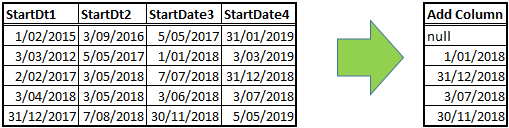
I have 4 date columns. For each row:

  • check that dates in these columns fall from 1/1/2018 to 31/12/2018 (i.e. 1/1/2018<=x<=31/12/2018) and
  • where this is true, return the maximum date in a new column

Refer screenshot below:

 Example.png

1 ACCEPTED SOLUTION
AnkitBI
Solution Sage
Solution Sage

You can also use below code. Similar to other one but with a single step.


let
    Source = Table.FromRows(Json.Document(Binary.Decompress(Binary.FromText("ZYzLDcAwCMV24RyJQJrfLIj91wg0aVHVmx8yFoFMmBk5U4UEBadjM6xYHbtfCcl5giYxp/jgr3OUcUdK2JZ+M9sep8i/8fSvKMUHtsC+UXUB", BinaryEncoding.Base64), Compression.Deflate)), let _t = ((type text) meta [Serialized.Text = true]) in type table [StartDt1 = _t, StartDt2 = _t, StartDt3 = _t, StartDt4 = _t]),
    #"Changed Type" = Table.TransformColumnTypes(Source,{{"StartDt1", type date}, {"StartDt2", type date}, {"StartDt3", type date}, {"StartDt4", type date}}),
    #"Added Custom" = Table.AddColumn(#"Changed Type", "Custom", each List.Max(List.Select(Record.FieldValues(_),each  _ >= Date.FromText("1/1/2018") and _ <= Date.FromText("31/12/2018"))))
in
    #"Added Custom"

Thanks
Ankit Jain

Do Mark it as solution if the response resolved your problem. Do like the response if it seems good and helpful.

View solution in original post

2 REPLIES 2
AnkitBI
Solution Sage
Solution Sage

You can also use below code. Similar to other one but with a single step.


let
    Source = Table.FromRows(Json.Document(Binary.Decompress(Binary.FromText("ZYzLDcAwCMV24RyJQJrfLIj91wg0aVHVmx8yFoFMmBk5U4UEBadjM6xYHbtfCcl5giYxp/jgr3OUcUdK2JZ+M9sep8i/8fSvKMUHtsC+UXUB", BinaryEncoding.Base64), Compression.Deflate)), let _t = ((type text) meta [Serialized.Text = true]) in type table [StartDt1 = _t, StartDt2 = _t, StartDt3 = _t, StartDt4 = _t]),
    #"Changed Type" = Table.TransformColumnTypes(Source,{{"StartDt1", type date}, {"StartDt2", type date}, {"StartDt3", type date}, {"StartDt4", type date}}),
    #"Added Custom" = Table.AddColumn(#"Changed Type", "Custom", each List.Max(List.Select(Record.FieldValues(_),each  _ >= Date.FromText("1/1/2018") and _ <= Date.FromText("31/12/2018"))))
in
    #"Added Custom"

Thanks
Ankit Jain

Do Mark it as solution if the response resolved your problem. Do like the response if it seems good and helpful.

az38
Community Champion
Community Champion

Hi @atavo 


try this

let
    Source = Table.FromRows(Json.Document(Binary.Decompress(Binary.FromText("XY7LDcAgDEN34YyUDw2BWRD7r1GiEIp6s+HZ8RiJABkYSVJOBbCbrksLoJhWe18Qmelp5mFYMcc/LKjmVeVL8D6i/iNBKaCeBAGxm33kucrk0vXSeiWiQL25HQyBzrAYvIbNFw==", BinaryEncoding.Base64), Compression.Deflate)), let _t = ((type text) meta [Serialized.Text = true]) in type table [StartDt1 = _t, StartDt2 = _t, StartDt3 = _t, StartDt4 = _t]),
    #"Changed Type" = Table.TransformColumnTypes(Source,{{"StartDt1", type date}, {"StartDt2", type date}, {"StartDt3", type date}, {"StartDt4", type date}}),
    #"Added Custom" = Table.AddColumn(#"Changed Type", "Custom", each List.MaxN({[StartDt1],[StartDt2],[StartDt3],[StartDt4]},1, each _ <= Date.FromText("31.12.2018") and _ >= Date.FromText("01.01.2018"))),
    #"Expanded Custom" = Table.ExpandListColumn(#"Added Custom", "Custom"),
    #"Added Custom1" = Table.AddColumn(#"Expanded Custom", "Custom.1", each if [Custom]>=Date.FromText("01.01.2018") and [Custom] <= Date.FromText("31.12.2018") then [Custom] else null)
in
    #"Added Custom1"

pay attention to steps  #"Added Custom", #"Expanded Custom" and #"Added Custom1"


do not hesitate to give a kudo to useful posts and mark solutions as solution
LinkedIn

Helpful resources

Announcements
Fabric Data Days is here Carousel

Fabric Data Days 2026

Don't miss out on Data Days, June 15 through August 7. Learn Fabric, Power BI, SQL, AI and more.

Power BI DataViz World Championships carousel

Power BI DataViz World Championships - June 2026

A new Power BI DataViz World Championship is coming this June! Don't miss out on submitting your entry.