Get certified for free when you join Fabric Data Days 2026 and dive into Fabric, Power BI, SQL, AI, and other essential data skills.
Join nowData Days is here! Join us now for 60+ days of learning, challenges, and connection. Learn more
Hello everyone,
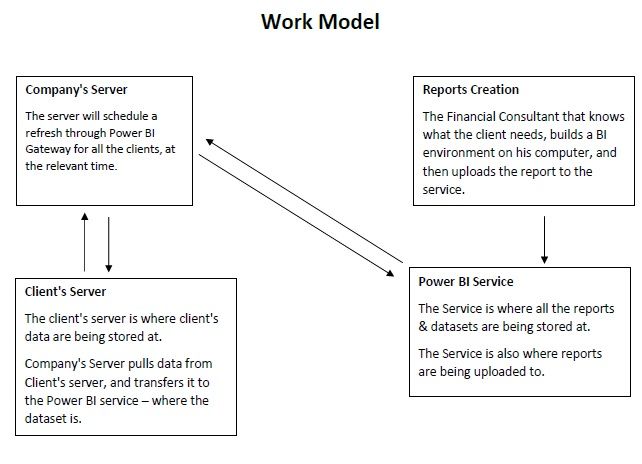
I would like to get your opinion on this doodle of mine.
The doodle shows how my company will create reports with schedule refresh abillities for clients, using Power BI.
The idea is this :
1. Creating a report
2. Publish it
3. Create connection through Power BI Gateway (Not Personal Mode)
4.Sharing reports with client through an account we provide.
The main idea is to create a dependency between the client and us. The reports and data will be at our control,
and the client will be able to view the report at any time.
I will be glad for this great forum to comment on my short description of the way we do things and give me notes.
The doodle :
Solved! Go to Solution.
@danielmillion ,
You can create report in Power BI Desktop, then publish the report to Power BI Service, add data source within gateway in Power BI Service and then set schedule refresh for this dataset.
After that, you can share the report to your clients, or share a dashboard to your clients. You clients will be able to view the Power BI report and they only have read-only permission on this report. In addition, please note that the clients will require Power BI pro license.
Regards,
Lydia
@danielmillion ,
You can create report in Power BI Desktop, then publish the report to Power BI Service, add data source within gateway in Power BI Service and then set schedule refresh for this dataset.
After that, you can share the report to your clients, or share a dashboard to your clients. You clients will be able to view the Power BI report and they only have read-only permission on this report. In addition, please note that the clients will require Power BI pro license.
Regards,
Lydia
Don't miss out on Data Days, June 15 through August 7. Learn Fabric, Power BI, SQL, AI and more.
Check out the May 2026 Power BI update to learn about new features.
| User | Count |
|---|---|
| 4 | |
| 4 | |
| 2 | |
| 2 | |
| 1 |
| User | Count |
|---|---|
| 11 | |
| 11 | |
| 5 | |
| 4 | |
| 4 |