Share feedback directly with Fabric product managers, participate in targeted research studies and influence the Fabric roadmap.
Sign up nowGet Fabric certified for FREE! Don't miss your chance! Learn more
Hello,
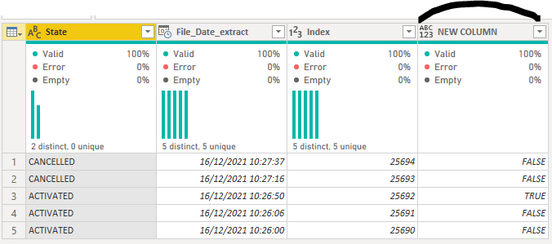
I want to add a new column with as results "True" or "False" using the following data showing in the images.
Each row has a datetime value which is the datetime of the file that has been imported and a state which is CANCELLED or ACTIVATED.
My guesses are using some sort of a list.generate() or recursive function as it looks like a kind of while do function but maybe there are other solutions.
An idea on how to get my result?
Thank you!
Solved! Go to Solution.
It looks like you want to tag the first ACTIVATED row. To do this, I'd recommend grouping by [State], taking the min over the date column, filtering [State] = "ACTIVATED", and then merging this back with the step before grouping. Then you can transform the column based on whether or not it's empty.
Here's a sample query you can paste into the Advanced Editor and walk through the steps:
let
Source = Table.FromRows(Json.Document(Binary.Decompress(Binary.FromText("i45Wcnb0c3b18XF1UdJRMtQ31DcyMLQEMZVidVAljfSB0MDIAMQESzo6h3iGOYaAJY31jUGShiAmhqSJvglI0gjEVIqNBQA=", BinaryEncoding.Base64), Compression.Deflate)), let _t = ((type nullable text) meta [Serialized.Text = true]) in type table [State = _t, Date = _t, Index = _t]),
#"Changed Type" = Table.TransformColumnTypes(Source,{{"State", type text}, {"Date", type date}, {"Index", Int64.Type}}),
#"Grouped Rows" = Table.Group(#"Changed Type", {"State"}, {{"MinDate", each List.Min([Date]), type nullable date}}),
#"Filtered Rows" = Table.SelectRows(#"Grouped Rows", each ([State] = "ACTIVATED")),
#"Merged Queries" = Table.NestedJoin(#"Changed Type", {"State", "Date"}, #"Filtered Rows", {"State", "MinDate"}, "New Column", JoinKind.LeftOuter),
#"Transformed Column" = Table.TransformColumns(#"Merged Queries", {{"New Column", each not Table.IsEmpty(_), type logical}})
in
#"Transformed Column"
It looks like you want to tag the first ACTIVATED row. To do this, I'd recommend grouping by [State], taking the min over the date column, filtering [State] = "ACTIVATED", and then merging this back with the step before grouping. Then you can transform the column based on whether or not it's empty.
Here's a sample query you can paste into the Advanced Editor and walk through the steps:
let
Source = Table.FromRows(Json.Document(Binary.Decompress(Binary.FromText("i45Wcnb0c3b18XF1UdJRMtQ31DcyMLQEMZVidVAljfSB0MDIAMQESzo6h3iGOYaAJY31jUGShiAmhqSJvglI0gjEVIqNBQA=", BinaryEncoding.Base64), Compression.Deflate)), let _t = ((type nullable text) meta [Serialized.Text = true]) in type table [State = _t, Date = _t, Index = _t]),
#"Changed Type" = Table.TransformColumnTypes(Source,{{"State", type text}, {"Date", type date}, {"Index", Int64.Type}}),
#"Grouped Rows" = Table.Group(#"Changed Type", {"State"}, {{"MinDate", each List.Min([Date]), type nullable date}}),
#"Filtered Rows" = Table.SelectRows(#"Grouped Rows", each ([State] = "ACTIVATED")),
#"Merged Queries" = Table.NestedJoin(#"Changed Type", {"State", "Date"}, #"Filtered Rows", {"State", "MinDate"}, "New Column", JoinKind.LeftOuter),
#"Transformed Column" = Table.TransformColumns(#"Merged Queries", {{"New Column", each not Table.IsEmpty(_), type logical}})
in
#"Transformed Column"
Thank you very much! This is what I want.
Looks a lot easier than using a List.Generate() and I don't even know if I can get the same result with a List.Generate().
Best regards
You could do this with List.Accumulate or List.Generate but you don't have to. 🙂
If you love stickers, then you will definitely want to check out our Community Sticker Challenge!
Check out the January 2026 Power BI update to learn about new features.
| User | Count |
|---|---|
| 13 | |
| 11 | |
| 11 | |
| 7 | |
| 6 |