cancel
Showing results for 
Search instead for 
Did you mean: 

We've captured the moments from FabCon & SQLCon that everyone is talking about, and we are bringing them to the community, live and on-demand. Starts on April 14th. Register now

Reply
Anonymous
Not applicable

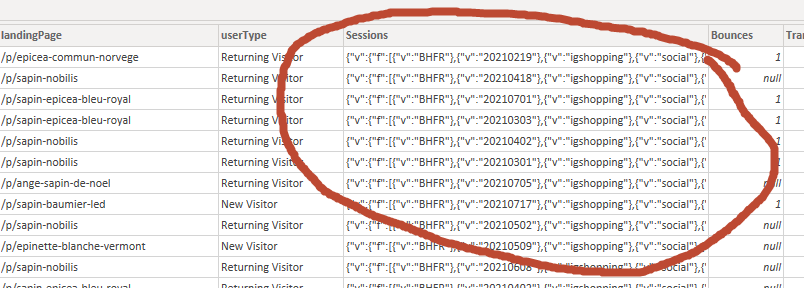
When expanded column is not returning expected value rather delimited values of the entire row.

The data source is BigQuery and the expected value on the Sessions table is an integer. Why is it that it is returning what appears to be a delimited values of the entire row? 

Appreciate any help. 


Cheers,

David


8-2-2021 12-42-43 PM.png

1 ACCEPTED SOLUTION

Hi @Anonymous ,

Currently simliar issue has been sumbited internal.

As a temporary workaround, try to make the table name and the column name be different to avoid this issue.


Best Regards,
Community Support Team _ Yingjie Li

View solution in original post

6 REPLIES 6
mahoneypat
Microsoft Employee
Microsoft Employee

That column may not contain valid JSON anymore (after Power BI tried to "help").  Are you able to send some example data?  I assume you are getting a JSON response.  If you paste your query URL in a browser you can copy/paste the JSON into a text file, store that in OneDrive or GoogleDrive and provide a link here.


Pat


Did I answer your question? Mark my post as a solution! Kudos are also appreciated!

To learn more about Power BI, follow me on Twitter or subscribe on YouTube.


@mahoneypa HoosierBI on YouTube


Anonymous
Not applicable

It looks like the real issue is when the table and column have the same names. 

Hi @Anonymous ,

Currently simliar issue has been sumbited internal.

As a temporary workaround, try to make the table name and the column name be different to avoid this issue.


Best Regards,
Community Support Team _ Yingjie Li

Anonymous
Not applicable

I went ahead and loaded the table the to model even though in the sample table in PowerQuery is showing a JSON array, lo and behold, it resolves itself and is returning the expected value in the column in the model.


Is this a bug that should be reported?

mahoneypat
Microsoft Employee
Microsoft Employee

Looks like that column contains JSON.  You could try making a custom column with = Json.Document([Sessions]) to confirm and/or drill into that array.


Pat


Did I answer your question? Mark my post as a solution! Kudos are also appreciated!

To learn more about Power BI, follow me on Twitter or subscribe on YouTube.


@mahoneypa HoosierBI on YouTube


Anonymous
Not applicable

Hi Pat, 


Thank you for looking into my problem. 


Added a custom column Json.Document([Sessions]) and records contain the following error message


DataSource.Error: ODBC: ERROR [42000] [Microsoft][BigQuery] (70) Invalid query: Unrecognized name: source; Did you mean bounces? at [3:5]
Details:
DataSourceKind=GoogleBigQuery
DataSourcePath=GoogleBigQuery
OdbcErrors=[Table]


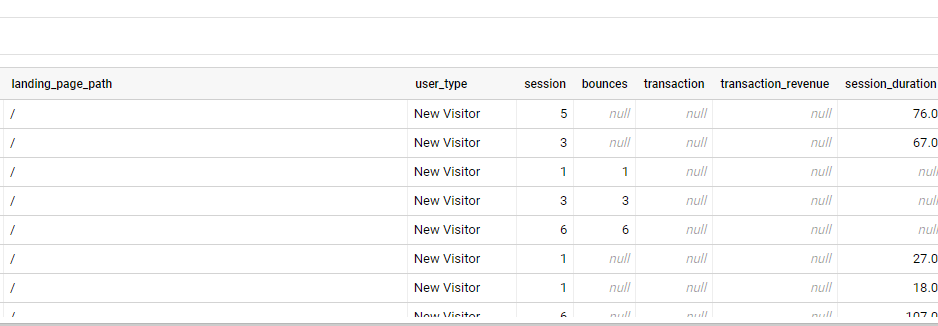
The preview of the table from BigQuery looks like this.

8-3-2021 4-01-06 PM.png

Helpful resources

Announcements
New to Fabric survey Carousel

New to Fabric Survey

If you have recently started exploring Fabric, we'd love to hear how it's going. Your feedback can help with product improvements.

Power BI DataViz World Championships carousel

Power BI DataViz World Championships - June 2026

A new Power BI DataViz World Championship is coming this June! Don't miss out on submitting your entry.

Join our Fabric User Panel

Join our Fabric User Panel

Share feedback directly with Fabric product managers, participate in targeted research studies and influence the Fabric roadmap.

March Power BI Update Carousel

Power BI Community Update - March 2026

Check out the March 2026 Power BI update to learn about new features.