Join us at FabCon Atlanta from March 16 - 20, 2026, for the ultimate Fabric, Power BI, AI and SQL community-led event. Save $200 with code FABCOMM.
Register now!The Power BI Data Visualization World Championships is back! Get ahead of the game and start preparing now! Learn more
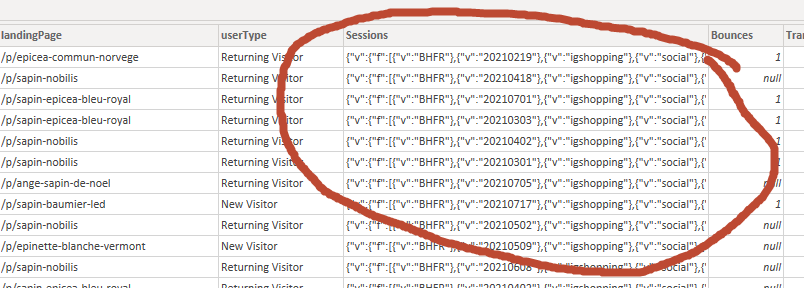
The data source is BigQuery and the expected value on the Sessions table is an integer. Why is it that it is returning what appears to be a delimited values of the entire row?
Appreciate any help.
Cheers,
David
Solved! Go to Solution.
Hi @Anonymous ,
Currently simliar issue has been sumbited internal.
As a temporary workaround, try to make the table name and the column name be different to avoid this issue.
Best Regards,
Community Support Team _ Yingjie Li
That column may not contain valid JSON anymore (after Power BI tried to "help"). Are you able to send some example data? I assume you are getting a JSON response. If you paste your query URL in a browser you can copy/paste the JSON into a text file, store that in OneDrive or GoogleDrive and provide a link here.
Pat
To learn more about Power BI, follow me on Twitter or subscribe on YouTube.
It looks like the real issue is when the table and column have the same names.
Hi @Anonymous ,
Currently simliar issue has been sumbited internal.
As a temporary workaround, try to make the table name and the column name be different to avoid this issue.
Best Regards,
Community Support Team _ Yingjie Li
I went ahead and loaded the table the to model even though in the sample table in PowerQuery is showing a JSON array, lo and behold, it resolves itself and is returning the expected value in the column in the model.
Is this a bug that should be reported?
Looks like that column contains JSON. You could try making a custom column with = Json.Document([Sessions]) to confirm and/or drill into that array.
Pat
To learn more about Power BI, follow me on Twitter or subscribe on YouTube.
Hi Pat,
Thank you for looking into my problem.
Added a custom column Json.Document([Sessions]) and records contain the following error message
DataSource.Error: ODBC: ERROR [42000] [Microsoft][BigQuery] (70) Invalid query: Unrecognized name: source; Did you mean bounces? at [3:5]
Details:
DataSourceKind=GoogleBigQuery
DataSourcePath=GoogleBigQuery
OdbcErrors=[Table]
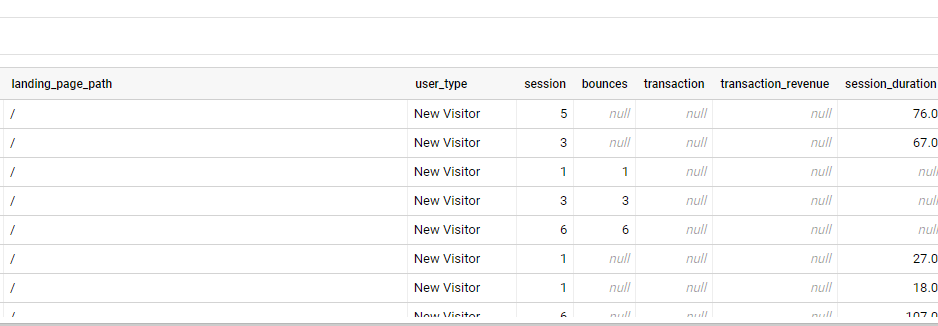
The preview of the table from BigQuery looks like this.
The Power BI Data Visualization World Championships is back! Get ahead of the game and start preparing now!
| User | Count |
|---|---|
| 17 | |
| 9 | |
| 9 | |
| 7 | |
| 7 |