
cancel
Showing results for 
Search instead for 
Did you mean: 

Vote for your favorite vizzies from the Power BI Dataviz World Championship submissions. Vote now!

Reply
Anonymous
Not applicable

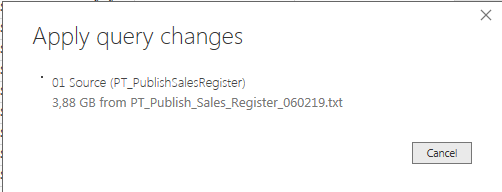
When applying, shows incorrect data size

Hello,


When I apply changes to my report, the data size shoes as around 10 GB, but the txt table weighs only like 100 KB. 


What could be the problem? 


Capture.PNGCapture12.PNG

1 ACCEPTED SOLUTION
v-piga-msft
Resident Rockstar
Resident Rockstar

Hi @Anonymous ,

Have you solved your problem?

If you have solved, please always accept the replies making sense as solution to your question so that people who may have the same question can get the solution directly.


Best  Regards,

Cherry

Community Support Team _ Cherry Gao
If this post helps, then please consider Accept it as the solution to help the other members find it more quickly.

View solution in original post

3 REPLIES 3
v-piga-msft
Resident Rockstar
Resident Rockstar

Hi @Anonymous ,

Have you solved your problem?

If you have solved, please always accept the replies making sense as solution to your question so that people who may have the same question can get the solution directly.


Best  Regards,

Cherry

Community Support Team _ Cherry Gao
If this post helps, then please consider Accept it as the solution to help the other members find it more quickly.
v-piga-msft
Resident Rockstar
Resident Rockstar

Hi @Anonymous ,


I'm afraid that may be caused by your power query functions.  If you use many references in your power query, so the size will be large when you apply changes.


I’m not an advanced Power Query user but I think you can take a look at following two threads which related to Table.Buffer. Maybe it can help you.


http://community.powerbi.com/t5/Desktop/How-to-Improve-Query-Reference-performance-for-large-tables/...

http://community.powerbi.com/t5/Desktop/Queries-over-large-data-tables/m-p/26783/highlight/true#M852...


Best  Regards,

Cherry

Community Support Team _ Cherry Gao
If this post helps, then please consider Accept it as the solution to help the other members find it more quickly.
Anonymous
Not applicable

I checked it out and it seems that the problem was in power query as you said. 

I used an index column to get to the cells I needed to, so i just took out that formulas with [index]{-1} etc. and it worked. 

Thanks!

Helpful resources

Announcements
Sticker Challenge 2026 Carousel

Join our Community Sticker Challenge 2026

If you love stickers, then you will definitely want to check out our Community Sticker Challenge!

January Power BI Update Carousel

Power BI Monthly Update - January 2026

Check out the January 2026 Power BI update to learn about new features.

FabCon Atlanta 2026 carousel

FabCon Atlanta 2026

Join us at FabCon Atlanta, March 16-20, for the ultimate Fabric, Power BI, AI and SQL community-led event. Save $200 with code FABCOMM.