cancel
Showing results for 
Search instead for 
Did you mean: 

July 28 - August 9 | Final Round of the Power BI Dataviz World Championships. This is your chance. Learn more

Reply
jk8979356
Regular Visitor

What is the code for a multiple condition, nested IF statement?

I need to create a multiple condition nested multiple IF statement to identify matches and then add text in a new conditional column. Their are two columns: [Column.Family] [Column.Item] and the logic is:

IF [Column.Family] equals "Blue" or "Black" or "White" or "Red" AND
IF [Column.Item] starts with "Mens Jeans" then return "Mens" in the new conditional column, else return [Column.Item]

IF [Column.Family] equals "Blue" or "Black" or "White" or "Red" AND
IF [Column.Item] starts with "Womens Shirts" then return "Womens" in the new conditional column, else return [Column.Item]

IF [Column.Family] equals "Blue" or "Black" or "White" or "Red" AND
IF [Column.Item] starts with "Youth Boys Shoes" then return "Youth Boys" in the new conditional column, else return [Column.Item]

IF [Column.Family] equals "Small" or "Medium" or "Large" or "XL" AND
IF [Column.Item] starts with "Football Uniforms" then return "Football" in the new conditional column, else return [Column.Item]


How can I create the multiple conditions and multiple nested if statements in M?

1 ACCEPTED SOLUTION
v-yingjl
Community Support
Community Support

Hi @jk8979356 ,

You can add a custom column in power query:

let
    Source = ...,
    #"Changed Type" = Table.TransformColumnTypes(Source,{{"Family", type text}, {"Item", type text}}),
    #"Added Custom" = 
        Table.AddColumn(
            #"Changed Type", "Custom",
            each if ([Family] = "Blue" or [Family] = "Black" or [Family] = "White" or [Family] = "Red") and Text.Start([Item],10) = "Men Jeans" 
                then "Men" 
            else if 
                    ([Family] = "Blue" or [Family] = "Black" or [Family] = "White" or [Family] = "Red") and Text.Start([Item],13) = "Womens Shirts" 
                then "Womens" 
            else if 
                    ([Family] = "Blue" or [Family] = "Black" or [Family] = "White" or [Family] = "Red") and Text.Start([Item],16) = "Youth Boys Shoes" 
                then "Youth Boys" 
            else if 
                    ([Family] = "Small" or [Family] = "Medium" or [Family] = "Large" or [Family] = "XL") and Text.Start([Item],17) = "Football Uniforms" 
                then "Football"
            else [Item])
in
    #"Added Custom"
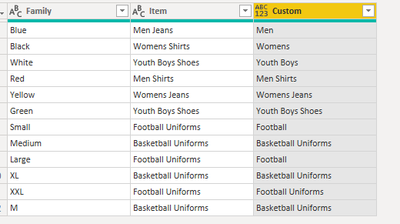
re.png

Attached a sample file in the below, hopes to help you.

In addition, here are some articles about nested if statements in power query that you can refer:

  1. IF Functions in Power Query Including Nested IFS 
  2. Logical Operators and Nested IFs in Power BI / Power Query 
  3. Power Query if Statements 


Best Regards,
Yingjie Li

If this post helps then please consider Accept it as the solution to help the other members find it more quickly.

View solution in original post

2 REPLIES 2
v-yingjl
Community Support
Community Support

Hi @jk8979356 ,

You can add a custom column in power query:

let
    Source = ...,
    #"Changed Type" = Table.TransformColumnTypes(Source,{{"Family", type text}, {"Item", type text}}),
    #"Added Custom" = 
        Table.AddColumn(
            #"Changed Type", "Custom",
            each if ([Family] = "Blue" or [Family] = "Black" or [Family] = "White" or [Family] = "Red") and Text.Start([Item],10) = "Men Jeans" 
                then "Men" 
            else if 
                    ([Family] = "Blue" or [Family] = "Black" or [Family] = "White" or [Family] = "Red") and Text.Start([Item],13) = "Womens Shirts" 
                then "Womens" 
            else if 
                    ([Family] = "Blue" or [Family] = "Black" or [Family] = "White" or [Family] = "Red") and Text.Start([Item],16) = "Youth Boys Shoes" 
                then "Youth Boys" 
            else if 
                    ([Family] = "Small" or [Family] = "Medium" or [Family] = "Large" or [Family] = "XL") and Text.Start([Item],17) = "Football Uniforms" 
                then "Football"
            else [Item])
in
    #"Added Custom"

re.png

Attached a sample file in the below, hopes to help you.

In addition, here are some articles about nested if statements in power query that you can refer:

  1. IF Functions in Power Query Including Nested IFS 
  2. Logical Operators and Nested IFs in Power BI / Power Query 
  3. Power Query if Statements 


Best Regards,
Yingjie Li

If this post helps then please consider Accept it as the solution to help the other members find it more quickly.

rogletree
Helper III
Helper III

I think this is what you want:


Column =

if ([Column.Family] = "Blue" or [Column.Family] = "Black" or [Column.Family] = "White" or [Column.Family] = "Red" then if (Text.Start([Column.Item], 10) = "Mens Jeans" then "Mens" else if Text.Start([Column.Item], 13) = "Womens Shirts" then "Womens" else if Text.Start([Column.Item], 16) = "Youth Boys Shoes" then "Youth Boys"))

else if ([Column.Family] = "Small" or [Column.Family] = "Medium" or [Column.Family] = "Large" or [Column.Family] = "XL" then if (Text.Start([Column.Item], 17) = "Football Uniforms" then "Football"))

else [Column.Item]


There may be a better way to do it but if I'm understanding correctly what you want then that should work. I may have missed a parenthesis or bracket somewhere.

Helpful resources

Announcements
FabCon and SQLCon Barcelona 2026

FabCon & SQLCon – Barcelona 2026

Join us in Barcelona for FabCon and SQLCon, the Fabric, Power BI, SQL, and AI community event. Save €200 with code FABCMTY200.

July Power BI Update Carousel

Power BI Monthly Update - July 2026

Check out the July 2026 Power BI update to learn about new features.

Power BI DataViz World Championships carousel

Power BI DataViz World Championships - June 2026

A new Power BI DataViz World Championship is coming this June! Don't miss out on submitting your entry.

Top Solution Authors
Top Kudoed Authors