cancel
Showing results for 
Search instead for 
Did you mean: 

Learn from the best! Meet the four finalists headed to the FINALS of the Power BI Dataviz World Championships! Register now

Reply
Quentin
Helper IV
Helper IV

Web datasource dynamically connected

Hello everyone, 


I have a tricky question. 
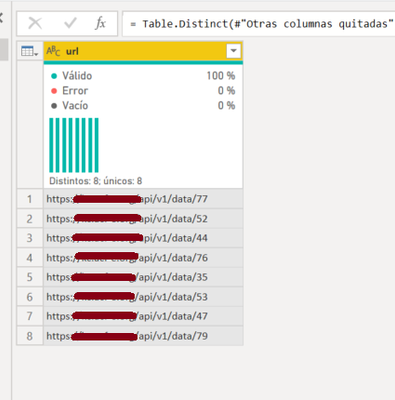
I am importing a table containing url of Web datasource (size of the table will change through time) but datasource are identically structured.
I want to be able to ask PowerQuery to connect to each of these datasource and append the data.

I have the following situation for example:

Quentin_1-1594122395398.png


These are URL to connect to results to 8 different surveys based on the same structure (coming from the same template). But in the future it can be 15 or 160.
I want to ask PowerQuery to connect as Web datasource to each of them and append results.

I hope i have been clear enough, i think it could be done via Advanced Editor but i'm not so familiar with it...
Thanks for your appreciated feedbacks!

1 ACCEPTED SOLUTION
Smauro
Solution Sage
Solution Sage

Trying to escape the editor:

Select [url] and got to Transform, select anything --e.g. Parse->Uppercase, replace Text.Upper, type text with
(x) => Csv.Document(Web.Contents(x))
if it's giving you a csv, or
(x) => Json.Document(Web.Contents(x))
if it's giving you a json.

If the transformation is more complicated, I'd advice you to take one url, create a new query connecting to it and bringing the table on a primal step, then go to advanced editor and change it as:
(t) => let ...
and change what's inside Web.Contents with t, e.g. Web.Contents("https/api/v1/data/77") to Web.Contents(t)
Now name this query anything, e.g. TransformApi
then, like previously, change Text.Upper, type text to TransformApi


Cheers


Spyros Mavroforos

Data Consultant


Find me on LinkedIn or drop me an email

eSpyros

View solution in original post

2 REPLIES 2
Smauro
Solution Sage
Solution Sage

Trying to escape the editor:

Select [url] and got to Transform, select anything --e.g. Parse->Uppercase, replace Text.Upper, type text with
(x) => Csv.Document(Web.Contents(x))
if it's giving you a csv, or
(x) => Json.Document(Web.Contents(x))
if it's giving you a json.

If the transformation is more complicated, I'd advice you to take one url, create a new query connecting to it and bringing the table on a primal step, then go to advanced editor and change it as:
(t) => let ...
and change what's inside Web.Contents with t, e.g. Web.Contents("https/api/v1/data/77") to Web.Contents(t)
Now name this query anything, e.g. TransformApi
then, like previously, change Text.Upper, type text to TransformApi


Cheers


Spyros Mavroforos

Data Consultant


Find me on LinkedIn or drop me an email

eSpyros

Hello @Smauro,

Thank you very much for your answer. I tried the first option and it worked magically.
I say magically because i don't understand it, but it works!

Well done and thanks for the efficiency y quick answer!

Helpful resources

Announcements
Join our Fabric User Panel

Join our Fabric User Panel

Share feedback directly with Fabric product managers, participate in targeted research studies and influence the Fabric roadmap.

February Power BI Update Carousel

Power BI Monthly Update - February 2026

Check out the February 2026 Power BI update to learn about new features.

FabCon Atlanta 2026 carousel

FabCon Atlanta 2026

Join us at FabCon Atlanta, March 16-20, for the ultimate Fabric, Power BI, AI and SQL community-led event. Save $200 with code FABCOMM.

Top Solution Authors